Front Matter
Title: White Labeling (Super Admin / Platform Branding)
Author: Jethro Magdaleno Lagmay
Creation Date: July 2, 2026
Status: Active
Introduction & Goals
Problem Summary
The platform requires a dynamic way for administrators to customize the visual identity of the application (specifically the player) without requiring code deployments. By implementing a White Labeling feature, admins can upload custom logos and modify color schemes on the fly to match specific branding requirements.
Goals & Non-Goals
Goals:
Provide a UI (
BrandingTabs) for Super Admins to upload a logo and customize application colors.Implement a robust 20-point theme engine (expanding beyond a single "Primary Color" to include navigation, sidebars, buttons, text, etc.).
Ensure instantaneous loading of brand assets on the frontend using
localStoragecaching to prevent UI flickering.Provide a centralized React Context (
BrandingContext) to distribute the theme globally.
Non-Goals:
Allowing layout or structural changes (e.g., moving components around).
Individual, per-user theme customization (branding is applied at the organizational level).
Glossary
Super Admin: A platform-wide administrator who sets the default global branding.
Agency Admin (Future Scope): An administrator for a specific sub-organization (Agency) who can override platform branding for their members.
BrandingTheme: A TypeScript record containing 20 distinct UI color and typography keys.
Hydration: The process of reading
localStorageto instantly paint the UI before the API responds.
High-Level Architecture
System Diagram
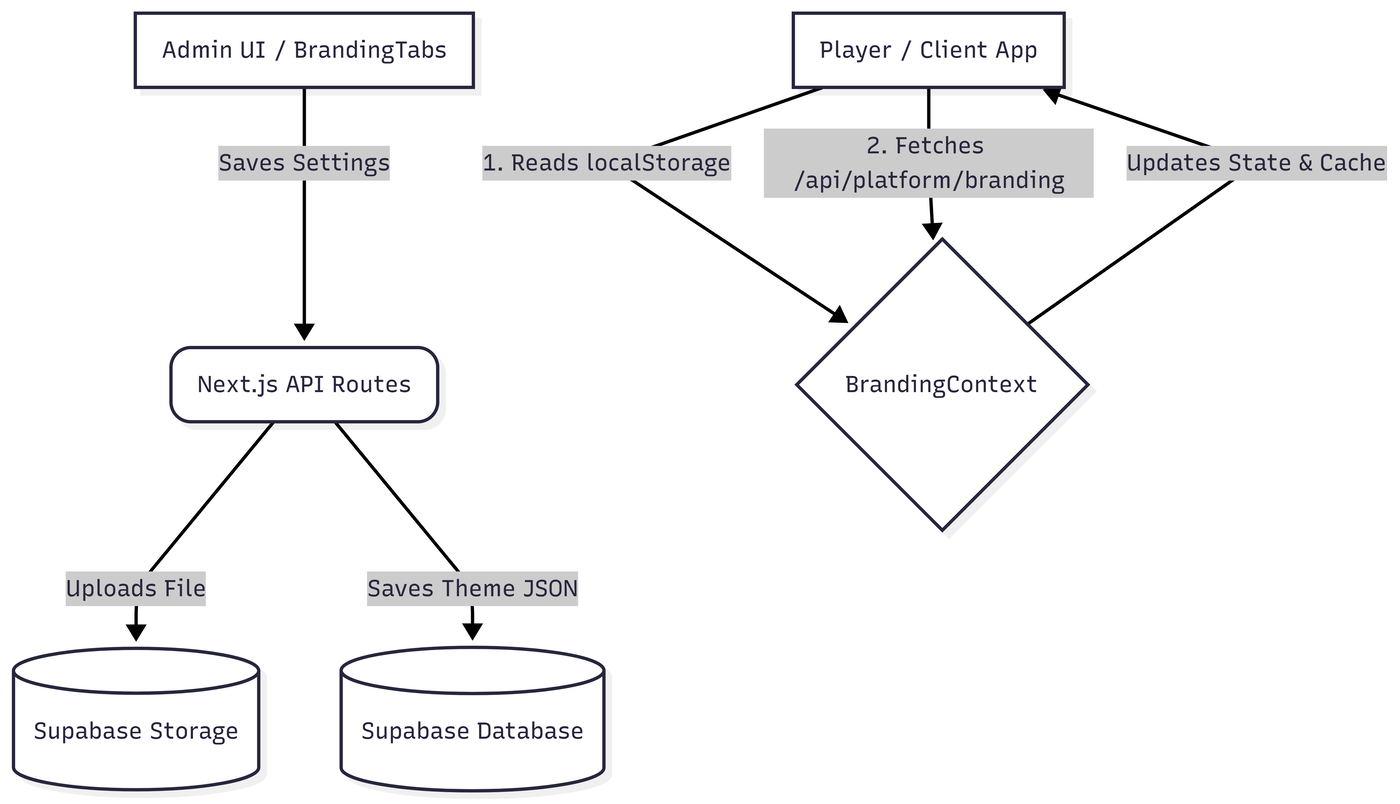
Technologies Used
Framework: Next.js (App Router, API Routes)
State Management: React Context API (
BrandingContext.tsx)UI Components: React, Tailwind CSS, Lucide Icons, shadcn/ui (
Tabs)Storage/Database: Supabase (assumed based on standard Next.js stack and asset handling)
Caching: Browser Web Storage API (
window.localStorage)
Detailed Design & Implementation
Data Model / Schema
While the database schema is managed via Supabase, the expected data structure requires storing the theme as a JSONB payload and the logo as a URL string.
branding_detailstable:id(UUID, Primary Key)created_at(TimestampTZ)updated_at(TimestampTZ)color_theme(JSONB) - Maps directly to theTHEME_KEYSarray defined in the frontend. Handles all primary, hover, and background colors.logo(Text) - Stores the public URL string.agency_id(UUID) - Foreign key for future agency-level isolation.
API Specification
GET /api/platform/branding: Fetches the global Super Admin theme and logo.GET /api/agency/branding: Fetches the agency-specific theme. (Note: Endpoint exists to support future Agency logic).Response Payload (Standardized):
JSON
{"data": {"logo": "https://storage.url/logo.png","color_theme": {"primaryButtonBg": "#FF5733","topNavBg": "#111111"}}}
Logic & Workflows
State Initialization:
BrandingContextinitializes a default empty theme.Hydration (Performance): Upon mounting, the context instantly checks
localStorage(branding_themeandbranding_logo_url) to apply cached branding, preventing "flash of unstyled content".Network Reconciliation: An asynchronous fetch is made to
/api/platform/branding. If the database returns newer values, it merges them usingmergeThemePatch(), updates the React state, and overwriteslocalStorage.Admin Updates: When a Super Admin saves changes via
BrandingTabs.tsx, the Context'ssetThemeandsetLogoUrlfunctions are called, immediately updating the UI andlocalStoragewhile the backend processes the APIPOST/PUTrequest.
Infrastructure & Operations
Dependencies
Image Hosting: Supabase Storage (requires public URL access).
Local Storage: Client browsers must have local storage enabled for optimal loading performance.
Monitoring & Alerting
API Failures: Monitor 5xx errors on
/api/platform/brandingand/api/agency/branding. If the API fails, the application gracefully falls back tolocalStorageor default hardcoded styles.
Deployment Plan
Ensure Supabase Storage buckets for logos are set to "Public".
Run database migrations to create the
branding_detailstable and apply the appropriate Row Level Security (RLS) policies before deploying the frontend code.
Testing & Quality Assurance
Test Strategy
Unit Testing: Validate
mergeThemePatchto ensure partial theme updates don't wipe out existing color values. ValidatecreateDefaultThemeinitializes all 20 keys tonull.Integration Testing: Test API route responses and payload formatting.
E2E Testing: Automate a flow where a mock Super Admin changes a color in
BrandingTabs, saves, and the Player updates accordingly.
Known Limitations & Future Implementation
⚠️ IMPORTANT - AGENCY IMPLEMENTATION: The current release and UI rollout are specifically for Super Admins to change the logo and colors globally for all platform users.
Future Scope: The code already contains foundational logic for Agency Admins (
preferAgencyboolean inBrandingContext.tsx). In a future release, agencies (specific organizations within the app) will use this logic to override the platform defaults, restricting their custom colors and logos to members of their agency only.
Maintenance & Support
Troubleshooting
Issue: Branding updates are not reflecting for end-users.
Fix: Ask the user to clear their browser cache/Local Storage, or ensure the API successfully saved the new JSON payload to the database. The app prioritizes
localStorageuntil the API responds.
Issue: Logo is not rendering, or shows a broken image icon.
Fix: Check the Supabase Storage bucket permissions. The logo bucket must allow public read access.
Issue: Some UI elements are unstyled.
Fix: Ensure the Super Admin filled out the necessary fields in the Theme tab. The system falls back to default styles if a specific key (e.g.,
primaryButtonBg) is explicitlynull.
Document version: 1.0.2
Changelog:
1.0.0 - Initial Document
1.0.1 - Added changelog
1.0.2 - Edited files based on BrandingDetails table
