1. Front Matter
Title: Verification Prompt
Author: Krizha Onise Cortez (armaminter)
Reviewers: Uriel Joshua Tribiana (Joshua-yel)
Created: April 2026
Status: Approved and Merged
References:
Issue: Secure User Delete / Administrative Security - https://github.com/wyzlab/WyzQuests/issues/53
Milestone: [7] Review Workflow
2. Introduction & Goals
Problem Summary
The Re-Authentication Verification Prompt provides an additional security layer for administrator-only destructive operations. Before executing sensitive actions such as deleting users, transferring ownership, or modifying AI configurations, administrators must verify their identity through Clerk authentication.
After successful verification, the system generates a single-use re-authentication token that remains valid for five minutes. This token is required by sensitive backend APIs before protected operations are allowed.
The feature reduces the risk of unauthorized administrative actions while maintaining a seamless user experience.
Goals & Non-Goals
Goals
Require administrators to verify their identity before sensitive actions.
Support both password-based and OAuth-based accounts.
Generate short-lived re-authentication tokens.
Prevent token reuse.
Validate all sensitive administrative requests.
Record successful and failed verification attempts.
Non-goals
Replace Clerk authentication.
Provide multi-factor authentication.
Allow reusable verification tokens.
Authenticate non-administrator users.
Glossary
Re-Authentication – Additional identity verification performed before executing sensitive operations.
ReAuth Token – Single-use verification token generated after successful authentication.
Sensitive Action – Administrative operation requiring identity verification.
OAuth Account – Administrator authenticated through an external identity provider.
Password Account – Administrator authenticated using Clerk email/password credentials.
3. High-Level Architecture
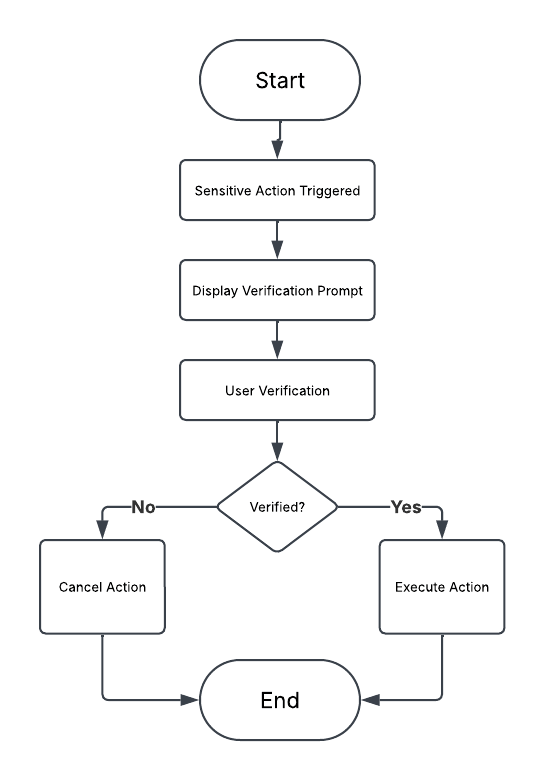
System Diagram
Technologies Used
Next.js App Router
React
TypeScript
Supabase
Clerk Authentication
Zod
TailwindCSS
Sonner Toast Notifications
4. Detailed Design & Implementation
Data Model / Schema
admin_reauth_tokens
Stores temporary verification tokens issued after successful administrator authentication.
Relevant Fields
id
admin_clerk_id
token
expires_at
used
ip_address
created_at
Example:
{ "admin_clerk_id": "...", "token": "...", "expires_at": "...", "used": false, "ip_address": "..."}audit_logs
Stores verification audit events.
Relevant Events:
REAUTH_SUCCESS
REAUTH_FAILED
API Specification
GET /api/admin/reauth
Returns the administrator authentication method.
Used to determine whether the modal should request a password or email confirmation.
POST /api/admin/reauth
Validates administrator credentials.
Creates a new single-use re-authentication token.
Returns the generated token.
Logic & Workflows
Re-Authentication Workflow
Administrator performs a sensitive action.
ReAuthModal opens.
GET
/api/admin/reauthdetermines the authentication method.Administrator submits password or confirms email.
POST
/api/admin/reauthvalidates credentials.Clerk verifies administrator identity.
issueReAuthToken() creates a new token.
Token is stored in
admin_reauth_tokens.Parent component receives the token.
Sensitive API request includes the token.
Backend validates the token using consumeReAuthToken().
Token is marked as used.
Sensitive operation proceeds.
5. Infrastructure & Operations
Dependencies
Dependency | Notes |
|---|---|
Clerk | Identity verification |
Supabase | Token storage |
Zod | Validation |
Sonner | Notifications |
React | UI State |
Next.js | API Routes |
Monitoring & Alerting
The verification system validates every authentication request before issuing a token.
Current monitoring includes:
Failed password verification
Failed OAuth verification
Expired tokens
Reused tokens
Invalid token format
Audit log generation
Audit events recorded:
REAUTH_SUCCESS
REAUTH_FAILED
Deployment Plan
Deploy database migration for
admin_reauth_tokens.Deploy re-authentication API.
Deploy ReAuthModal.
Verify Clerk authentication.
Verify token generation.
Verify token expiration.
Verify token consumption.
Promote to staging.
6. Testing & Quality Assurance
Test Strategy
Password verification
OAuth verification
Successful token generation
Expired token rejection
Token reuse rejection
Sensitive API authorization
Audit logging
Known Limitations
Verification tokens expire after five minutes.
Only administrators can use the feature.
Does not support multi-factor authentication.
Tokens cannot be renewed.
7. Maintenance & Support
Troubleshooting
Verification modal does not appear
Verify the component is rendered before sensitive actions.
Authentication always fails
Verify Clerk credentials.
Verify administrator account.
Token rejected
Verify token expiration.
Verify token has not already been consumed.
Verify backend validation.
Sensitive action denied
Verify consumeReAuthToken() succeeds.
Verify administrator permissions.
Changelog
v1.0 (July 2026)
Initial implementation of administrator re-authentication using single-use verification tokens.
Document Version
1.0 - Published, Initial internal technical guide, July 2026.
