1. Front Matter
Title: Form Editor
Author: Krizha Onise Cortez (armaminter)
Reviewers: Joylynne Grace Esportuno (teruterubozuuu), James Derick Billate (zcrnnn)
Created: February 2026
Status: Approved and Merged
References:
Issue: [2.1] Form Editor - https://github.com/wyzlab/WyzQuests/issues/71
Milestone: [2] Design (Dual Editor)
2. Introduction & Goals
Problem Summary
The Form Editor is the primary authoring interface used by creators to build quest content through a structured, linear workflow. It enables creators to compose educational content using reusable content cards, upload supporting media, organize scenarios, attach Question Hub activities, configure reflections and discussions, and publish complete learning experiences without directly modifying quest metadata.
The feature serves as the foundation of the Quest Editor by providing an intuitive card-based editing experience while maintaining synchronization with the Visual Canvas representation. It ensures that creators can freely edit content in either interface while preserving a single source of truth for quest structure and content.
The Form Editor also integrates media management, validation, publishing workflows, AI-generated curriculum imports, and Question Hub activities into one unified editing environment.
Goals & Non-Goals
Goals
Content Authoring
Allow creators to create, edit, duplicate, delete, and reorder content cards.
Support multiple educational content types including Text, Media, Reflection, Discussion, Scenario, Question, Activity, and Code cards.
Allow rich text editing for supported content.
Support drag-and-drop ordering.
Media Management
Upload images, videos, audio files, documents, and motivation media.
Store uploaded assets using Supabase Storage.
Automatically replace previous media when updating existing content.
Scenario Management
Support nested child cards inside Scenario cards.
Preserve child ordering.
Support mixed child content types.
Activity Integration
Connect Activity Cards to reusable Question Hub activities.
Display linked activities inside the editor.
Preserve activity references during publishing.
Canvas Synchronization
Automatically synchronize Form Editor changes to Visual Canvas.
Generate linear canvas nodes for linear quests.
Preserve node positions during synchronization.
Import cards from existing canvas metadata.
Publishing
Validate quest content before publishing.
Create required discussion forum posts.
Update publishing status.
Prevent invalid quests from being published.
Non-goals
The Form Editor does not currently support collaborative real-time editing.
The Form Editor does not perform automatic content versioning.
Creators cannot edit multiple cards simultaneously.
Media editing is limited to upload and replacement.
Visual Canvas remains the primary editor for exploration quests.
Glossary
Content Card - Individual editable unit representing a piece of quest content.
Scenario Card - Parent container capable of holding nested child cards.
Child Card - Content contained within a Scenario Card.
Activity Card - Card linked to reusable Question Hub activities.
Motivation Attachment - Optional motivational text or media shown after completing content.
Question Hub - Central repository of reusable quiz activities.
Canvas Metadata - JSON representation of quest nodes and edges.
Linear Quest - Quest authored primarily through the Form Editor.
Exploration Quest - Quest authored primarily through Visual Canvas.
Publishing Validation - Validation process ensuring all required content exists before publishing.
Quest Content Card - Database record representing one card in the editor.
3. High-Level Architecture
System Diagram
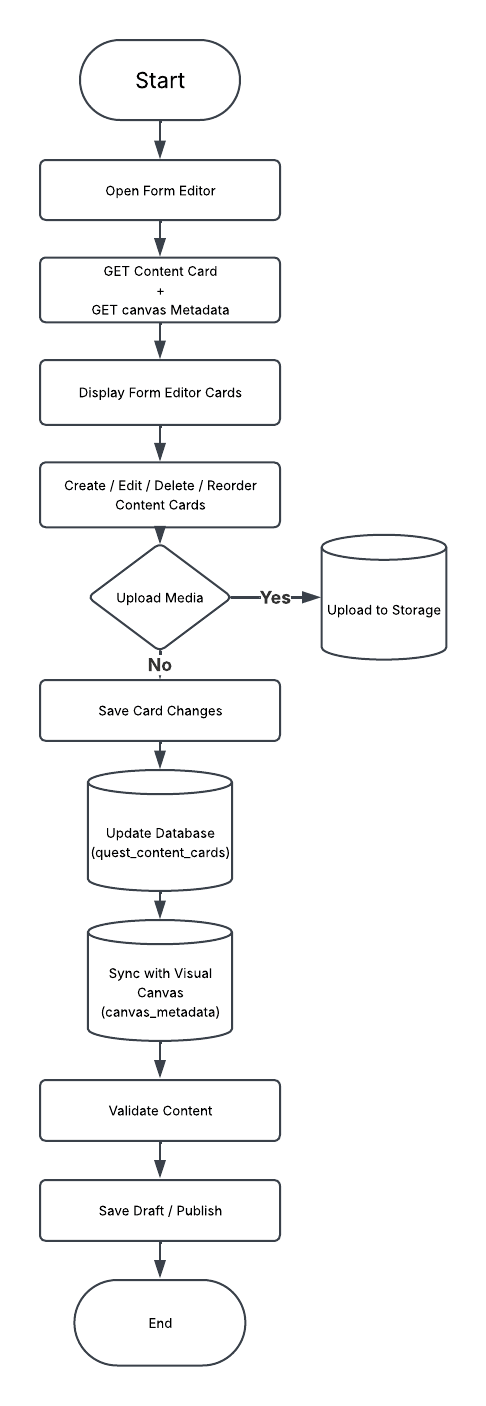
Technologies Used
The Form Editor is implemented using the following technologies:
Next.js App Router
React
TypeScript
Supabase
Clerk Authentication
React Hook Form
Zod
TailwindCSS
Sonner Toast Notifications
Supabase Storage
TipTap Editor
Monaco Editor
@dnd-kit (Drag and Drop)
The Form Editor also reuses several shared application services including authentication helpers, canvas synchronization utilities, media upload services, publishing validation, and shared Quest Editor contexts.
4. Detailed Design & Implementation
Data Model / Schema
quest_content_cards
The Form Editor stores each content block as an independent card inside the quest_content_cards table. Every card belongs to a specific quest and maintains its own content, ordering, and optional motivation attachment.
Relevant Fields:
id
quest_id
type
content
motivation
order_index
created_at
updated_at
Example:
{ "quest_id": "...", "type": "text", "content": { "title": "Introduction", "body": "<p>Welcome learners...</p>" }, "motivation": { "type": "text", "content": "Great job!" }, "order_index": 1}quests
The Form Editor also utilizes the existing quests table to synchronize content with the Visual Canvas.
Relevant Fields:
id
canvas_metadata
quest_mode
publishing_status
The canvas_metadata field stores nodes, edges, folders, and synchronization information used by the Visual Canvas.
canvas_metadata
Linear quests automatically synchronize Form Editor cards into the canvas_metadata JSON document.
Example:
{ "nodes": [], "edges": [], "folders": [], "quest_mode": "linear"}API Specification
Content Card APIs
GET
/api/creator/quest-content-cards/listReturns all content cards belonging to a quest.
POST
/api/creator/quest-content-cards/createCreates a new content card and inserts it into the quest.
PUT
/api/creator/quest-content-cards/updateUpdates an existing content card including its content, motivation, and metadata.
DELETE
/api/creator/quest-content-cards/deleteDeletes a content card and removes associated uploaded assets when necessary.
PUT
/api/creator/quest-content-cards/reorderUpdates the ordering of multiple cards after drag-and-drop operations.
Media APIs
POST
/api/creator/quest-content-cards/upload-mediaUploads media assets such as images, videos, audio files, and documents.
POST
/api/creator/quest-content-cards/upload-motivation-mediaUploads media used within motivation attachments.
Canvas Synchronization APIs
GET
/api/creator/update-quest-canvasRetrieves existing canvas metadata and determines whether the quest uses Linear Mode or Exploration Mode.
POST
/api/creator/convert-canvas-to-cardsConverts generated canvas nodes into Form Editor cards during AI curriculum imports.
Publishing APIs
POST
/api/creator/validate-quest-contentValidates every content card before allowing publishing.
PATCH
/api/creator/update-questUpdates the quest publishing status after successful validation.
Supporting APIs
GET
/api/creator/get-activityRetrieves reusable activities from the Question Hub for Activity Cards.
POST
/api/forum/create-postCreates discussion forum posts linked to Discussion Cards during publishing.
Logic & Workflows
Form Editor Initialization Workflow
Creator opens the Form Editor.
The system retrieves the quest canvas metadata.
The quest mode is checked.
Exploration quests redirect to the Visual Canvas.
Linear quests retrieve all content cards.
Existing canvas metadata is synchronized with database records.
Cards are rendered in their saved order.
Content Editing Workflow
Creator selects a content card.
The appropriate editing modal opens.
The creator modifies the content.
Local state updates immediately.
Changes are submitted through the Update API.
Database records are updated.
Canvas metadata synchronizes automatically.
Success feedback is displayed.
Card Creation Workflow
Creator selects a content type.
Default card values are generated.
A new database record is created.
The card is inserted into the editor.
Canvas synchronization updates the corresponding node.
Card Reordering Workflow
Creator drags a card.
The new order is calculated.
Updated ordering is submitted.
Database order indexes are updated.
Canvas nodes are regenerated in the new order.
Media Upload Workflow
Creator selects a file.
Client validates file type and size.
File uploads to Supabase Storage.
Public URL is generated.
Card content updates with the new URL.
Existing media is replaced if applicable.
Canvas Synchronization Workflow
Whenever a card is created, updated, deleted, or reordered:
The latest cards are retrieved.
Cards are converted into canvas nodes.
Linear edges are regenerated.
Existing node positions are preserved.
Updated metadata is saved to the quest.
Publishing Workflow
Creator selects Publish.
Canvas state is saved.
Quest validation executes.
Discussion cards create forum posts if necessary.
Publishing status updates.
Success confirmation is displayed.
5. Infrastructure & Operations
Dependencies
Dependency | Notes |
|---|---|
Supabase | Stores quest content cards, canvas metadata, and uploaded assets |
Supabase Storage | Stores images, videos, audio files, and other uploaded media |
Clerk Authentication | Authenticates creators and validates editing permissions |
React Hook Form | Handles form state and submission |
Zod | Validates card content before persistence |
@dnd-kit | Enables drag-and-drop card reordering |
TipTap | Rich text editor for supported content cards |
Monaco Editor | Code editor used by Code Block cards |
Sonner Toast | Displays success and error notifications |
The Form Editor also relies on shared Quest Editor contexts, publishing utilities, Visual Canvas synchronization services, and Question Hub integration.
Monitoring & Alerting
The Form Editor validates all creator input using shared Zod schemas before persisting changes.
Validation includes:
Required content validation
Supported media type validation
File size validation
Reflection minimum and maximum word limits
Discussion configuration validation
Question and activity validation
Scenario child card validation
Publishing readiness validation
Current implementation relies on API responses and server logs to monitor:
Failed content saves
Failed media uploads
Canvas synchronization failures
Publishing validation failures
Database update failures
Storage upload failures
Forum post creation failures
Deployment Plan
Execute any required Supabase database migrations.
Verify Row Level Security (RLS) policies.
Deploy updated Form Editor pages.
Deploy Quest Content Card API routes.
Deploy media upload endpoints.
Verify Supabase Storage configuration.
Verify Form Editor and Visual Canvas synchronization.
Verify Question Hub integration.
Verify publishing workflow.
Promote changes to staging after successful validation.
6. Testing & Quality Assurance
Test Strategy
Content Cards
Create content cards
Update existing cards
Delete cards
Duplicate cards
Reorder cards
Scenario child cards
Activity card linking
Media
Upload image
Upload video
Upload audio
Upload document
Replace existing media
Motivation media upload
Canvas Synchronization
Form → Canvas synchronization
Canvas → Form synchronization
Node ordering preservation
Position preservation
Publishing
Draft saving
Publishing validation
Discussion forum creation
Publishing status updates
Validation
Required field validation
Reflection limits
Question validation
Activity validation
Scenario validation
Known Limitations
The Form Editor does not currently support collaborative real-time editing.
Content version history is not available.
Bulk editing multiple cards simultaneously is not supported.
Media editing is limited to replacing uploaded files.
Visual Canvas remains the primary editor for exploration quests.
Large quests with hundreds of cards may experience slower synchronization due to full canvas regeneration.
Scenario cards currently support only a single Question Card as a child.
7. Maintenance & Support
Troubleshooting
Cards do not appear
Verify the quest exists.
Verify the creator has permission to edit the quest.
Verify the List Content Cards API returns data.
Verify the quest is using Linear Mode.
Media upload fails
Verify file size limits.
Verify supported file type.
Verify Supabase Storage configuration.
Verify upload endpoint availability.
Canvas is not synchronized
Verify the quest is configured as a Linear Quest.
Verify canvas metadata exists.
Verify synchronization completed successfully.
Verify no API validation errors occurred.
Publishing fails
Verify all required cards are completed.
Verify publishing validation succeeds.
Verify discussion cards have valid configurations.
Verify Question Hub activities remain valid.
Question Hub activity cannot be selected
Verify the selected activity exists.
Verify the activity has not been archived.
Verify the Question Hub API returns the activity.
Scenario child cards do not save
Verify the Scenario Card exists.
Verify child card validation succeeds.
Verify synchronization completed successfully.
Changelog
v1.0 (February 2026)
Initial implementation of the Form Editor supporting:
Linear quest authoring
Content card management
Scenario child cards
Media uploads
Question Hub integration
Automatic Visual Canvas synchronization
Publishing validation
Discussion forum integration
Document Version
1.0 – Draft, Feature pushed to development server after initial review, February 2026
1.1 – Published, Initial internal technical guide for the Form Editor, July 2026
