Author name: Joylynne Grace C. Esportuno
Reviewers: Joshua Uriel Tribiana
Creation Date: June 29, 2026
References: https://github.com/wyzlab/WyzQuests/issues/85
Status: Approved and Merged
INTRODUCTION & GOALS
Problem Summary
The Quest Player gives learners a runtime view of published quest content. It transforms creator-authored canvas_metadata into a playable sequence of details, content nodes, scenario children, questions, quizzes, reflections, code blocks, media, discussions, and end states.
Goals
Render a quest's details page followed by active, non-archived canvas nodes.
Support both
linearandexplorationquest modes.Flatten scenario children into one playable item per screen.
Route exploration-mode question choices through canvas edges.
Support public share links, embeds, SCORM status/location calls, and xAPI answer statements.
Non-Goals
The Quest Player does not edit quest content or canvas layout.
The Quest Player does not validate whether a quest is publishable; publishing validation is handled before runtime.
The Quest Player does not create learner enrollments; enrollment is handled by learner and creator enrollment APIs.
The Quest Player does not guarantee progress persistence for anonymous public share viewers.
Glossary
Quest Player —The learner-facing runtime component that displays quest content.
View Content — Product-facing name for opening and consuming quest content.
Canvas Metadata — JSONB quest structure stored in
quests.canvas_metadata; containsnodes,edges, andquest_mode.Node — A top-level canvas item such as
Scenario,Text,Quiz,Reflection,Question,Image,Video,Audio,File,Link,Discussion, orCode.Child Node — A renderable item nested inside a
Scenarionode.Details Step — The initial player step that displays quest overview details before starting node playback.
Path History — Client-side list of previously visited player steps used for navigation labels and back behavior.
Visited Cards — Historical field name in
quest_enrollments.progress; in the canvas player it stores visited node IDs.Completed Nodes — Map in
quest_enrollments.progressthat stores completion metadata for interactive nodes.SCORM — LMS packaging/runtime integration supported by
/scorm/[questID].xAPI — Experience API statement integration supported through SCORM/xAPI launch query parameters.
HIGH-LEVEL ARCHITECTURE
System Diagram
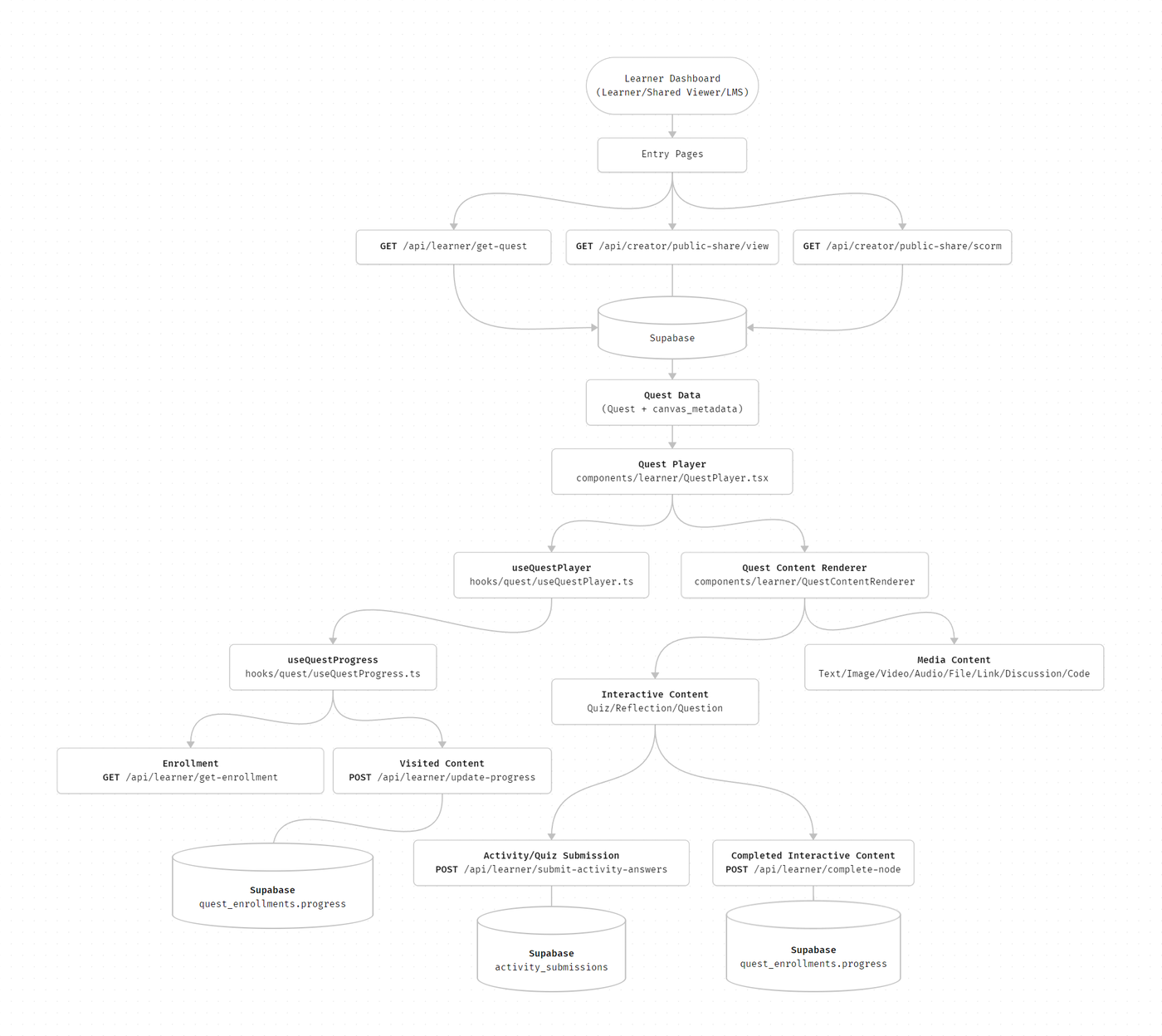
Technologies Used
Next.js, TypeScript, Zod, DOMPurify and TipTap editor
DETAILED DESIGN & IMPLEMENTATION
Data Model/Schema
#### `quests`Relevant fields:- `id`- `title`- `introduction`- `tags`- `profile_img_url`- `publishing_status`- `duration`- `enrollment_fee`- `background_img_url`- `quest_mode`- `canvas_metadata` `canvas_metadata` is a JSONB object shaped by `canvasMetadataSchema`:```ts{ nodes: CanvasNode[]; edges: CanvasEdge[]; quest_mode: "linear" | "exploration";}``` `CanvasNode` requires:```ts{ id: string; x: number; y: number; type: string; data?: Record<string, unknown>;}``` `CanvasEdge` requires:```ts{ source: string; target: string; id?: string; sourceHandle?: string | null; targetHandle?: string | null; label?: string; logic?: string; edgeType?: string;}``` #### `quest_enrollments`The player reads and updates:- `id`- `quest_id`- `learner_id`- `status`- `enrolled_at`- `progress` Current normalized `progress` structure:```json{ "percentage": 0, "visited_cards": ["details", "node-id"], "completed_nodes": { "node-id": { "type": "Quiz", "completed_at": "2026-06-29T00:00:00.000Z", "score": 85, "attempts": 1 } }, "last_visited_at": "2026-06-29T00:00:00.000Z"}``` #### `activities`, `questions`, and `activity_submissions`Quiz/activity nodes can load questions from the activity hub. Quiz-mode activity submissions are persisted in `activity_submissions`; activity-mode submissions can return graded results without saving a row. ### Entity Relationship Diagram```mermaiderDiagram QUESTS ||--o{ QUEST_ENROLLMENTS : has QUESTS ||--o{ QUEST_CONTENT_CARDS : legacy_or_linear_cards QUESTS ||--o{ ACTIVITY_SUBMISSIONS : records ACTIVITIES ||--o{ QUESTIONS : contains ACTIVITIES ||--o{ ACTIVITY_SUBMISSIONS : receives QUEST_CONTENT_CARDS ||--o{ ACTIVITY_SUBMISSIONS : references QUESTS { uuid id text title text publishing_status text quest_mode jsonb canvas_metadata } QUEST_ENROLLMENTS { uuid id uuid quest_id uuid learner_id jsonb progress text status } ACTIVITIES { uuid id text activity_type int max_retakes jsonb grading_settings } QUESTIONS { uuid id uuid activity_id text type text text jsonb answer jsonb options } ACTIVITY_SUBMISSIONS { uuid id uuid learner_id uuid activity_id uuid quest_id uuid content_card_id jsonb answers int score int total_questions int percentage }```API Specification
#### `GET /api/learner/get-quest?id=<quest_id>`- Authentication: Required- Purpose: Fetch a published quest for authenticated learner playback.- Success response:```json{ "success": true, "data": { "id": "uuid", "title": "Quest title", "publishing_status": "published", "canvas_metadata": { "nodes": [], "edges": [], "quest_mode": "linear" } }}```- Notes: Filters to `publishing_status = published`. #### `GET /api/learner/get-enrollment?quest_id=<quest_id>`- Authentication: Required- Purpose: Load learner enrollment and normalized progress.- Success response:```json{ "success": true, "data": { "id": "enrollment-id", "quest_id": "quest-id", "progress": { "percentage": 0, "visited_cards": [], "completed_nodes": [], "last_visited_at": null }, "status": "active", "enrolled_at": "2026-06-29T00:00:00.000Z" }}``` #### `POST /api/learner/update-progress`- Authentication: Required- Purpose: Mark a player step/node as visited.- Request:```json{ "quest_id": "uuid", "node_id": "details"}```- Success response:```json{ "success": true, "data": { "progress": { "percentage": 25, "visited_cards": ["details"], "last_visited_at": "2026-06-29T00:00:00.000Z" }, "percentage": 25, "visited_nodes": ["details"] }}```- Notes: `node_id = details` is treated as a special valid step. Other node IDs must exist in active `canvas_metadata.nodes`. #### `POST /api/learner/complete-node`- Authentication: Required for persisted learner completions- Purpose: Mark an interactive node as completed.- Request:```json{ "quest_id": "uuid", "node_id": "node-or-child-id", "node_type": "Quiz", "score": 85, "question_results": [], "raw_score": 17, "learner_answer": "<p>Reflection answer</p>"}```- Valid `node_type` values: `Quiz`, `Reflection`, `Question`, `Code`- Success response:```json{ "success": true, "data": { "message": "Node completion recorded", "node_id": "node-or-child-id", "completed_at": "2026-06-29T00:00:00.000Z", "attempts": 1 }}```- Notes: Validates both top-level nodes and scenario children. #### `POST /api/learner/submit-activity-answers`- Authentication: Required- Purpose: Submit answers for activity-hub backed cards.- Request:```json{ "activity_id": "uuid", "quest_id": "uuid", "content_card_id": "uuid", "answers": { "question-id": "answer" }}```- Success response:```json{ "success": true, "data": { "score": 3, "total_questions": 4, "percentage": 75, "question_results": [], "passed": true, "activity_type": "quiz", "passing_score": 70, "submission_id": "uuid", "attempt_number": 1 }}```Logic & Workflows
Entry Workflow
app/quests/[id]/page.tsxloads the quest through either learner fetch or creator preview fetch.app/share/[hash]/page.tsxresolves public share metadata and blocks inactive links.app/scorm/[questID]/page.tsxresolves SCORM/public-share data and passes SCORM/xAPI launch configuration.All entry points render
QuestPlayerwithquestandcanvasMetadata.
Player Initialization
QuestPlayerdetects SCORM delivery by comparingshareTypeagainst known SCORM export types.useQuestPlayerreceivescanvasMetadata,questId,quest_mode, SCORM state, preview state, and optional completion callback.The hook chooses the start node from active nodes using
data.isStart === true, falling back to the first active node.The initial
currentStepis alwaysdetails.
Node and Child Rendering
Archived top-level nodes are ignored.
Scenario nodes expose non-question children first, then a question child if present.
Standalone non-scenario nodes are wrapped as their own playable child when they do not have scenario children.
QuestContentRendererdispatches rendering based on child type.Text HTML is sanitized through DOMPurify before rendering.
Navigation Workflow
The learner starts on the details step.
Continuemoves from details to the selected start node.Non-question children move to the next child until the final child.
At the final child, the player follows an outgoing edge.
In
linearmode, question choices do not affect routing; the player follows the first edge from the current node.In
explorationmode, question choices callgetNextNode(currentStep, choiceId, edges).Empty scenario nodes auto-advance to the next connected node when possible.
End nodes display an end-of-path state and enable
Finish.
Question Workflow
Single-choice questions set
selectedChoiceId.Checkbox questions maintain
selectedChoiceIdsand use the first selected choice for route selection.Submission marks the current question child complete.
Feedback is shown when choice feedback exists.
Continueis disabled until required question submission is complete.xAPI
answeredstatements are sent on choice selection when endpoint, auth, actor, and current child are available.
Interactive Completion Workflow
QuizRenderer,ReflectionRenderer,QuestionBlock, and code completion callbacks report completion toQuestPlayer.useNodeInteractionssends completion details to/api/learner/complete-nodeunless the player is in preview/SCORM contexts where persistence should be avoided.Completion writes update
quest_enrollments.progress.completed_nodes.Attempts increment if the same node is completed again.
Progress Calculation
/api/learner/update-progress computes progress with a mixed model:
60% from visited active canvas nodes plus details
40% from completed interactive nodes when interactives exist
/api/learner/complete-node computes interactive completion percentage from completed interactive nodes. Because both APIs can update progress.percentage, engineers should inspect the full progress object when debugging unexpected learner percentages.
INFRASTRUCTURE & OPERATIONS
Dependencies
Supabase database and RLS/auth behavior
Clerk/auth integration through
authenticateUserPublic share APIs for shared and SCORM launches
Canvas authoring and validation pipeline that writes valid
quests.canvas_metadataActivity hub APIs and data for hub-backed quiz nodes
Browser Fullscreen API for embedded share links
LMS runtime environment for SCORM and xAPI launches
Monitoring & Alerting
Current implementation relies primarily on server logs and browser console errors. Recommended log points to monitor:
GET /api/learner/get-quest404 or auth failuresGET /api/learner/get-enrollmentenrollment missesPOST /api/learner/update-progressvalidation failures for missing node IDsPOST /api/learner/complete-nodevalidation failures for missing child nodesPOST /api/learner/submit-activity-answersgrading, submission, and retake-limit errorsPublic share fetch failures in
/share/[hash]and/scorm/[questID]
Recommended alert thresholds:
5xx rate above 2% for learner APIs over 10 minutes
Repeated
Node not found in quest canvaserrors for the same questPublic share view failures above normal traffic baseline
Activity submission save failures above 1% over 10 minutes
Deployment Plan
Confirm all schema migrations for
quests.canvas_metadataand enrollment progress are applied.Validate representative published quests using
docs/QUEST_VALIDATION.md.Test authenticated learner playback through
/quests/[id].Test creator preview through
/quests/[id]?preview=true.Test public share playback through
/share/[hash].Test embed fullscreen controls for share type
embed.Test SCORM launch through
/scorm/[questID]?ver=<version>.Test xAPI launch with
ver=xapi,endpoint,auth, andactor.Roll out behind existing publishing/share controls; no separate Quest Player feature flag currently exists.
Watch learner API logs during the first production window.
TESTING & QUALITY ASSURANCE
Test Strategy
Recommended test coverage:
Unit test
useQuestPlayerstart-node selection, archived-node skipping, child flattening, linear routing, exploration routing, end-node handling, and back/restart behavior.Unit test progress normalization for legacy number,
completed_sections, and currentvisited_cardsformats.API tests for:
Missing quest IDs and node IDs
Unenrolled learner progress writes
Archived node rejection
Scenario child completion
Activity retake-limit enforcement
Published-only learner quest fetches
Integration tests for authenticated quest playback and progress persistence.
E2E tests for:
Details to first node
Media rendering
Quiz submission
Reflection word limits and submission
Branching choice path in exploration mode
Share link inactive state
Preview mode avoiding progress writes
Known Limitations
Anonymous shared-link viewers receive a login prompt and should not expect saved progress.
visited_cardsis a legacy name and now stores canvas node IDs.update-progressandcomplete-nodeboth update progress percentage with different formulas.Checkbox branching uses the first selected choice as the route choice.
Empty scenario nodes can auto-advance, but malformed edge graphs can still leave the learner without a next step.
Activity submission progress still references
quest_content_cards, which can diverge from canvas-first playback in some edge cases.
MAINTENANCE & SUPPORT
Troubleshooting
Quest opens as 404 for learners
Confirm the quest exists.
Confirm
publishing_status = published.Confirm learner authentication is valid.
For preview mode, confirm the creator endpoint is being used through
?preview=true.
Player starts but no content appears
Inspect
quests.canvas_metadata.nodes.Confirm at least one active node exists.
Confirm node
dataincludes a renderabletype.Check whether nodes or children have
data.isArchived = true.
Continue button is disabled
Check whether the current child is interactive.
For questions, submit or acknowledge feedback before continuing.
For reflections, satisfy min/max word constraints and submit.
For quizzes, answer required questions and pass client/server validation.
Progress is not saved
Confirm the learner is enrolled in
quest_enrollments.Confirm the player is not in preview mode.
Confirm the player is not in SCORM mode.
Inspect
/api/learner/update-progressand/api/learner/complete-noderesponses.Check whether the node ID exists in active
canvas_metadata.
Branching goes to the wrong node
Confirm quest mode is
exploration; linear mode intentionally ignores choice-based routing.Inspect
canvas_metadata.edgesforsource,target, handles, and choice linkage.Confirm the selected choice ID matches the edge routing logic expected by
getNextNode.
Quiz questions do not load
For hub-backed quizzes, confirm
questionSource = hubandactivityIdis present.Check
/api/learner/get-activity-questions.Confirm the activity is published/available and has questions.
Shared link does not open
Confirm the public share record is live.
Confirm
expires_athas not passed.Check
/api/creator/public-share/view?hash=<hash>.
SCORM or xAPI telemetry is missing
Confirm
/scorm/[questID]receives the expectedverquery value.For xAPI, confirm
endpoint,auth, andactorquery parameters are present.Inspect browser console/network calls for xAPI statement failures.
Changelog
1.0 - Approved, Initial internal technical guide for Quest Player/View Content based on current canvas-first implementation, 06/29/2026
Document version: 1.0, Published, implementation of View Content feature pushed to dev server, 06/29/2026
