Author name: Joylynne Grace C. Esportuno
Reviewers: Jethro Lagmay
Creation Date: June 30, 2026
References: https://github.com/wyzlab/WyzQuests/issues/57
Status: Approved and Merged
INTRODUCTION & GOALS
Problem Summary
Dismiss Alert lets a user clear the unread state of an in-app notification without deleting the notification record. In the current UI, an unread notification can be dismissed through the row overflow menu's Mark as Read action or implicitly when the user clicks the notification itself. Once marked read, the notification remains in the list, moves out of the unread filter, loses unread styling, and the unread badge count decreases immediately.
Goals
Show an unread count badge on the notification bell.
Allow a user to mark a single unread notification as read.
Decrease the unread count immediately when a notification is marked read.
Persist read state to
notifications.is_read = trueandnotifications.read_at = now.Prevent users from marking notifications that belong to another user.
Keep read notifications visible in the default
alllist and available through theReadfilter.Hide
Mark as Readfor notifications already marked read.
Non-Goals
Dismiss Alert does not delete notification records; deletion is handled by the separate delete action.
Dismiss Alert does not currently include a visible
Mark All Readbutton inNotifications.tsx.Dismiss Alert does not use realtime subscriptions; notifications are refreshed by polling and manual refresh.
Dismiss Alert does not synchronize unread counts across browser tabs instantly.
Dismiss Alert does not send analytics events for read actions.
Glossary
Dismiss Alert: User action that marks a notification as read.
Mark as Read: The visible overflow-menu action for dismissing one unread notification.
Unread Count: Client-derived count of loaded notifications where
is_read === false.Optimistic Update: Local UI update applied before the API call finishes.
Rollback: Reverting the local optimistic state when the API request fails.
Read State: Persistent notification fields
is_readandread_at.
HIGH-LEVEL ARCHITECTURE
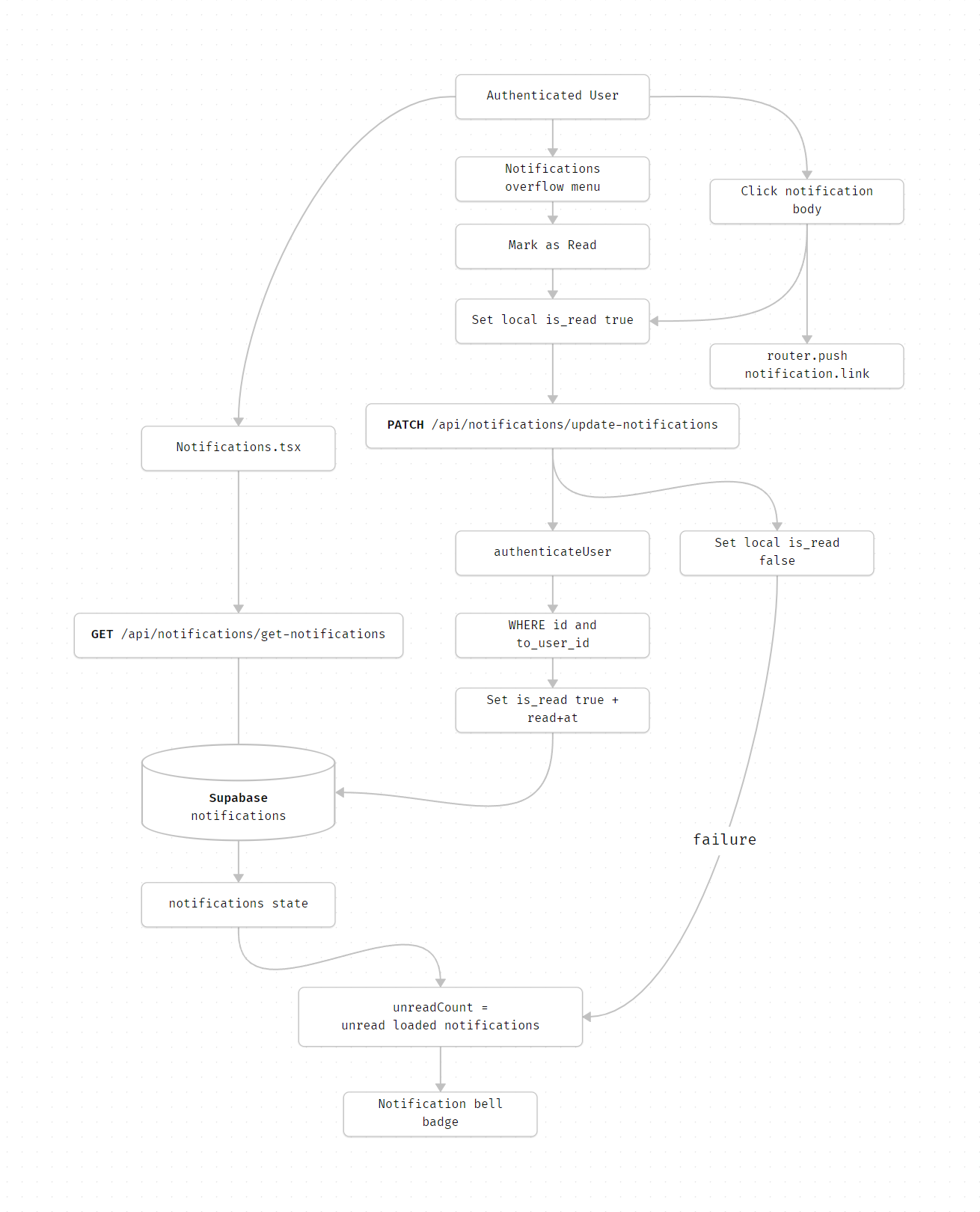
System Diagram
Technologies Used
Next.js, TypeScript, Supabase, Zod, and Sonner toast
Detailed Design & Implementation
Data Model / Schema
#### notifications Created by 20260415_create_notifications_table.sql. Relevant fields: - id: Notification UUID. - from_user_id: Optional sender app_users.id. - to_user_id: Required recipient app_users.id. - title: Notification title. - body: Notification body. - link: Optional navigation target. - data: Notification metadata JSONB. - is_read: Boolean read state, default false. - read_at: Timestamp set when dismissed/read. - created_at: Creation timestamp. Read-state example: ```json { "id": "notification-uuid", "to_user_id": "current-app-user-id", "title": "Changes Requested", "body": "Revisions needed on \"Quest title\"", "is_read": true, "read_at": "2026-06-30T00:00:00.000Z" } ``` Indexes relevant to Dismiss Alert: - idx_notifications_to_user_id for recipient notification lists. - idx_notifications_to_user_unread for unread filtering. - idx_notifications_created_at for newest-first ordering. ```API Specification
#### GET /api/notifications/get-notifications?page=<page>&limit=<limit>&unread_only=<boolean> - Authentication: Required - Purpose: Fetch notifications for the authenticated user. - Query defaults: - page: 1 - limit: 10 - limit max: 50 - Success response: ```json { "success": true, "message": "Notifications fetched successfully", "data": { "notifications": [ { "id": "notification-uuid", "title": "New Comment", "body": "New feedback on \"Quest title\"", "link": "/quest-editor/quest-id/content/visual-canvas?comments=true", "is_read": false, "data": { "type": "NEW_COMMENT" }, "created_at": "2026-06-30T00:00:00.000Z" } ], "totalCount": 1, "hasMore": false, "currentPage": 1 } } ``` #### PATCH /api/notifications/update-notifications - Authentication: Required - Purpose: Mark one notification as read. - Request: ```json { "id": "notification-uuid" } ``` - Validation: - id must be a valid UUID. - Security: - Requires id and to_user_id = authenticatedUserId. - A user cannot mark another user's notification as read. - Database update: ```ts { is_read: true, read_at: now } ``` - Success response: ```json { "success": true, "message": "Notification marked as read", "data": { "id": "notification-uuid" } } ``` - Failure responses: - 400: Invalid request body. - 422/validation response: Invalid notification ID. - 404: Notification not found or not owned by the user. - 500: Database update error. #### PATCH /api/notifications/mark-all-read - Authentication: Required - Purpose: Mark all unread notifications for the authenticated user as read. - Request: ```json { "before": "2026-06-30T00:00:00.000Z" } ``` - Notes: - Body is optional. - before scopes updates to notifications created before a timestamp. - This endpoint exists but is not currently exposed as a button in Notifications.tsx. - Success response: ```json { "success": true, "message": "All notifications marked as read", "data": { "markedCount": 3 } } ``` #### DELETE /api/notifications/delete-notifications - Authentication: Required - Purpose: Delete one notification. - Relation to Dismiss Alert: - Delete is a separate action from dismiss/read. - Delete removes the notification from local state and the database.Logic & Workflows
Notification Load Workflow
1. Notifications.tsx waits for a Clerk user from useUser.
2. It calls /api/notifications/get-notifications?page=1&limit=10.
3. It stores the response in local notifications state.
4. It computes unreadCount from loaded notifications:
notifications.filter((n) => !n.is_read).length5. If unreadCount > 0, it renders the bell badge.
6. The component polls every 30 seconds and supports manual refresh.
Mark as Read Button Workflow
1. User opens the notification bell dropdown.
2. User opens a notification's overflow menu.
3. If the notification is unread, the menu shows Mark as Read.
4. User clicks Mark as Read.
5. UI calls handleNotifClick(notification.id).
6. If the notification exists and is unread, local state is optimistically updated to is_read: true.
7. unreadCount recomputes immediately and decreases.
8. Client sends PATCH /api/notifications/update-notifications.
9. If the API succeeds, the local read state remains.
10. If the API fails, local state rolls back to is_read: false and the unread count increases back.
Click Notification Workflow
1. User clicks the notification body.
2. If unread, the same handleNotifClick mark-read workflow runs.
3. The handler preserves hash data in sessionStorage when the link contains a hash.
4. The client navigates with router.push(path).
5. Because the local update happens before navigation, the unread badge decreases immediately.
Read/Unread Filter Workflow
1. Header filter buttons set local filter to read, unread, or back to all.
2. Filtering is client-side over loaded notifications.
3. After marking a notification read:
It disappears from the
Unreadfilter.It appears in the
Readfilter.It remains visible in
All.
Delete Action Workflow
1. User opens a notification's overflow menu.
2. User clicks Delete.
3. UI optimistically removes the notification from local state.
4. Client sends DELETE /api/notifications/delete-notifications.
5. If the API fails, the deleted notification is restored to its original position.
6. Delete can reduce unread count only because the notification is removed from local state, not because is_read changes.
INFRASTRUCTURE & OPERATIONS
Dependencies
Supabase
notificationstable and indexes.RLS or API ownership checks for user notification isolation.
authenticateUserresolving the current internalapp_users.id.Clerk session availability in the notification client.
Notification producers that insert rows with
is_read = false.
Monitoring & Alerting
Current implementation uses server logs and client rollback behavior. Monitor:
[get-notifications] Database error[update-notifications] Database error[update-notifications] Unexpected error[mark-all-read] Database error[delete-notifications] Database error
Recommended alert thresholds:
Mark-read API failure rate above 2% over 15 minutes.
Repeated
Notification not found or you do not have permissionfor valid sessions.Notification fetch failures above 2% over 15 minutes.
Unusually high delete failures, because rollback can make the UI feel inconsistent.
Deployment Plan
1. Confirm notifications table migration is applied.
2. Confirm idx_notifications_to_user_unread exists for unread filtering.
3. Create a test unread notification for a user.
4. Open the notification bell and verify the unread badge count.
5. Click Mark as Read from the overflow menu.
6. Confirm the unread count decreases immediately.
7. Confirm notifications.is_read = true and read_at is populated.
8. Repeat by clicking an unread notification body and confirm count decreases before navigation.
9. Test the unread filter and ensure the read notification is removed from that filtered view.
10. Test failure handling by forcing the API to fail in a non-production environment and confirming rollback.
TESTING & QUALITY ASSURANCE
Test Strategy
Recommended test coverage:
Unit/component test
Notifications.tsxunread count calculation.Component test
Mark as Readis shown only for unread notifications.Component test optimistic state update decreases unread count.
Component test failed mark-read request rolls back
is_read.Component test clicking a notification marks it read and routes to the notification link.
API test
PATCH /api/notifications/update-notifications:valid owned notification
invalid UUID
notification owned by another user
missing body
API test
PATCH /api/notifications/mark-all-read:empty body marks all unread
beforescopes bycreated_atinvalid
beforereturns validation error
API test
GET /api/notifications/get-notifications:pagination
unread-only filtering
user ownership
E2E smoke:
create unread notification
verify badge count
mark read
verify badge count decreases and persists after refresh
Known Limitations
Unread count is calculated only from notifications currently loaded in the client, not from a separate total unread-count query.
Cross-tab unread count updates rely on polling or the next fetch, not realtime sync.
The mark-all-read endpoint exists but is not currently exposed in the notification dropdown UI.
Mark as Readhas no success toast, by design; only delete uses toasts.If a user marks a notification read and navigates immediately, the API uses
keepalive, but browser/network conditions can still fail.Client-side filtering only applies to loaded notifications, so older unread notifications may not affect the displayed badge until loaded or fetched on page 1.
MAINTENANCE & SUPPORT
Troubleshooting
Unread count does not decrease after Mark as Read
Confirm the notification was unread before clicking.
Check whether
handleNotifClickreturned early because the notification was already read.Inspect the local
notificationsstate foris_read.Check
/api/notifications/update-notificationsresponse.
Unread count decreases then comes back
The optimistic update likely rolled back.
Check
[update-notifications]server logs.Confirm the notification belongs to the authenticated user.
Confirm the notification ID is a valid UUID.
Notification is marked read in database but UI still shows unread
Refresh notifications manually with the refresh button.
Wait for the 30-second polling interval.
Confirm the current loaded notification row has the same
id.
Mark as Read option is missing
The option is intentionally hidden when
notif.is_readis already true.Use the
Unreadfilter to verify whether the item is still unread.
Another user's notification cannot be marked read
This is expected.
The API updates only rows matching both
idandto_user_id.
Badge count seems lower than expected
The badge is based on loaded notifications, not a database-wide unread count.
Check whether more notifications are available through
Load More.Check whether page 1 fetch returned all recent unread notifications.
Changelog
1.0 - Approved, Initial internal technical guide for Dismiss Alert mark-read behavior and unread-count updates, 04/10/2026
Document Version
1.0 - Published, Dismiss Alert technical documentation created for internal review, 06/30/2026
