Author name: Joylynne Grace C. Esportuno
Reviewers: Joshua Uriel Tribiana
Creation Date: June 30, 2026
References: https://github.com/wyzlab/WyzQuests/issues/56
Status: Approved and Merged
INTRODUCTION & GOALS
Problem Summary
View Feedback lets a creator jump from a review notification directly to the relevant reviewer feedback inside the quest editor. When a reviewer comments on a node or requests changes, the system stores an in-app notification containing a deep link. Clicking that notification marks it as read and routes the creator to the quest's visual canvas with query parameters that automatically open the feedback sheet.
Goals
Notify quest creators when reviewers leave feedback or request changes.
Store notification links that route creators back to the reviewed quest.
Open the reviewer feedback sheet automatically when
comments=trueis present in the URL.Select and filter to a specific canvas node when
node_id=<nodeId>is present.Mark notifications as read when a creator clicks them.
Allow creators to reply to reviewer feedback threads.
Support both exploration and linear visual canvas modes.
Non-Goals
View Feedback does not create reviewer comments; comments are created by the commenting APIs.
View Feedback does not edit canvas content directly.
View Feedback does not currently persist reviewer final notes from
SubmitReviewModal.View Feedback does not currently guarantee the notification scrolls to a specific comment thread by
comment_id.View Feedback does not send browser push notifications.
Glossary
View Feedback — The creator workflow for opening reviewer comments from a notification deep link.
Reviewer Feedback Panel — Creator-facing label for
CommentPanel.Comment Panel — Shared right-side sheet used by reviewers and creators for comments/feedback.
Deep Link — A URL with query parameters such as
?comments=true&node_id=<nodeId>.Notification Link — The
notifications.linkvalue used by the notification bell to navigate.Node Feedback — A comment attached to a canvas node ID.
Reviewer Status Notification — Notification created when a reviewer approves a quest or requests changes.
Read State —
notifications.is_readandnotifications.read_at.
HIGH-LEVEL ARCHITECTURE
System Diagram
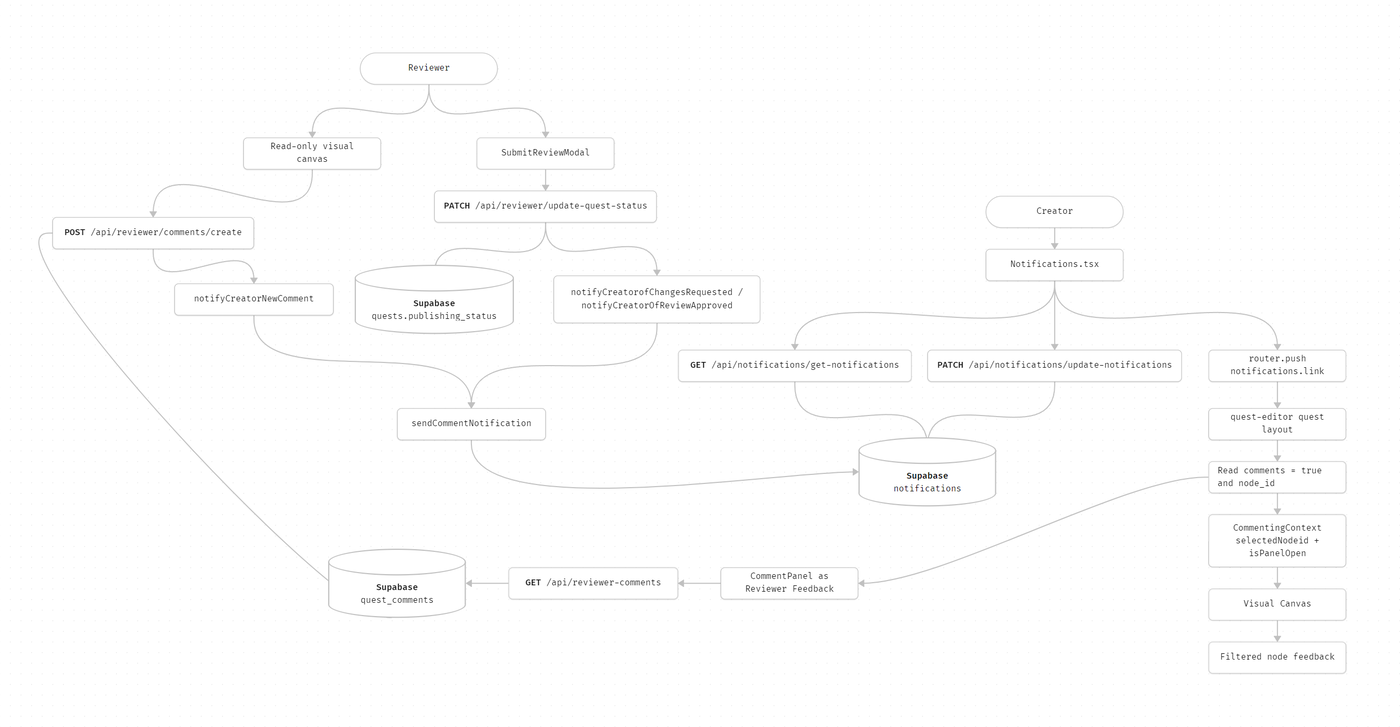
Technologies Used
Next.js, TypeScript, Supabase, Zod, and Sonner toast
DETAILED DESIGN & IMPLEMENTATION
Data Model/Schema
#### `notifications`Created by `20260415_create_notifications_table.sql`. Relevant fields:- `id`- `from_user_id`- `to_user_id`- `title`- `body`- `link`- `data`- `is_read`- `read_at`- `created_at` Example notification for a node-level comment:```json{ "from_user_id": "reviewer-app-user-id", "to_user_id": "creator-app-user-id", "title": "Comment on \"Quiz 1\"", "body": "New feedback on \"Intro to Fractions\"", "link": "/quest-editor/quest-id/content/visual-canvas?comments=true&node_id=node-123", "data": { "type": "NEW_COMMENT", "quest_id": "quest-id", "node_id": "node-123", "comment_id": "comment-id" }, "is_read": false}``` Supported notification types from `COMMENT_NOTIFICATION_TYPES`:- `NEW_COMMENT`- `COMMENT_RESOLVED`- `COMMENT_REPLY`- `REVIEW_SUBMITTED`- `CHANGES_REQUESTED` #### `quest_comments`Used by the feedback panel to display reviewer feedback. Relevant fields:- `id`- `quest_id`- `node_id`- `app_user_id`- `guest_invite_id`- `content`- `is_resolved`- `parent_comment_id`- `created_at`- `updated_at` The list API groups comments into threads:```ts{ comment: Comment; replies: Comment[];}``` #### `quests`Used to resolve:- `id`- `title`- `creator_id`- `canvas_metadata`- `publishing_status` `creator_id` determines who receives review notifications. `canvas_metadata` is used to compute node display names such as `TEXT 1` or `QUIZ 2`. #### `app_users`Used for internal user IDs and display names:- `id`- `name`- `email`- `role` Notification `from_user_id` and `to_user_id` use internal `app_users.id` UUIDs, not Clerk string IDs.API Specification
#### `GET /api/notifications/get-notifications?page=<page>&limit=<limit>&unread_only=<boolean>`- Authentication: Required- Purpose: Fetch paginated notifications for the current user.- Query defaults: - `page`: `1` - `limit`: `10` - `limit` max: `50`- Success response:```json{ "success": true, "message": "Notifications fetched successfully", "data": { "notifications": [ { "id": "notification-id", "title": "Changes Requested", "body": "Revisions needed on \"Quest title\"", "link": "/quest-editor/quest-id/content/visual-canvas?comments=true", "is_read": false, "data": { "type": "CHANGES_REQUESTED", "quest_id": "quest-id" }, "created_at": "2026-06-30T00:00:00.000Z" } ], "totalCount": 1, "hasMore": false, "currentPage": 1 }}``` #### `PATCH /api/notifications/update-notifications`- Authentication: Required- Purpose: Mark one notification as read.- Request:```json{ "id": "notification-uuid"}```- Security: Updates only when `to_user_id` matches the authenticated user.- Success response:```json{ "success": true, "message": "Notification marked as read", "data": { "id": "notification-uuid" }}``` #### `POST /api/reviewer/comments/create`- Authentication: `REVIEWER`, `CREATOR`, `ADMIN`, or `AGENCY`- Purpose: Create a node comment or reply and notify the relevant users.- Request:```json{ "quest_id": "quest-uuid", "node_id": "node-123", "content": "Please clarify this question.", "parent_comment_id": null}```- Notification side effect: - Calls `notifyCreatorOfNewComment`. - If `parent_comment_id` exists, also calls `notifyParentAuthorOfReply`. - Notification failures are logged but do not fail comment creation. #### `PATCH /api/reviewer/update-quest-status`- Authentication: `REVIEWER` or `ADMIN`- Purpose: Reviewer finalizes the review as `approved` or `changes_requested`.- Request:```json{ "quest_id": "quest-uuid", "publishing_status": "changes_requested"}```- Notification side effect: - `changes_requested` calls `notifyCreatorOfChangesRequested`. - `approved` calls `notifyCreatorOfReviewApproved`. - Also sends a non-blocking status email.- Notes: - Approval validates quest content before updating status. - `SubmitReviewModal` has a final-notes input, but those notes are not currently sent to this API. #### `GET /api/reviewer/comments?quest_id=<quest_id>&node_id=<node_id>`- Authentication: Required reviewer/commenting access- Purpose: Fetch comment threads for the feedback panel.- Query: - `quest_id`: required UUID - `node_id`: optional node filter- Response includes `threads`, `totalCount`, and `currentUserId`. #### `GET /api/reviewer/comments/export?quest_id=<quest_id>&format=csv`- Authentication: Required reviewer/commenting access- Purpose: Export feedback threads as CSV from the feedback panel.- Response: CSV file download.Logic & Worflows
Reviewer Comment to Creator Feedback Workflow
Reviewer opens the quest in read-only canvas mode.
Reviewer clicks a node; the canvas sets
CommentingContext.selectedNodeIdand opens the comment panel.Reviewer submits a comment through
/api/reviewer/comments/create.API sanitizes and inserts the comment into
quest_comments.API computes a human-readable node display name from
canvas_metadata.API calls
notifyCreatorOfNewCommentwith the quest ID, node ID, display name, and comment ID.Notification helper resolves the quest creator and inserts a
NEW_COMMENTnotification.Notification
linkpoints to/quest-editor/<questId>/content/visual-canvas?comments=true&node_id=<nodeId>.
Reviewer Requests Changes Workflow
Reviewer opens
SubmitReviewModal.Reviewer chooses
Reject & Return to Draft.SubmitReviewModalcalls/api/reviewer/update-quest-statuswithpublishing_status = changes_requested.API updates
quests.publishing_status.API calls
notifyCreatorOfChangesRequested.Notification helper inserts a
CHANGES_REQUESTEDnotification.Notification
linkpoints to/quest-editor/<questId>/content/visual-canvas?comments=true.Creator clicks the notification and lands on the visual canvas with the feedback panel open.
Creator Clicks Notification Workflow
Notifications.tsxpolls/api/notifications/get-notificationsevery 30 seconds while a user is present.Creator clicks a notification row.
If unread, UI optimistically marks it read.
Client sends
PATCH /api/notifications/update-notifications.Client calls
router.push(notification.link).QuestEditorLayoutreadscomments=trueintocommentsMode.QuestEditorLayoutrendersCommentPanelwithisCreatorView={true}andforceOpen={commentsMode}.CommentPanelopens the sheet and, ifnode_idexists, setsselectedNodeId.CommentPanelfetches/api/reviewer/comments?quest_id=<questId>.If a node is selected, the panel enables node filtering and fetches comments for that node.
Creator Feedback Panel Behavior
The sheet title is
Reviewer Feedback.Creator sees an info banner explaining they can reply in each thread.
Creator can toggle node filtering when a node is selected.
Creator can export feedback to CSV when comments exist.
New top-level comment form is hidden for creators; creators interact through replies in existing threads.
Closing the sheet removes the
commentsquery parameter throughrouter.replace.
Approval Notification Behavior
Reviewer approval triggers a
REVIEW_SUBMITTEDnotification.Current link points to
/quest-editor/<questId>/overview.This means approval notifications do not open the feedback panel by default.
INFRASTRUCTURE & OPERATIONS
Dependencies
Supabase tables:
notificationsquest_commentsquestsapp_users
Auth helpers:
authenticateUserauthenticateAnyRole
Visual canvas routes and React Flow rendering
CommentingProvidermounted inQuestEditorLayoutAPP_URLfor status email linksBrowser session storage for hash-based notification scroll behavior used by other notification types
Monitoring & Alerting
Current implementation relies on server logs and client behavior. Monitor:
[comment-notifications] Failed to send[comment-notifications] Quest lookup failed[reviewer/comments/create] Insert error[get-notifications] Database error[update-notifications] Database errorFailed to fetch commentsFailed to update quest status
Deployment Plan
Confirm
notificationstable migration and indexes are applied.Confirm
quest_commentsAPIs are deployed and accessible to reviewers and creators.Confirm
QuestEditorLayoutmountsCommentingProviderandCommentPanelfor creator view.Add reviewer feedback on a test quest node.
Confirm creator receives a
NEW_COMMENTnotification.Click the notification and verify URL includes
comments=true&node_id=<nodeId>.Verify the visual canvas opens and the
Reviewer Feedbacksheet is open.Verify comments are filtered to the selected node.
Submit
changes_requestedfromSubmitReviewModal.Confirm creator receives a
CHANGES_REQUESTEDnotification and the feedback sheet opens.Confirm the notification is marked read after click.
TESTING QUALITY & ASSURANCE
Test Strategy
Unit test notification template links in
comment-notifications.ts.API test
GET /api/notifications/get-notificationsfor pagination, unread-only filtering, and ownership.API test
PATCH /api/notifications/update-notificationsfor ownership enforcement.API test
/api/reviewer/comments/createverifies notification side effects are called without blocking comment creation.API test
/api/reviewer/update-quest-statusverifies status-specific notification functions are called.Component test
Notifications.tsxfor click behavior:optimistic read update
read API call
navigation to stored link
Component test
CommentPanelforcomments=trueauto-open andnode_idselection.E2E test:
reviewer comments on a node
creator clicks notification
creator lands on canvas with feedback sheet open and node-filtered comments visible
E2E test:
reviewer requests changes
creator clicks notification
creator lands on canvas with feedback sheet open
Known Limitations
SubmitReviewModalcollects final notes but does not send or persist them.Approval notifications route to quest overview, not the feedback panel.
CHANGES_REQUESTEDnotifications open all feedback but do not identify a specific comment or node.notifications.data.comment_idis stored but not currently used byCommentPanelto scroll to a specific thread.Notification polling runs every 30 seconds; there is no realtime subscription.
The notification click handler supports hash storage for other flows, but reviewer feedback links currently rely on query parameters.
Closing the feedback sheet removes
commentsbut leavesnode_idin the URL.Comment notification insertion is fire-and-forget; failures do not retry.
MAINTENANCE & SUPPORT
Troubleshooting
Creator clicks notification but feedback panel does not open
Confirm the notification
linkcontainscomments=true.Confirm the route is under
/quest-editor/<questId>/...soQuestEditorLayoutis mounted.Confirm
CommentPanelreceivesforceOpen={commentsMode}.Check browser console for route or fetch errors.
Feedback panel opens but shows no comments
Confirm comments exist in
quest_commentsfor the quest.If
node_idis present, confirm the comment uses the samenode_id.Try removing
node_idfrom the URL to show all quest comments.Check
/api/reviewer/comments?quest_id=<questId>&node_id=<nodeId>.
Notification does not appear for creator
Confirm
notifyCreatorOfNewCommentornotifyCreatorOfChangesRequestedwas called.Confirm the quest has a valid
creator_id.Check
[comment-notifications]server logs.Inspect
notifications.to_user_idand confirm it matches the creator's internalapp_users.id.
Notification remains unread after click
Check
/api/notifications/update-notificationsresponse.Confirm the notification belongs to the authenticated user.
Confirm
notifications.is_readandread_atupdate in Supabase.
Creator cannot reply to feedback
Confirm the thread is displayed in
CommentThread.Confirm the creator has an allowed role for
/api/reviewer/comments/create.Check request payload includes
parent_comment_id.Check validation errors for empty or oversized comment content.
Reviewer requested changes but creator lands on content page instead of feedback panel
In-app
CHANGES_REQUESTEDnotifications should link to visual canvas withcomments=true.Status email links currently use
/quest-editor/<questId>/content, which does not explicitly open the feedback panel.Update the email notification link to the same visual-canvas deep link if email click-through must open View Feedback.
Changelog
1.0 - Approved, Initial internal technical guide for View Feedback notification deep links, 04/15/2026
Document version:
1.0 - Published, Feature pushed to dev server after initial dev review, 06/30/2026
