Author name: Joylynne Grace C. Esportuno
Reviewers: Jethro Lagmay
Creation Date: March 27, 2026
References: https://github.com/wyzlab/WyzQuests/issues/55
Status: Approved and Merged
INTRODUCTION & GOALS
Problem Summary
Review Alert notifies a quest creator in the notification bell when a reviewer finalizes a review. The reviewer can either approve the quest or request changes. The status update API changes quests.publishing_status, then creates an in-app notification for the quest creator and sends a companion status email.
From the creator's perspective, the notification bell shows that a reviewed quest needs attention or has been approved. From the system perspective, Review Alert is a non-blocking side effect of the reviewer status workflow.
Goals
Notify the creator when a reviewer approves a quest.
Notify the creator when a reviewer requests changes.
Non-Goals
Review Alert does not create or manage reviewer comments.
Review Alert does not persist the optional final notes typed in SubmitReviewModal.
Review Alert does not provide realtime notification delivery; the bell polls every 30 seconds.
Glossary
Review Alert — In-app notification sent to a creator after reviewer final review action.
Review Submitted — Notification type used when a quest is approved.
Changes Requested — Notification type used when a reviewer rejects/returns a quest for revision.
Creator — The quests.creator_id user who receives the review alert.
Reviewer — The REVIEWER or ADMIN user submitting the review decision.
Notification Bell (Notifications.tsx) — the UI dropdown that lists notifications.
Fire-and-Forget — A side effect that logs errors but does not throw back into the main workflow.
High-Level Architecture
System Diagram
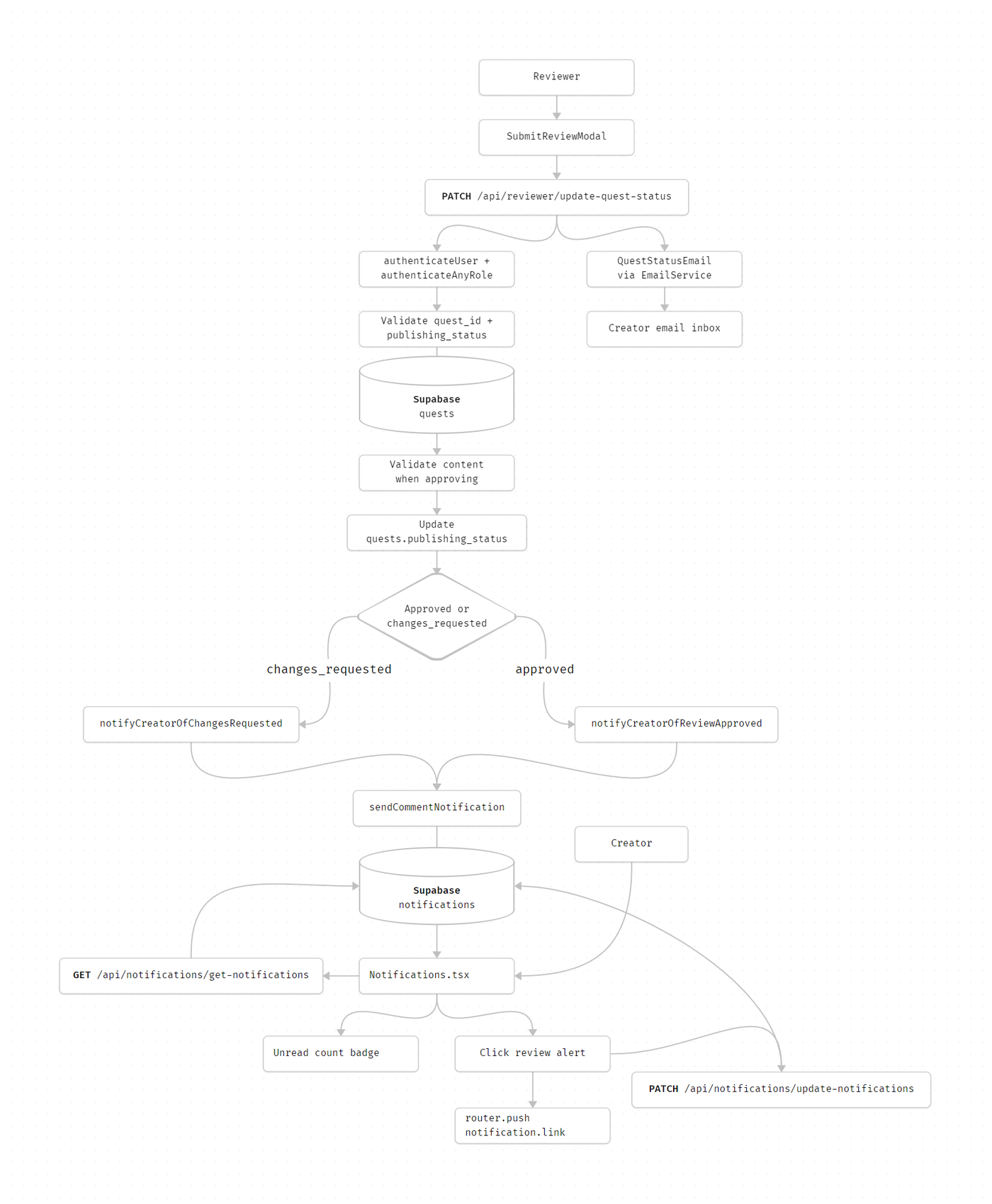
Technologies Used
Next.js, TypeScript, Supabase, Zod, and Sonner toast
DETAILED DESIGN & IMPLEMENTATION
Data Model / Schema
#### quests Review Alert is triggered after a quest status update. Relevant fields: - id - title - creator_id - publishing_status - canvas_metadata Allowed review status inputs from updateQuestStatusSchema: ```ts "approved" | "changes_requested" ``` Approval path validates canvas_metadata before updating status. #### notifications Review alerts are stored in the shared notifications table. Relevant fields: - id - from_user_id - to_user_id - title - body - link - data - is_read - read_at - created_at Approved notification shape: ```json { "from_user_id": "reviewer-app-user-id", "to_user_id": "creator-app-user-id", "title": "Review Submitted", "body": "Review completed for \"Quest title\"", "link": "/quest-editor/quest-id/overview", "data": { "type": "REVIEW_SUBMITTED", "quest_id": "quest-id" }, "is_read": false } ``` Changes-requested notification shape: ```json { "from_user_id": "reviewer-app-user-id", "to_user_id": "creator-app-user-id", "title": "Changes Requested", "body": "Revisions needed on \"Quest title\"", "link": "/quest-editor/quest-id/content/visual-canvas?comments=true", "data": { "type": "CHANGES_REQUESTED", "quest_id": "quest-id" }, "is_read": false } ``` #### app_users Used to resolve: - reviewer display name for email - creator email/name for email - internal UUIDs for notification sender/recipient Notification user IDs use internal app_users.id, not Clerk IDs.API Specification
#### PATCH /api/reviewer/update-quest-status - Authentication: Required - Authorized roles: REVIEWER, ADMIN - Purpose: Finalize review status and trigger creator review alert. - Request: ```json { "quest_id": "quest-uuid", "publishing_status": "approved" } ``` - Supported status values: - approved - changes_requested - Success response: ```json { "success": true, "message": "Quest status successfully updated to approved", "data": { "id": "quest-uuid", "publishing_status": "approved" } } ``` - Validation and behavior: - Fetches quest creator_id, title, and canvas_metadata. - If approving, runs quest content validation first. - Updates quests.publishing_status. - Calls status-specific in-app notification helper. - Sends a non-blocking status email. #### GET /api/notifications/get-notifications?page=<page>&limit=<limit>&unread_only=<boolean> - Authentication: Required - Purpose: Fetch creator notifications for the bell dropdown. - Success response: ```json { "success": true, "message": "Notifications fetched successfully", "data": { "notifications": [ { "id": "notification-id", "title": "Review Submitted", "body": "Review completed for \"Quest title\"", "link": "/quest-editor/quest-id/overview", "is_read": false, "data": { "type": "REVIEW_SUBMITTED", "quest_id": "quest-id" }, "created_at": "2026-06-30T00:00:00.000Z" } ], "totalCount": 1, "hasMore": false, "currentPage": 1 } } ``` #### PATCH /api/notifications/update-notifications - Authentication: Required - Purpose: Mark a review alert as read after click or explicit Mark as Read. - Request: ```json { "id": "notification-uuid" } ``` - Security: Updates only rows where to_user_id equals the authenticated user. #### DELETE /api/notifications/delete-notifications - Authentication: Required - Purpose: Delete one notification from the bell dropdown. - Relation to Review Alert: Optional cleanup action; not part of creating the review alert.Logic & Workflows
Reviewer Approval Workflow
1. Reviewer opens SubmitReviewModal.
2. Modal fetches unresolved comment count from /api/reviewer/comments?quest_id=<questID>.
3. If unresolved comments exist, approval is disabled.
4. Reviewer confirms Approve & Publish.
5. Modal calls /api/reviewer/update-quest-status with publishing_status = approved.
6. API validates request and reviewer/admin role.
7. API validates quest content.
8. API updates quests.publishing_status to approved.
9. API calls notifyCreatorOfReviewApproved.
10. Notification helper inserts a REVIEW_SUBMITTED notification for the creator.
11. API sends a non-blocking "quest approved" email.
12. Reviewer is routed back to /reviewer/queue.
Reviewer Requests Changes Workflow
1. Reviewer opens SubmitReviewModal.
2. Reviewer confirms Reject & Return to Draft.
3. Modal calls /api/reviewer/update-quest-status with publishing_status = changes_requested.
4. API validates request and reviewer/admin role.
5. API updates quests.publishing_status to changes_requested.
6. API calls notifyCreatorOfChangesRequested.
7. Notification helper inserts a CHANGES_REQUESTED notification for the creator.
8. API sends a non-blocking "changes requested" email.
9. Reviewer is routed back to /reviewer/queue.
Notification Insert Workflow
1. Status helper fetches quest title and creator_id.
2. Helper calls sendCommentNotification.
3. sendCommentNotification skips notification if reviewer and creator are the same user.
4. It resolves title, body, and link from notification templates.
5. It inserts into notifications.
6. Insert errors are logged and do not block the status update response.
Creator Bell Workflow
1. Notifications.tsx loads notifications after Clerk user is available.
2. It calls /api/notifications/get-notifications?page=1&limit=10.
3. It stores notifications locally.
4. It computes unreadCount from loaded notifications.
5. Bell badge appears when unread count is greater than zero.
6. The dropdown lists review alerts with title and body.
7. Creator can filter read/unread notifications.
8. Notifications poll every 30 seconds and can be manually refreshed.
Creator Click Workflow
1. Creator clicks the review alert row.
2. If unread, UI optimistically marks it read and sends PATCH /api/notifications/update-notifications.
3. UI navigates with router.push(notification.link).
4. Approved review alert routes to /quest-editor/<questId>/overview.
5. Changes-requested review alert routes to /quest-editor/<questId>/content/visual-canvas?comments=true.
6. If the read API fails, local read state rolls back.
INFRASTRUCTURE & OPERATIONS
Dependencies
Supabase tables:
quests
notifications
app_users
Notification table indexes:
idx_notifications_to_user_id
idx_notifications_to_user_unread
idx_notifications_created_at
Auth helpers:
authenticateUser
authenticateAnyRole
Quest validation for approval path.
Email infrastructure for companion QuestStatusEmail.
APP_URL for email links.
Monitoring & Alerting
Current implementation logs notification and email failures but does not persist delivery attempts. Monitor:
Database update error
Status update blocked by database policies or invalid Quest ID.
[comment-notifications] Failed to send REVIEW_SUBMITTED
[comment-notifications] Failed to send CHANGES_REQUESTED
[comment-notifications] Quest lookup failed
Failed to send status email
[get-notifications] Database error
Recommended alert thresholds:
Review status update failures above 2% over 15 minutes.
Notification insert failures above 2% over 15 minutes.
Repeated quest lookup failures for status notification helpers.
Creator reports of missing review alerts after successful reviewer status updates.
Deployment Plan
1. Confirm notifications table migration is applied.
2. Confirm reviewers/admins can call /api/reviewer/update-quest-status.
3. Submit a test quest for review.
4. As reviewer, approve the quest.
5. Confirm quests.publishing_status = approved.
6. Confirm creator receives a REVIEW_SUBMITTED notification.
7. Click the notification and verify it routes to quest overview.
8. Submit another test quest and request changes.
9. Confirm creator receives a CHANGES_REQUESTED notification.
10. Click the notification and verify it routes to the visual canvas with feedback panel open.
11. Confirm unread badge count decreases after click.
12. Verify companion status emails in a staging SMTP inbox.
TESTING & QUALITY ASSURANCE
Test Strategy
Recommended test coverage:
API test /api/reviewer/update-quest-status:
unauthenticated request
unauthorized role
invalid body
quest not found
approval blocked by validation errors
approved status updates quest and triggers approval notification
changes requested status updates quest and triggers changes notification
email failure does not fail status update
Unit test notification template output:
REVIEW_SUBMITTED title/body/link
CHANGES_REQUESTED title/body/link
data payload includes type and quest_id
Component test SubmitReviewModal:
approval disabled with unresolved comments
approve calls status API with approved
reject calls status API with changes_requested
Component test Notifications.tsx:
review alerts render title/body
unread badge count includes review alerts
click marks read and navigates to link
E2E test:
reviewer approves quest
creator sees notification bell badge
creator opens notification and lands on overview
E2E test:
reviewer requests changes
creator sees notification bell badge
creator opens notification and lands on feedback view
Known Limitations
SubmitReviewModal includes optional final notes, but notes are not sent to the API or stored.
In-app notification insertion is fire-and-forget and does not retry.
Email delivery is separate and non-blocking; email success does not guarantee in-app notification success.
Notification polling is every 30 seconds; there is no realtime bell update.
MAINTENANCE & SUPPORT
Troubleshooting
Creator does not see a review alert
Confirm /api/reviewer/update-quest-status returned success.
Confirm quests.creator_id is the expected creator app user UUID.
Check notifications table for a row with to_user_id = creator_id.
Check [comment-notifications] logs.
Confirm reviewer and creator are not the same user; self-notifications are skipped.
Review alert appears but badge count is wrong
Confirm the notification has is_read = false.
Refresh the notification bell.
Wait for the 30-second polling interval.
Check whether the notification is on a later page not loaded by the client.
Approval did not create alert
Confirm quest content validation passed.
Confirm publishing_status was exactly approved.
Check notifyCreatorOfReviewApproved logs.
Inspect notifications.data.type for REVIEW_SUBMITTED.
Changes requested did not open feedback view
Confirm notification link is /quest-editor/<questId>/content/visual-canvas?comments=true.
Confirm QuestEditorLayout receives comments=true.
See docs/VIEW_FEEDBACK_TECHNICAL_GUIDE.md for feedback deep-link troubleshooting.
Status email was sent but bell notification is missing
Email and in-app notifications are separate side effects.
Check sendCommentNotification insert logs.
Confirm notification insert RLS/service-role behavior in Supabase.
Bell notification exists but creator cannot open the linked page
Confirm creator still owns or can access the quest.
Confirm the quest editor route exists.
Confirm the link path matches current routing conventions.
Changelog
1.0 - Approved, Initial internal technical guide for Review Alert notification behavior, 03/27/2026
Document Version
1.0 - Published, Review Alert technical documentation created for internal review, 06/30/2026
