Author name: Joylynne Grace C. Esportuno
Reviewers: Joshua Uriel Tribiana
Creation Date: June 29, 2026
References: https://github.com/wyzlab/WyzQuests/issues/82
Status: Approved and Merged
INTRODUCTION & GOALS
Problem Summary
Enrollment Alerts reduces silent enrollments and notify learners when a creator enrolls them in a quest. The alert is delivered as a transactional email rendered from a React Email template and sent through the platform SMTP configuration, with optional agency SMTP/branding support available in the shared email service.
Goals
Send an enrollment email after a creator successfully enrolls a learner.
Send enrollment emails for each successful CSV bulk enrollment.
Render a branded email template with learner name, quest title, quest description, creator name, and a Start Quest link.
Use the shared
EmailServicefor SMTP delivery.Keep enrollment creation successful even when email sending fails.
Provide an admin test endpoint and UI action for validating the enrollment email template and SMTP delivery.
Non-Goals
Enrollment Alerts do not currently send in-app notifications.
Enrollment Alerts do not currently send for learner self-enrollment through
/api/learner/enroll.Enrollment Alerts do not retry failed email sends.
Enrollment Alerts do not store an email delivery audit row.
Enrollment Alerts do not block enrollment creation when SMTP delivery fails.
Enrollment Alerts do not currently support per-email localization or template editing from the UI.
Glossary
Enrollment Alert — Transactional email sent when a learner is added to a quest by a creator.
Single Enrollment — Creator adds one learner by email through
create-enrollment.Bulk Enrollment — Creator uploads a CSV of learner emails through
bulk-create.React Email — Component-based email rendering used through
@react-email/render.Branding Data — Optional logo and color theme loaded from
branding_detailsby agency ID.Platform SMTP — SMTP configuration read from environment variables.
Agency SMTP — Optional agency-specific SMTP configuration stored in branding data and decrypted before use.
Silent Failure — Email send failure is logged but does not fail the enrollment transaction.
HIGH-LEVEL ARCHITECTURE
System Diagram
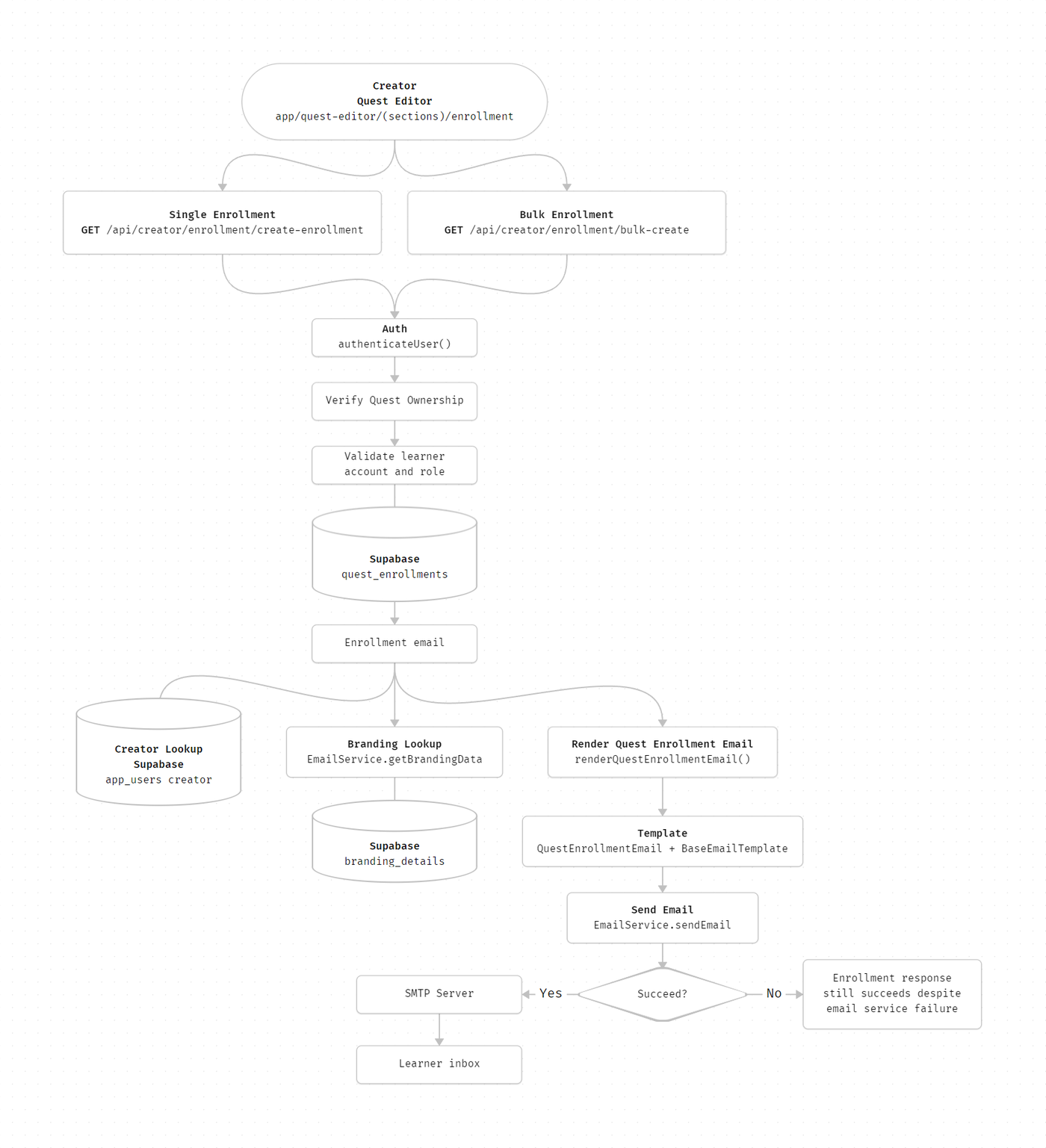
Technologies used
Next.js, TypeScript, Supabase, Clerk, React Email, Nodemailer, Emailit, Zod, Papa Parse, and CryptoJS
DETAILED DESIGN & IMPLEMENTATION
Data Mode/Schema
#### `quest_enrollments`Enrollment Alerts are triggered only after rows are inserted into `quest_enrollments`. Relevant fields:- `id`- `quest_id`- `learner_id`- `status`- `progress`- `enrolled_at` Single enrollment inserts:```json{ "quest_id": "uuid", "learner_id": "uuid", "status": "ongoing", "progress": { "percentage": 0, "visited_cards": [], "last_visited_at": null }, "enrolled_at": "2026-06-29T00:00:00.000Z"}``` Bulk enrollment inserts the same logical data but currently omits `progress`, relying on database defaults or nullable progress behavior. #### `quests`Enrollment APIs read:- `id`- `title`- `description`- `creator_id` `title` and `description` are used in the email template. `creator_id` is used to authorize the creator's access to the quest. #### `app_users`Enrollment APIs read:- `id`- `name`- `email`- `role` Learners must exist in `app_users` and must have `role = LEARNER`. Creator name is used in the email template. #### `branding_details``EmailService.getBrandingData(agencyId)` can read:- `logo`- `color_theme`- `smtp_config` `color_theme` can include:```json{ "primaryButtonBg": "#0093DD", "primaryButtonText": "#ffffff", "headingText": "#1e3a8a", "bodyText": "#374151"}```API Specification
#### `POST /api/creator/enrollment/create-enrollment`- Authentication: Required creator session- Purpose: Enroll one learner and send one enrollment alert.- Request:```json{ "quest_id": "uuid", "learner_email": "learner@example.com"}```- Success response:```json{ "success": true, "message": "Learner enrolled successfully", "data": { "id": "enrollment-id", "learner_id": "learner-id", "quest_id": "quest-id", "name": "Learner Name", "email": "learner@example.com", "status": "ongoing", "enrolledAt": "2026-06-29T00:00:00.000Z", "progress": { "percentage": 0, "visited_cards": [], "last_visited_at": null } }}```- Main validation failures: - `400`: Missing quest ID or learner email - `404`: Quest not found or learner account does not exist - `403`: Target user is not a learner - `409`: Learner is already enrolled - `500`: Enrollment insert failed- Email behavior: email errors are logged and do not change the success response. #### `POST /api/creator/enrollment/bulk-create?questId=<quest_id>`- Authentication: Required creator session- Purpose: Enroll many learners from a CSV and send enrollment alerts to successful inserts.- Request: `multipart/form-data` with a `file` field.- CSV format:```csvemaillearner1@example.comlearner2@example.com```- Success response:```json{ "success": true, "successfulEnrollments": 2, "failedEnrollments": [ { "email": "not-a-learner@example.com", "reason": "User is not a learner" } ]}```- Main validation failures: - `400`: Missing quest ID, missing file, or invalid CSV - `404`: Quest not found or unauthorized - `500`: User lookup or enrollment insert failed- Email behavior: sends emails in parallel with `Promise.all`; individual email failures are logged and do not fail the bulk response. #### `POST /api/admin/branding/email/test-enrollment`- Authentication: Required `ADMIN` role with agency context- Purpose: Render and send a sample enrollment email.- Request:```json{ "testEmail": "test@example.com", "learnerName": "Test Learner", "questTitle": "Sample Quest", "creatorName": "Test Creator"}```- Success response:```json{ "success": true, "message": "Enrollment email test sent successfully"}```- Notes: Uses agency branding data and agency SMTP when available, with fallback behavior controlled by `EmailService`. #### `POST /api/admin/branding/smtp/test`- Authentication: Required `ADMIN` role with agency context- Purpose: Verify a submitted SMTP config can connect.- Request:```json{ "host": "smtp.example.com", "port": 587, "user": "smtp-user", "password": "smtp-password", "from_name": "WyzQuests", "from_email": "notifications@example.com", "enabled": true}```Logic & Workflows
Single Enrollment Alert Workflow
Creator submits learner email and quest ID from the enrollment UI.
API authenticates the creator through
authenticateUser.API verifies the quest exists and belongs to the creator.
API verifies the target email exists in
app_users.API rejects non
LEARNERusers.API checks for an existing enrollment.
API inserts a
quest_enrollmentsrow.API fetches creator name from
app_users.API gets branding data through
EmailService.getBrandingData.API renders
QuestEnrollmentEmailthroughrenderQuestEnrollmentEmail.API sends the email through
EmailService.sendEmail.If email sending fails, the error is logged and the enrollment response still succeeds.
Bulk Enrollment Alert Workflow
Creator uploads a CSV with an
emailcolumn.API authenticates the creator and verifies quest ownership.
API parses CSV with Papa Parse and validates rows with Zod.
API fetches all matching users in one Supabase query.
API fetches existing enrollments for the quest.
API builds
learnersToInsertandfailedEnrollments.API inserts all valid learner enrollments in one Supabase insert.
API fetches email service and branding data once.
API renders and sends enrollment emails in parallel for successful enrollments.
Individual email failures are logged without failing the bulk response.
Email Rendering Workflow
renderQuestEnrollmentEmailcalls React Emailrender.QuestEnrollmentEmailprepares default colors frombrandingData.color_themeor fallback constants.Template uses
APP_URLto build the Start Quest button URL.Template renders inside
BaseEmailTemplate.BaseEmailTemplateoptionally displays the configured logo and common footer.
SMTP Delivery Workflow
EmailService.getInstance()returns a singleton service.sendEmailresolves SMTP config.If an
agencyIdis provided and agency SMTP is enabled, the service decrypts and tries agency SMTP first.If agency SMTP fails, it logs the failure and falls back to platform SMTP.
If no
agencyIdis provided, platform SMTP is used directly.The transporter is verified before sending.
The method returns
{ success, error?, usedFallback? }.
INFRASTRUCTURE & OPERATIONS
Dependencies
Supabase tables:
quests,app_users,quest_enrollments,branding_detailsSMTP environment variables:
SMTP_HOSTSMTP_PORTSMTP_USERSMTP_PASSWORDSMTP_FROM_NAMESMTP_FROM_EMAIL
APP_URLfor Start Quest links in email templatesENCRYPTION_KEYfor agency SMTP password decryptionExternal SMTP provider availability
Clerk/session authentication through local auth helpers
Monitoring & Alerting
Current implementation logs email failures to server logs and does not persist delivery status. Monitor:
Failed to send enrollment emailEmail failed: <learner_email>Email sending failedAgency SMTP failed, falling back to platform SMTPPOST /create-enrollment error[BULK_ENROLLMENT_POST]
Deployment Plan
Confirm platform SMTP environment variables are present in the target environment.
Confirm
APP_URLpoints to the correct deployed application URL.Confirm
ENCRYPTION_KEYis configured for environments using agency SMTP.Run the admin SMTP test.
Run the admin enrollment email test.
Test single creator enrollment with a real learner account.
Test bulk CSV enrollment with valid, duplicate, missing, and non-learner emails.
Check server logs for silent email failures.
Confirm learner receives email and Start Quest link opens
/quests/<questID>.
TESTING & QUALITY ASSURANCE
Testing Strategy
Recommended test coverage:
Unit test
QuestEnrollmentEmailrendering with and without branding data.Unit test
EmailService.sendEmailplatform SMTP success and failure paths using mocked Nodemailer.Unit test agency SMTP fallback behavior.
API tests for
create-enrollment:Missing fields
Quest ownership failure
Missing learner account
Non-learner target
Duplicate enrollment
Successful enrollment with email service mocked
Email failure still returns successful enrollment
API tests for
bulk-create:Missing file
Invalid CSV shape
Mixed valid and invalid learners
Duplicate filtering
Per-recipient email failure logging
Manual QA:
Verify email subject and rendered content
Verify Start Quest button URL
Verify logo and color theme rendering
Verify test email UI states in
EmailSettings
Known Limitations
No delivery audit table exists for enrollment alert attempts.
No retry queue or background job handles SMTP failures.
Email sending happens inside the request lifecycle, which can slow large bulk enrollment requests.
Learner self-enrollment through
/api/learner/enrolldoes not send an enrollment alert.Bulk enrollment currently renders
learnerNameas"Learner"instead of each user's stored name.Bulk enrollment and the admin test endpoint should pass
questIDintorenderQuestEnrollmentEmail; otherwise the Start Quest link can render with an undefined quest ID.Single enrollment uses platform SMTP because it calls
sendEmailwithout an agency ID.Bulk enrollment inserts do not explicitly initialize
progress.
MAINTENANCE & SUPPORT
Troubleshooting
Learner was enrolled but did not receive email
Check server logs for
Failed to send enrollment emailorEmail sending failed.Check Emailit if the domain is working
Confirm
SMTP_HOST,SMTP_PORT,SMTP_USER, andSMTP_PASSWORDare configured.Confirm SMTP provider credentials are valid and not blocked by provider policy.
Check spam/quarantine folders.
Confirm learner email in
app_users.emailis correct.
Start Quest button opens the wrong URL
Confirm
APP_URLis set in the environment.Confirm
questIDis passed torenderQuestEnrollmentEmail.Confirm the target quest is accessible to the learner.
Bulk enrollment succeeds but some learners do not receive email
Check logs for
Email failed: <learner_email>.Check whether the failed learners were listed in
failedEnrollments.Check SMTP provider rate limits.
Consider splitting large CSV files into smaller batches until a retry queue exists.
Test enrollment email fails in admin settings
Check
/api/admin/branding/email/test-enrollmentresponse.Run
/api/admin/branding/smtp/testto isolate SMTP connectivity.Verify agency SMTP config if using agency delivery.
Confirm platform SMTP fallback credentials are valid.
Branding does not appear in email
Confirm
branding_detailsexists for the agency.Confirm
logois a reachable public URL.Confirm
color_themecontains expected keys.Confirm the email path passes an
agencyIdwhen agency branding is required.
Changelog
1.0 - Approved, Initial internal technical guide for Enrollment Alerts based on current enrollment email implementation, 06/29/2026
Document version:
1.0 - Published, Enrollment Alerts technical documentation, 06/29/2026
1.1 - Published, Add emailit on troubleshooting, 07/03/2026
