1. Front Matter
Title: Multi-role RBAC
Author: scorevi (Sean Patrick Caintic)
Reviewers: armaminter (Onise Kortez)
Created: June 2026
Status: Approved
2. Introduction & Goals
Problem Summary
WyzQuests serves multiple distinct user personas — platform administrators, agency owners, content creators, reviewers, and learners — each requiring isolated views and scoped permissions. A flat single-role model cannot accommodate the nested organizational structure where a user may simultaneously hold a platform role (what they can do across WyzQuests) and an agency membership role (what they can do within a specific agency workspace).
This document defines the three-layer RBAC model that governs every API route, database query (via Row Level Security), and frontend dashboard in WyzQuests.
Goals:
Enforce authorization at the API level — no client-trust-only guards.
Support dual-role identities: one platform role plus zero or one agency membership roles.
Enable privileged users (ADMIN, CREATOR) to "View As" lower-privilege roles for UX testing.
Allow fine-grained folder-level sharing (view/edit/admin/owner) independent of platform or agency roles.
Bind every authenticated request to a single, validated effective role via
authenticate*()utilities.
Non-Goals:
Custom role-permission matrices per agency (agencies inherit the fixed hierarchy).
Attribute-Based Access Control (ABAC) beyond the existing role + agency membership + folder permission layers.
Impersonation in the security sense — "View As" is a UX preview, not full account takeover.
Temporary or time-limited role assignments.
Glossary
Term | Definition |
|---|---|
Platform Role | A user's global role stored in |
Agency Membership Role | A user's role within a specific agency, stored in |
Effective Role | The role currently governing a request, after resolving the "View As" cookie against the View As Hierarchy. All |
View As | A feature allowing ADMIN and CREATOR users to switch their effective role for UX preview. Enforced at the API level via an httpOnly cookie. |
RLS | Row Level Security — PostgreSQL policies on Supabase tables that enforce per-row access based on the authenticated user's JWT claims. |
Re-auth | A single-use, 5-minute-expiry token required before performing sensitive admin actions (e.g., changing roles, deleting users). |
Owner | The Clerk user who created the agency ( |
Folder Permission | Granular access control on a creator's content folder. Levels: |
3. High-Level Architecture
System Diagram
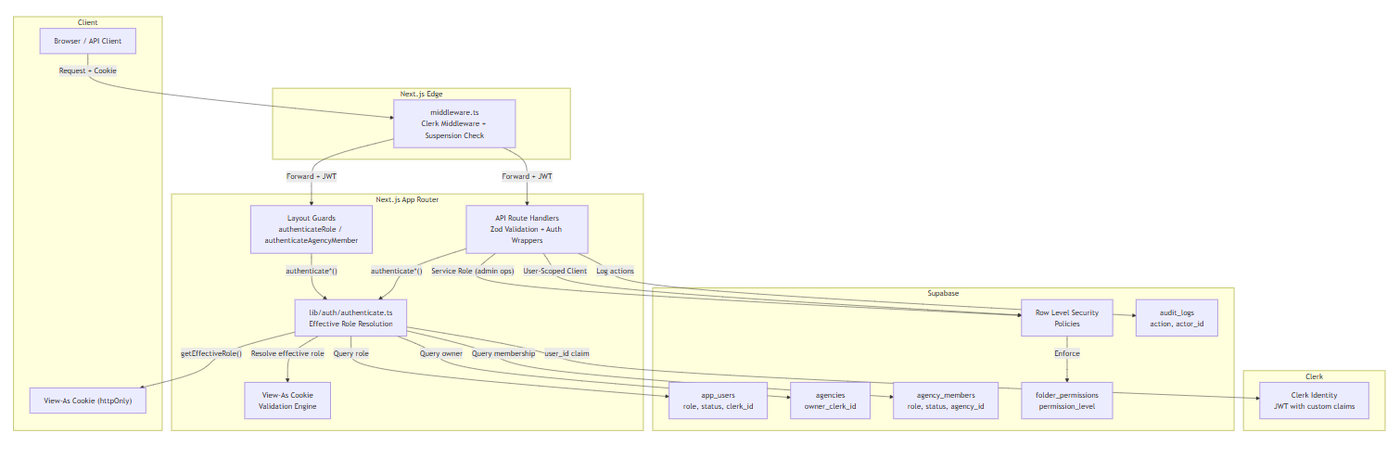
Technologies Used
Layer | Technology |
|---|---|
Identity Provider | Clerk (JWT with custom |
Authorization Engine | Custom TypeScript utilities in |
Validation | Zod ( |
Database RLS | Supabase PostgreSQL Row Level Security policies |
Session Transport | httpOnly |
Sensitive Action Re-auth |
|
Middleware | Next.js 15 |
4. Detailed Design & Implementation
Data Model / Schema
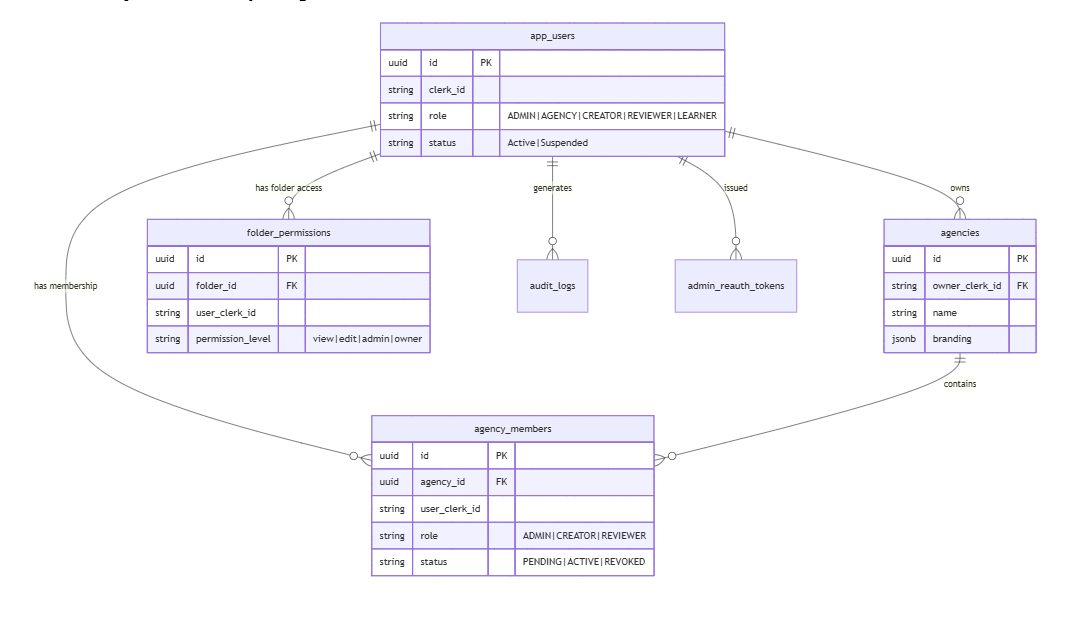
Platform Users (app_users)
-- Relevant columnsrole VARCHAR(50) DEFAULT 'LEARNER'::character varying CHECK (role IN ('ADMIN', 'AGENCY', 'CREATOR', 'LEARNER', 'REVIEWER'));status VARCHAR(20) DEFAULT 'Active'::character varying CHECK (status IN ('Active', 'Suspended'));clerk_id VARCHAR(255) NOT NULL;The role column is the single source of truth for platform-level authorization. New users default to LEARNER. The AGENCY value is legacy and functionally disabled in the View As hierarchy.
Agencies
CREATE TABLE agencies ( id UUID PRIMARY KEY DEFAULT gen_random_uuid(), owner_clerk_id TEXT NOT NULL, -- Clerk ID; the agency OWNER name TEXT NOT NULL, branding JSONB DEFAULT '{}', created_at TIMESTAMPTZ DEFAULT now());Ownership is determined by owner_clerk_id, not by a row in agency_members. The owner has implicit OWNER privileges across all agency features.
Agency Members
CREATE TABLE agency_members ( id UUID PRIMARY KEY DEFAULT gen_random_uuid(), agency_id UUID REFERENCES agencies(id) ON DELETE CASCADE, user_clerk_id TEXT NOT NULL, role VARCHAR(50) CHECK (role IN ('CREATOR', 'REVIEWER', 'ADMIN')), status VARCHAR(20) CHECK (status IN ('PENDING', 'ACTIVE', 'REVOKED')), invited_by TEXT, token_limit INTEGER, joined_at TIMESTAMPTZ DEFAULT now());The role column governs agency-internal permissions. An OWNER is never stored here — ownership is derived from agencies.owner_clerk_id.
Folder Permissions
CREATE TABLE folder_permissions ( id UUID PRIMARY KEY DEFAULT gen_random_uuid(), folder_id UUID REFERENCES folders(id) ON DELETE CASCADE, user_clerk_id TEXT NOT NULL, permission_level TEXT CHECK (permission_level IN ('view', 'edit', 'admin', 'owner')), UNIQUE(folder_id, user_clerk_id));RLS policies enforce:
view— Read files in folderedit— Read + modify filesadmin— Invite additional users, modify permissionsowner— Full control (assigned at folder creation)
Admin Re-auth Tokens
CREATE TABLE admin_reauth_tokens ( id UUID PRIMARY KEY DEFAULT gen_random_uuid(), token_hash TEXT NOT NULL UNIQUE, admin_user_id UUID NOT NULL REFERENCES app_users(id), action_code TEXT NOT NULL, consumed BOOLEAN DEFAULT FALSE, expires_at TIMESTAMPTZ NOT NULL, created_at TIMESTAMPTZ DEFAULT now());Direct client access is blocked: USING (false). Tokens are consumed server-side via consumeReAuthToken().
Audit Logs
CREATE TABLE audit_logs ( id UUID PRIMARY KEY DEFAULT gen_random_uuid(), actor_id UUID NOT NULL, action TEXT NOT NULL, target_type TEXT, target_id UUID, metadata JSONB DEFAULT '{}', created_at TIMESTAMPTZ DEFAULT now());RLS: Only users with app_users.role = 'ADMIN' can SELECT; INSERT is unrestricted for server-side logging.
Entity Relationship Diagram
API Specification
Every protected API route follows this pattern:
import { authenticateRole, authenticateAnyRole, handleAuthError } from "@/lib/auth/authenticate"; export async function POST(request: NextRequest) { try { const { id, role } = await authenticateRole("ADMIN"); // Zod validation of request body // Business logic return ApiResponse.success(data); } catch (error) { return handleAuthError(error); }}Available Auth Functions
Function | Check Performed | Returns | Use Case |
|---|---|---|---|
| Valid Clerk session + synced in |
| Any authenticated endpoint |
| Above + fetches role |
| Endpoints needing role info |
| Effective role equals |
| Single-role dashboards |
| Effective role in |
| Multi-role layouts (e.g., CREATOR+ADMIN) |
| Above + current agency membership |
| Agency-scoped routes |
| Specific platform role + agency |
| Agency routes requiring specific platform role |
| Agency OWNER or ADMIN membership |
| Team management, billing |
| Any active agency member (excludes LEARNERs) |
| Agency dashboard access |
Response Format
All API routes return standardized ApiResponse envelopes:
{ "success": true, "data": { ... }, "error": null}{ "success": false, "data": null, "error": { "code": "AUTHORIZATION_ERROR", "message": "Access denied: Requires ADMIN role" }}Key RBAC Endpoints
Method | Route | Required Auth | Description |
|---|---|---|---|
|
|
| List roles available for "View As" |
|
|
| Set View As cookie |
|
|
| Change a user's platform role |
|
| ADMIN + manual check | Issue re-auth token |
|
| ADMIN | Suspend a user account |
|
|
| Delete user (blocks deleting other admins) |
|
|
| List users with role filters |
|
| Any authenticated + View As | Agency membership status |
|
|
| Team members with platform roles |
|
|
| Invite member to agency |
|
|
| Edit member role/token limit |
|
|
| Remove member |
|
|
| Update agency branding |
|
| Role + | Manage folder sharing |
Logic & Workflows
Effective Role Resolution Flow
When any authenticate*() function is called, the following resolution chain executes:
1. authenticateUser() ├── Verify Clerk session validity ├── Query or sync user in app_users table └── Return internal user ID (cached 5 min) 2. authenticateUserWithRole() ├── Call authenticateUser() ├── Query app_users.role └── Return { id, role } (cached 30 sec) 3. getEffectiveRole() ├── Read actual role from app_users ├── Read view_as_role cookie ├── Validate against VIEW_AS_HIERARCHY │ ├── ADMIN → AGENCY, CREATOR, REVIEWER, LEARNER │ ├── CREATOR → REVIEWER, LEARNER │ ├── REVIEWER → LEARNER │ ├── AGENCY → (none — legacy disabled) │ └── LEARNER → (none) ├── If cookie value not in hierarchy: log security warning, ignore cookie └── Return effective role 4. authenticateRole(requiredRole) ├── Call authenticateUserWithRole() ├── Call getEffectiveRole() ├── Compare effective role === requiredRole └── If mismatch: throw AuthorizationError (403) 5. authenticateAgencyAdmin() ├── Call authenticateUserWithRole() ├── Check isRestrictedFromAgencyAdmin() — blocks CREATOR, REVIEWER, LEARNER ├── Query agency_members for ACTIVE membership ├── Check membership.role === 'ADMIN' OR user is agency owner └── If no match: throw AuthorizationError (403)Agency Membership Invitation Validation
The invitation system (lib/agency/member-invitation.service.ts) enforces a strict rule chain before allowing an invite:
Rule | Check | Reason |
|---|---|---|
1 | Inviter !== Invitee | Cannot invite yourself |
2 | Invitee is not Super Admin | Cannot invite platform ADMINS |
3 | Invitee is not an Agency Owner | Cannot invite existing AGENCY-role users |
4 | Invitee is not a LEARNER | Learners cannot be agency members |
5 | Role compatibility | CREATOR platform role → only CREATOR/ADMIN in agency; REVIEWER → only REVIEWER/ADMIN |
6 | No existing agency membership | User cannot belong to multiple agencies |
7 | Active user only | Cannot invite suspended users |
8 | Only OWNER can invite ADMIN | Agency admins cannot escalate members to admin |
1. User calls POST /api/user/switch-role { viewAsRole: "CREATOR" }2. Server validates: a. User is authenticated b. getEffectiveRole() confirms current effective role c. viewAsRole is in VIEW_AS_HIERARCHY[user.actualRole]3. If valid: set httpOnly cookie "view_as_role"="CREATOR" (24h expiry)4. Subsequent requests: a. middleware.ts forwards cookie b. authenticate*() calls getEffectiveRole() c. All authorization checks use effectiveRole = "CREATOR" d. API returns viewingAsRole, isViewingAsOther flags5. To reset: call POST /api/user/switch-role with no body → clears cookieRe-auth Token Flow (Sensitive Actions)
1. Frontend detects sensitive action (e.g., change-role, delete-user)2. Frontend calls GET /api/admin/reauth to determine auth method3. Frontend calls POST /api/admin/reauth { password: "..." }4. Server verifies Clerk credentials → issues admin_reauth_tokens row (5-min TTL, single-use)5. Frontend includes reauth_token in subsequent sensitive action call6. Server calls consumeReAuthToken(): a. Hash token b. Find matching unconsumed, non-expired token c. Mark as consumed d. Return success7. If token invalid/expired/used: return 403Suspension Check (Middleware)
middleware.ts runs on every request:1. Clerk middleware authenticates session → clerkUserId2. Skip check for public routes: /api/webhooks/clerk, /sign-in, /sign-up, /access-revoked3. Skip check for static assets4. Query app_users.status WHERE clerk_id = clerkUserId (service role — bypasses RLS)5. If status === "Suspended": - API routes → 403 JSON response - Page routes → redirect to /access-revoked6. Else: forward request normally5. Infrastructure & Operations
Dependencies
Service | Purpose | Failure Impact |
|---|---|---|
Clerk | Identity verification, JWT issuance | All authentication fails; API returns 401 |
Supabase | User data, role queries, RLS enforcement | Authorization data unavailable; API returns 500 |
Next.js Edge Runtime | Middleware suspension checks | Suspended users may access protected routes |
httpOnly Cookies | View As session transport | View As feature silently falls back to actual role |
Monitoring & Alerting
Auth failures: All
AuthorizationErrorandAuthenticationErrorinstances are thrown via the centralizedhandleAuthError()utility. Monitor 401/403 rates by endpoint.View As security warnings:
getEffectiveRole()logsconsole.warnwhen a cookie value is outside the allowed View As hierarchy — indicates potential tampering attempts. Monitor via log aggregation.Re-auth failures: Failed
consumeReAuthToken()calls log the reason (expired, already used, invalid hash). Monitor for brute-force indicators.Suspension hits: Middleware suspension checks should be monitored for volume — unexpected spikes may indicate a wave of compromised accounts.
Audit log volume:
audit_logsinsert rate for sensitive actions (role change, user delete, suspension) should be tracked.
Deployment Plan
Schema Migrations: Run in Supabase dashboard or via
supabase db push— all RBAC tables (agency_members,folder_permissions,admin_reauth_tokens,audit_logs) include DDL with RLS policies.RLS Verification: After each migration, verify policies are enabled on every table:
SELECT tablename FROM pg_tables WHERE rowsecurity = true.Role Defaults: New users default to
LEARNERvialib/syncUser.ts. Verify on Clerk webhook and first sign-in paths.Feature Flags: No feature flags are used for RBAC — all checks are compile-time via
authenticate*()calls. To add a new role:
a. Update the Zod enum inlib/schemas/role-switch.schema.ts(line 5)
b. Update the database CHECK constraint inapp_users
c. UpdateVIEW_AS_HIERARCHYif the role should be switchable
d. Add layout guards and nav group visibility rules
e. Update middleware suspension logic if needed
f. Run migration, deploy server
6. Testing & Quality Assurance
Test Strategy
Level | Scope | Approach |
|---|---|---|
Unit |
| Mock Supabase and Clerk responses; assert correct role resolution and error throw |
Integration | API routes with auth guards | Test each route with valid/invalid roles, View As cookies, expired tokens |
RLS | Database row-level policies | Run SQL queries as different roles via Supabase local to verify INSERT/UPDATE/DELETE restrictions |
End-to-End | Full role workflows | Login → navigate dashboard → switch View As → perform agency admin actions → verify folder permissions |
Known Limitations
Single Agency Membership: Users can belong to at most one agency. Multi-agency support is not planned for MVP.
AGENCY Platform Role (Legacy): The
AGENCYplatform role exists in the check constraint but is effectively disabled in the View As hierarchy. No users should hold this role.View As Does Not Affect RLS: The "View As" cookie only changes the effective role in TypeScript auth checks. RLS policies on Supabase still use the user's actual JWT
user_idclaim. This means View As cannot be used to test RLS behavior from a lower-privilege perspective.No Dynamic Permissions: Permissions are role-based, not configurable per agency. All agencies share the same role hierarchy.
No Role Expiration: Roles are permanent until manually changed by an admin. There is no time-bound role assignment.
7. Maintenance & Support
Troubleshooting
Symptom | Likely Cause | Debug Steps |
|---|---|---|
403 "Requires ADMIN role" | View As cookie set to lower role | Check |
403 on agency routes | User is LEARNER or has REVOKED membership | Verify |
403 on folder permissions | Insufficient | Check |
401 on API routes | Missing or expired Clerk session | Check Clerk JWT; verify |
"Token invalid" on re-auth | Token expired (>5 min) or already consumed | Re-issue token via |
Suspended user accessing routes | Middleware suspension check may be failing | Verify |
View As not working | Cookie not set or invalid hierarchy | Verify |
Invitation failure | Role conflict or user already in agency | Check invitation validation rules in |
Changelog
Version | Status | Description | Date |
|---|---|---|---|
1.0 | Draft | Initial RBAC architecture documentation — covers three-layer model, auth functions, API endpoints, deployment, and troubleshooting | 06/29/2026 |
Document Version
1.0 - Initial version 2026-06-28 22:43 UTC
1.0.1 - Minor edits 2026-06-28 22:44 UTC
1.0.2 - Minor edits 2026-06-28 22:49 UTC
1.0.3 - Minor edits 2026-06-28 23:33 UTC
1.0.4 - Minor edits 2026-06-29 04:01 UTC
1.0.5 - Minor edits 2026-06-29 07:51 UTC
1.0.6 - Minor edits 2026-06-29 09:17 UTC