Author: Jethro Lagmay
Reviewers: Sean Patrick Caintic
Creation Date: April 28, 2026
Status: Approved & Merged
References
GitHub Issue: https://github.com/wyzlab/WyzQuests/issues/48
GitHub Pull Request: https://github.com/wyzlab/WyzQuests/pull/437
Introduction and Goals
Problem Summary:
Previously, when a Creator deleted a Background Asset, the system performed a "Hard Delete"—immediately dropping the row from Supabase Storage. This resulted in irreversible data loss upon accidental clicks. To improve the Creator UX and provide a safety net, we are introducing a "Soft Delete" pattern via a dedicated Trash Bin dashboard, allowing users to restore assets within a 30-day grace period.
Goals & Non Goals:
Goals:
1. Implement a soft-delete mechanism for asset_metadata.
2. Create a dedicated /creator/trash UI that displays deleted assets with a dynamic time-remaining countdown.
3. Provide robust API endpoints to Soft Delete, Restore, and Permanently Purge assets.
4. Enforce strict Zod payload validation on all mutation endpoints.
5. Adhere strictly to v1.3 Design Tokens (e.g., Wyz Orange for destructive actions).
Non-Goals:
1. This initial release tracks an expires_at timestamp but does not implement the backend CRON job to automatically wipe expired files. Currently, files must be manually purged by the user, or retained until the batch cleanup service is built in Phase 2.
2. This feature is currently scoped only to Background Assets. It does not yet apply to Characters, Quests, or Audio libraries.
High-Level Architecture
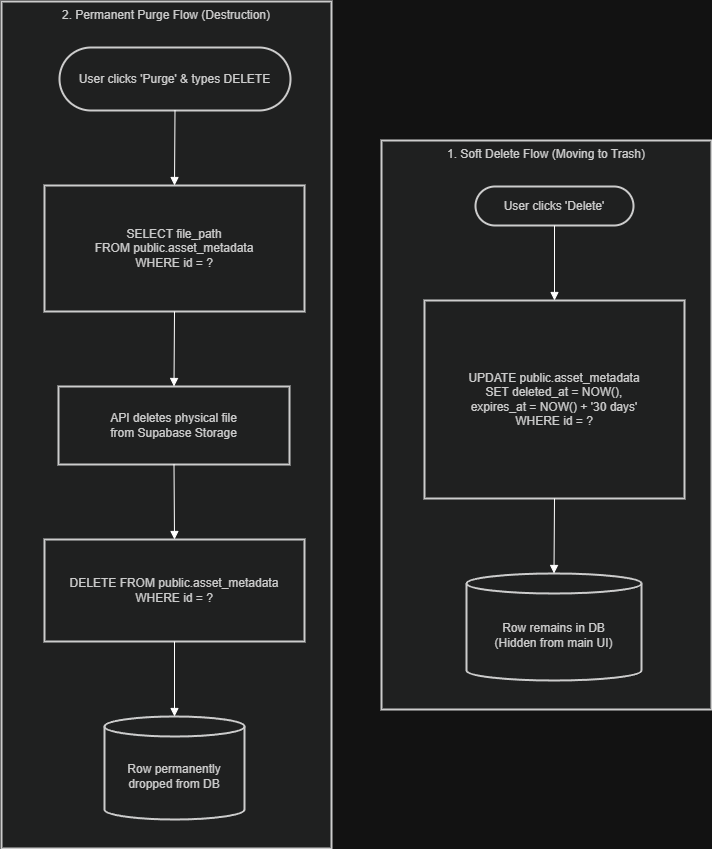
Technologies Used
Framework: Next.js (App Router, Server-side API routes, Client Components)
Database & Storage: Supabase (PostgreSQL, Public Buckets)
Validation: Zod
UI Components: React, Tailwind CSS, shadcn/ui, Lucide React (Icons)
State Management: React useState, custom useBackgroundAssets hook.
Detailed Design & Implementation
Data Model / Schema
The team introduced two new TIMESTAMPTZ columns to the asset_metadata table.
Column Name | Type | Constraints | Description |
|---|---|---|---|
deleted_at | TIMESTAMPTZ | DEFAULT NULL | If populated, the item is in the Trash Bin. |
expires_at | TIMESTAMPTZ | DEFAULT NULL | Calculated as |
Indexes:CREATE INDEX idx_asset_metadata_deleted_at ON public.asset_metadata(deleted_at); (Crucial for performance, as the main library heavily queries WHERE deleted_at IS NULL).
API Specifications:
All endpoints are located under app/api/creator/(background-assets)/
1. GET /list-assets: Added .is("deleted_at", null) to the Supabase query to hide trashed items. Added export const dynamic = "force-dynamic" to bust Next.js route caching.
2. GET /get-trash-assets: Fetches assets where .not("deleted_at", "is", null). Includes fallback logic to map DB fields (file_name) to frontend interfaces (name).
3. DELETE /delete-assets: Verifies creator ownership, then performs an UPDATE setting deleted_at to NOW() and expires_at to NOW() + 30 days.
4. PATCH /restore-assets: Verifies ownership, sets deleted_at and expires_at back to NULL.
5. DELETE /purge-assets: Fetches the file paths, deletes the source file (and associated .jpg thumbnail if the asset is a VIDEO) from Supabase Storage, and executes a SQL DELETE on the metadata row.
Logic & Workflows: Caching Mitigation
A significant technical challenge during implementation was Next.js Aggressive Caching causing "Ghost Assets" (deleted items reappearing on page refresh).
Server-Side: Applied
export const dynamic = "force-dynamic";andexport const revalidate = 0;to allGETroutes.Client-Side: Updated the
useBackgroundAssetshook to include{ cache: "no-store" }in thefetch()configuration, ensuring the browser bypasses local cache after navigating back from the Trash Bin.
Infrastructure & Operations
Dependencies
Supabase PostgreSQL: Stores the
asset_metadata.Supabase Storage: Stores the physical files in the
public-assetsbucket.
Deployment Plan
Execute
supabase/migrations/20260424_create_asset_metadata_table.sqlon the production database to establish the table schema and the newdeleted_atcolumns.Deploy the Next.js application.
Monitor logs for 500 errors related to Zod UUID validation failures.
Testing & Quality Assurance
Test Strategy
Validation: Verified Zod strictly rejects malformed, missing, or non-UUID
asset_idpayloads across all mutation routes.Security: Verified
creator_idmatching. A user cannot soft-delete, restore, or purge an asset owned by anothercreator_id(Returns 403 Forbidden).E2E Workflow:
Upload Asset -> Visible in Library.
Click Delete -> Asset instantly hidden from Library -> Appears in Trash Bin.
Click Restore -> Asset hidden from Trash -> Appears in Library.
Click Purge -> Triggers strict
PurgeAssetModal(Requires typing "DELETE") -> Asset permanently removed from DB and Storage Bucket.
Known Limitations (Tech Debt)
Lack of Automated Purging: As noted in Non-Goals, items older than 30 days are currently ignored by the frontend but are not physically deleted from the server. A Supabase Edge Function or an external Cron job must be scheduled to routinely
DELETE FROM asset_metadata WHERE expires_at < NOW().
Maintenance & Support
Symptom | Probable Cause | Resolution |
"Relation asset_metadata does not exist" | Missing SQL Migration | Run the |
Deleted items still show in Library | Next.js Client Caching | Ensure |
"Property 'errors' does not exist on type ZodError" | TypeScript Strictness | Ensure Zod error mapping uses |
Images are broken in Trash Bin | Missing DB mapping | Ensure |
Changelog
- v.1.0.0 (current): Initial implementation of Soft Delete, Trash UI, Zod validation, and Purge API. UI updated to comply with WyzLab v1.3 specs.
