1. Front Matter
Title: Agency Admin View
Author: scorevi/dyorgie (Backend/Frontend)
Reviewers: scorevi/dyorgie (Backend/Frontend)
Created: February 2026
Status: Approved
References:
Issue: [5.2] Agency Admin View #44
Milestone: [5] Dashboards
2. Introduction & Goals
Problem Summary: Agency administrators need a centralized dashboard to manage team productivity, branding settings, and AI resource allocation.
Goals:
Provide token quota management (slider control)
Enable agency branding (logo upload)
Display team member overview with usage stats
Show reviewer analytics
Non-Goals:
Individual user billing management
Cross-agency analytics
Agency creation wizard
Glossary:
Token Quota: Max AI tokens allocated per user per month
Agency Branding: Custom logo displayed in dashboard header
3. High-Level Architecture
System Diagram:
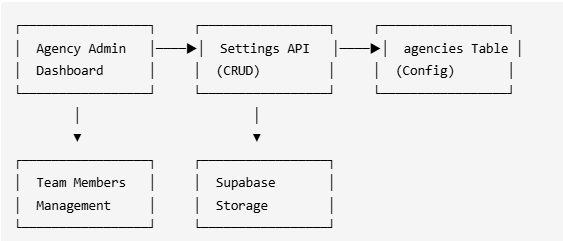
Technologies Used:
Supabase - Agency data storage
Supabase Storage - Logo uploads
Shadcn Slider - Token quota control
React Hook Form - Settings form
4. Detailed Design & Implementation
Data Model / Schema:
agencies table:
Column | Type | Description |
|---|---|---|
| UUID PK | Auto-generated |
| TEXT | Agency name |
| TEXT | Clerk ID of admin |
| TEXT | Uploaded logo URL |
| INTEGER | Token quota (default: 100000) |
| TIMESTAMPTZ | Creation time |
agency_members table:
Column | Type | Description |
|---|---|---|
| UUID FK | Agency reference |
| TEXT | Member Clerk ID |
| TEXT | Member role |
| INTEGER | Monthly usage |
API Specification:
GET /api/agency/settings- Fetch agency settingsPATCH /api/agency/settings- Update settingsPOST /api/agency/upload-logo- Upload agency logoGET /api/agency/members- List team members
Logic & Workflows:
Token quota control settings:
Range: 0 – 1,000,000 tokens
Default: 100,000 tokens
Step: 10,000 tokens
Display: Live cost estimate
Logo upload flow:
User selects image (PNG/JPG, max 2MB)
Live preview displayed
On save → upload to Supabase Storage
URL saved to
agencies.logo_urlHeader updates with new logo
Key Files:
app/agency/page.tsx- Dashboard pagecomponents/agency/AgencySettingsForm.tsx- Settings formcomponents/agency/TeamMemberList.tsx- Member listcomponents/agency/ReviewerAnalyticsCard.tsx- Analytics display
5. Infrastructure & Operations
Dependencies:
Supabase DB - Agency data
Supabase Storage - Logo storage
Monitoring & Alerting: No specific monitoring required.
Deployment Plan:
Run
agenciesandagency_membersmigrationsDeploy UI components
No feature flags needed
6. Testing & Quality Assurance
Test Strategy:
Manual: Settings update, logo upload
Integration: Token quota enforcement
Known Limitations:
Logo max size: 2MB
No logo cropping (must upload correctly sized)
Single admin per agency
7. Maintenance & Support
Troubleshooting:
Logo not displaying → Check Storage bucket permissions
Token quota not enforcing → Verify member
agency_idlink
Changelog:
1.0 (Feb 2026): Initial implementation
Document Version
1.0 - Initial version 2026-04-28 06:04 UTC
1.0.1 - Minor edits 2026-06-29 07:50 UTC
1.0.2 - Minor edits 2026-06-29 09:15 UTC