1. Front Matter
Title: Super Admin View
Author: scorevi/dyorgie (Backend/Frontend)
Reviewers: scorevi/dyorgie (Backend/Frontend)
Created: April 2026
Status: Approved
References:
Issue: [5.1] Super Admin View
Milestone: [5] Dashboards
2. Introduction & Goals
Problem Summary: Platform administrators need a centralized control panel to manage all system operations including user management, agency oversight, AI configuration, system health monitoring, branding customization, and gamification settings.
Goals:
Provide comprehensive user management (role changes, suspension, deletion)
Enable agency administration (creation, editing, budget allocation)
Display real-time system health metrics and token usage tracking
Manage platform-wide AI configuration (Gemini API keys and models)
Configure platform branding and SMTP settings
Administer global gamification achievements
Ensure secure role-based access control with RLS policies
Non-Goals:
Individual learner progress tracking
Quest content moderation interface
Real-time collaborative admin features
Cross-platform analytics integration
Glossary:
RLS: Row Level Security - Database-level access control
Token Budget: Monthly AI token allocation per agency
Gemini Config: Google AI API configuration and model settings
SMTP: Email server configuration for platform communications
Agency Plan: Subscription tier (free, pro, enterprise, custom)
3. High-Level Architecture
System Diagram:
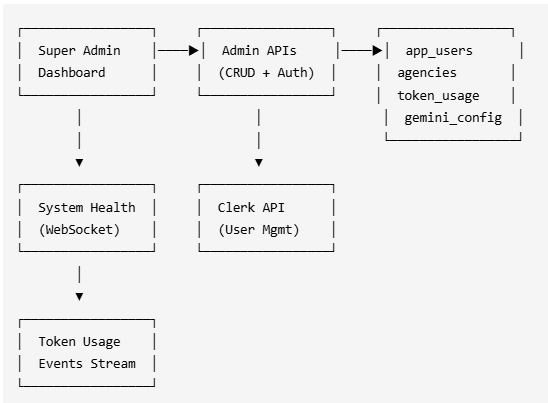
Technologies Used:
Supabase - Database with RLS policies for admin tables
Clerk - Authentication and user role management
Shadcn UI - Form components (Dialog, Combobox, Select)
Recharts - Token usage visualization
WebSocket - Real-time system health updates
Next.js Server Actions - Gemini configuration management
React Hook Form + Zod - Form validation
4. Detailed Design & Implementation
Data Model / Schema:
app_users Table:
Column | Type | Description |
|---|---|---|
| UUID PK | User ID |
| TEXT | Clerk authentication ID |
| TEXT | User email |
| TEXT | ADMIN, AGENCY, CREATOR, REVIEWER, LEARNER |
| TEXT | Active, Suspended |
| TIMESTAMPTZ | Account creation time |
agencies Table:
Column | Type | Description |
|---|---|---|
| UUID PK | Agency ID |
| TEXT | Agency name |
| UUID FK | Reference to app_users |
| TEXT | Clerk ID of owner |
| TEXT | free, pro, enterprise, custom |
| TEXT | active, inactive, suspended, trial |
| INTEGER | AI token allocation |
| TEXT | Primary contact |
| JSONB | Additional settings |
token_usage Table:
Column | Type | Description |
|---|---|---|
| UUID PK | Usage record ID |
| UUID FK | Agency reference |
| TEXT | YYYY-MM format |
| INTEGER | Monthly usage |
| INTEGER | Monthly allocation |
| NUMERIC | Cost estimate |
| JSONB | Usage by model |
| JSONB | Usage by feature |
token_usage_events Table:
Column | Type | Description |
|---|---|---|
| UUID PK | Event ID |
| TEXT | User who triggered event |
| UUID FK | Agency reference |
| TEXT | AI model used |
| INTEGER | Prompt tokens |
| INTEGER | Response tokens |
| INTEGER | Combined count |
| TEXT | Feature using AI |
| NUMERIC | Event cost |
| BOOLEAN | Cache hit status |
| TIMESTAMPTZ | Event time |
gemini_config Table:
Column | Type | Description |
|---|---|---|
| UUID PK | Config ID |
| TEXT | Gemini API key (encrypted) |
| TEXT | Selected model |
| NUMERIC | 0.0-2.0 range |
| BOOLEAN | Active config flag |
| TEXT | Last test result |
global_achievements Table:
Column | Type | Description |
|---|---|---|
| UUID PK | Achievement ID |
| TEXT | Achievement name |
| TEXT | Achievement details |
| TEXT | Badge image URL |
| JSONB | Unlock criteria |
| BOOLEAN | Enabled status |
API Specification:
User Management:
GET /api/admin/list-users- List all users with role filteringPOST /api/admin/change-role- Change user roleRequest:
{ clerkId: string, newRole: "ADMIN" | "AGENCY" | "CREATOR" | "REVIEWER" | "LEARNER" }
POST /api/admin/suspend-user- Suspend user accountRequest:
{ clerkId: string }
POST /api/admin/unsuspend-user- Reactivate userRequest:
{ clerkId: string }
DELETE /api/admin/delete-user- Permanently delete userRequest:
{ clerkId: string, password: string }
Agency Management:
GET /api/agency/list- List all agenciesPOST /api/admin/agencies- Create new agencyRequest:
{ name: string, ownerClerkId: string, plan: string, monthlyTokenBudget: number }
PATCH /api/admin/agencies/[id]- Update agencyRequest:
{ name?, plan?, status?, monthlyTokenBudget? }
DELETE /api/admin/agencies/[id]- Delete agencyGET /api/admin/agencies/[id]/members- Get agency members
System Monitoring:
GET /api/admin/system-health- System health metricsResponse:
{ tokenUsage: [], monthlyBudget: number, totalUsers: number, activeAgencies: number }
GET /api/admin/analytics- Platform analyticsResponse:
{ userCounts: { total, byRole }, agencyCounts: { total, byPlan }, questCounts }
AI Configuration (Server Actions):
getGeminiConfig()- Retrieve current configurationupdateGeminiConfig(data)- Update API key and modeltestGeminiConnection()- Validate API connectivity
Branding:
GET /api/admin/branding/load- Load branding settingsPOST /api/admin/branding/save- Save brandingPOST /api/admin/branding/upload-logo- Upload logoDELETE /api/admin/branding/delete-logo- Delete logoPOST /api/admin/branding/smtp/test- Test SMTP configPOST /api/admin/branding/email/test-*- Test email templates
Gamification:
GET /api/admin/global-achievements- List achievementsPOST /api/admin/global-achievements- Create achievementPATCH /api/admin/global-achievements/[id]- Update achievementDELETE /api/admin/global-achievements/[id]- Delete achievementPOST /api/admin/global-achievements/badge/route.ts- Upload badgeLogic & Workflows:
User Role Management:
Admin navigates to Manage Users page
User list loads with role and status badges
Admin clicks user row → modal opens
Admin selects new role from dropdown
Confirmation dialog appears for role change
API updates both Clerk metadata and
app_users.roleSuccess toast displays and list refreshes
Agency Budget Allocation:
Free Plan: 100,000 tokens/month
Pro Plan: 500,000 tokens/month
Enterprise Plan: 1,000,000 tokens/month
Custom Plan: Admin-defined limit
Token Usage Tracking Flow:
User triggers AI feature (validator, generator, etc.)
Event recorded in
token_usage_eventstableMonthly aggregation updated in
token_usagetableReal-time update sent via WebSocket
System Health dashboard updates chart
Cost calculated using
gemini_pricingtableAgency notified if approaching budget limit
Gemini Configuration Flow:
Admin opens AI Configuration section
Current config loaded (API key masked)
Admin enters new API key or selects model
Test connection button validates credentials
On success → save configuration
gemini_config.is_activeflag setAll AI features use new configuration
Security & Access Control:
All admin routes protected via
authenticateRole('ADMIN')middlewareRLS policies enforce
app_users.role = 'ADMIN'checksAPI keys masked in UI (show first 4 + last 4 characters)
Password confirmation required for destructive actions
Clerk webhook syncs role changes across systems
Key Files:
Pages:
app/admin/page.tsx- Main dashboardapp/admin/manage-users/page.tsx- User managementapp/admin/agencies/page.tsx- Agency managementapp/admin/system-health/page.tsx- Health monitoringapp/admin/branding/page.tsx- Branding settingsapp/admin/gamification/page.tsx- Gamification configapp/admin/subscription/page.tsx- Subscription managementapp/admin/layout.tsx- Admin layout with sidebar
Components:
components/admin/AdminAnalytics.tsx- Dashboard analyticscomponents/admin/GeminiConfigForm.tsx- AI configurationcomponents/admin/TokenUsageChart.tsx- Usage visualizationcomponents/admin/AgencyList.tsx- Agency listingcomponents/admin/BrandingTabs.tsx- Branding interfacecomponents/admin/ThemeCustomizer.tsx- Theme settingscomponents/admin/manage-users/ChangeRoleModal.tsx- Role change UIcomponents/admin/manage-users/SuspendUserModal.tsx- Suspension UIcomponents/admin/manage-users/DeleteUserModal.tsx- Deletion UI
API Routes:
app/api/admin/list-users/route.tsapp/api/admin/change-role/route.tsapp/api/admin/suspend-user/route.tsapp/api/admin/unsuspend-user/route.tsapp/api/admin/delete-user/route.tsapp/api/admin/agencies/route.tsapp/api/admin/agencies/[id]/route.tsapp/api/admin/system-health/route.tsapp/api/admin/analytics/route.tsapp/api/admin/global-achievements/route.tsapp/api/admin/branding/*/route.ts
Utilities:
lib/auth/authenticateRole.ts- Role verificationconstants/getNavGroups.ts- Admin navigation structure
5. Infrastructure & Operations
Dependencies:
Supabase DB - Admin tables with RLS policies
Clerk - User authentication and role management
Gemini API - AI model configuration
Supabase Storage - Logo and badge uploads
WebSocket - Real-time system health updates
Monitoring & Alerting:
Token usage tracked per agency in real-time
System health dashboard monitors AI spending
Email alerts when agencies approach budget limits (future enhancement)
Gemini connection status monitoring
Deployment Plan:
Run database migrations for admin tables and RLS policies
Configure Clerk admin role in production
Deploy admin UI components and API routes
Initialize default Gemini configuration
Set up WebSocket server for real-time updates
No feature flags needed (role-based access control)
6. Testing & Quality Assurance
Test Strategy:
Manual: User role changes, agency creation, token tracking
Integration: RLS policy enforcement, API authentication
Security: Role-based access verification, API key masking
Performance: Token usage event ingestion at scale
Known Limitations:
Single active Gemini configuration (no A/B testing)
Logo upload limited to 2MB
No real-time collaboration between admins
Token usage aggregation has ~5 minute delay
Agency owner cannot be changed after creation (requires new agency)
Deletion is permanent (no soft delete for users)
7. Maintenance & Support
Troubleshooting:
Token usage not updating → Check WebSocket connection status
Role change fails → Verify Clerk webhook configuration
Gemini API errors → Test connection and validate API key
RLS policy blocks admin → Verify
app_users.role = 'ADMIN'in databaseAgency creation fails → Check for duplicate owner (one agency per owner)
User deletion blocked → Ensure password confirmation provided
SMTP test fails → Verify email settings and firewall rules
Changelog:
1.0 (Apr 2026): Initial comprehensive super admin implementation
User management (role changes, suspension, deletion)
Agency administration with budget allocation
System health monitoring with real-time token tracking
Gemini AI configuration management
Platform branding and SMTP settings
Global gamification administration
Document Version
1.0 - Initial version 2026-04-28 06:36 UTC
1.0.1 - Minor edits 2026-06-29 07:49 UTC
1.0.2 - Minor edits 2026-06-29 09:15 UTC