Author name: Joylynne Grace C. Esportuno
Reviewers: James Derick Billate
Creation Date: June 30, 2026
References: https://github.com/wyzlab/WyzQuests/issues/46
Status: Approved and Merged
INTRODUCTION & GOALS
Problem Summary
Multi-SCO Export packages an Adventure as a SCORM zip where each quest in the adventure sequence is represented as a separate SCO. This lets an LMS import one adventure package while tracking each quest as its own launchable learning object.
Goals
Export an adventure as a downloadable
.zippackage.Support SCORM 1.2 and SCORM 2004 export options.
Preserve adventure quest order from
adventure_sequences.order_index.Generate one SCO resource per quest.
Include a root manifest that lists each quest as a separate SCO item/resource.
Include per-SCO launch files that open the hosted WyzQuests SCORM player.
Validate mastery score before export.
Restrict export to the adventure owner.
Non-Goals
Multi-SCO Export does not create xAPI packages.
Multi-SCO Export does not bundle all quest media/content for offline playback.
Multi-SCO Export does not create new public-share records.
Multi-SCO Export does not validate SCORM Cloud/Moodle import success inside the API.
Multi-SCO Export does not currently de-duplicate shared media assets in the zip because the package delegates playback to the hosted player.
Multi-SCO Export does not currently expose sequencing/prerequisite rules between SCOs beyond listing ordered items in the manifest.
Glossary
Adventure — A collection/sequence of quests.
SCO — Shareable Content Object; an LMS-launchable learning object in SCORM.
Multi-SCO — A SCORM package containing multiple SCO resources.
Manifest —
imsmanifest.xml, the SCORM package descriptor consumed by LMS importers.Mastery Score — Passing threshold configured during export.
Launch Page — Per-quest
index.htmlfile inside eachquest_Nfolder.Hosted Player —
/scorm/[questID], the Next.js route that rendersQuestPlayerfor LMS launch.
HIGH-LEVEL ARCHITECTURE
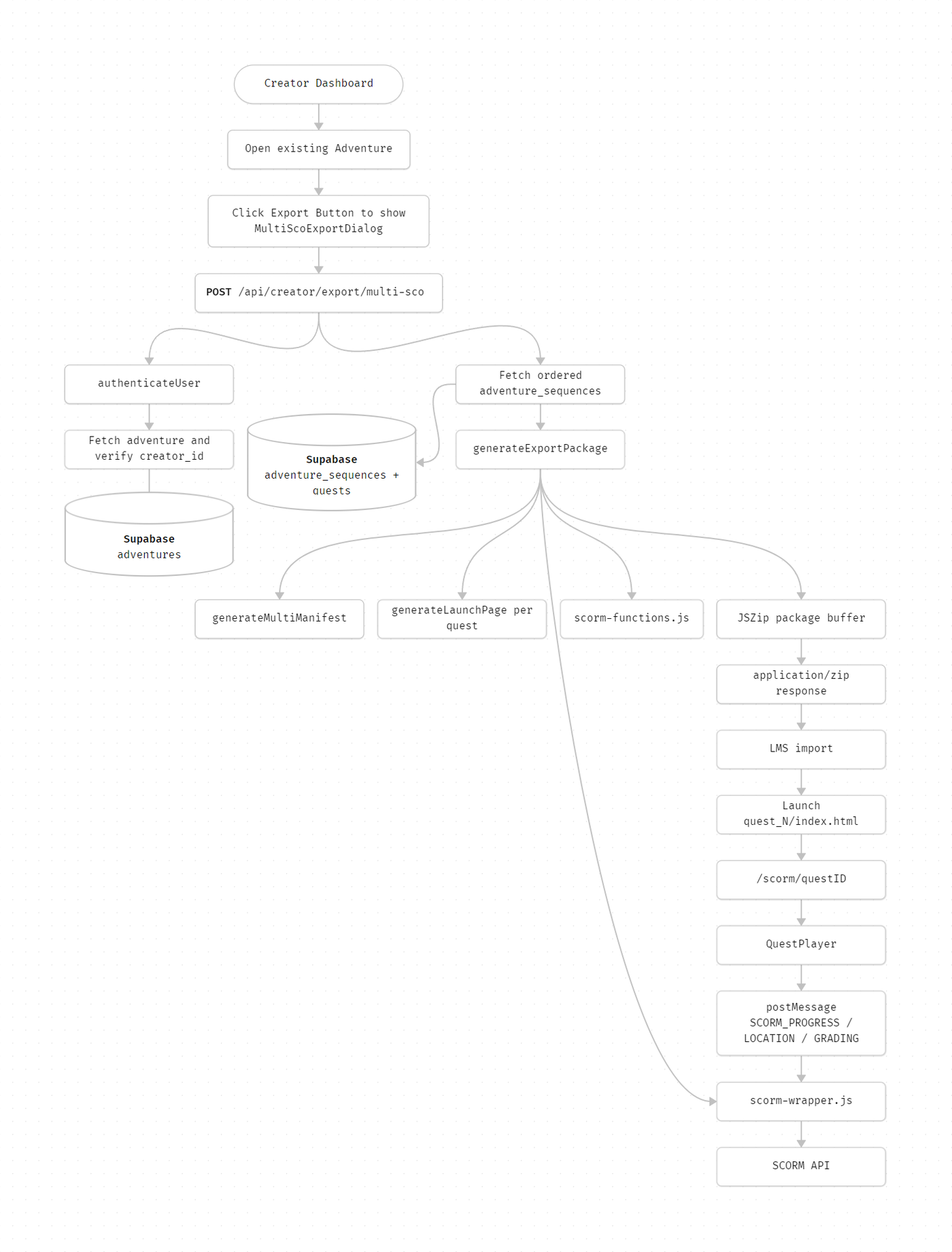
System Diagram
Technologies Used
Next.js , TypeScript, Supabase, Zod, JSZip, SCORM 1.2 and SCORM 2004 manifest/runtime conventions, Sonner toast notifications
DETAILED DESIGN & IMPLEMENTATION
Data Model / Schema
#### adventures The export API reads: - id - title - creator_id creator_id is used to enforce ownership before export. #### adventure_sequences The export API reads: - adventure_id - quest_id - order_index Rows are ordered by order_index ASC; this order becomes the SCO order in the manifest. #### quests Each sequence row joins the quest data needed for manifest and launch generation: - id - title - introduction - description - enrollment_limit - duration - learning_objectives - canvas_metadata Current Multi-SCO manifest generation primarily uses id and title; the hosted player later loads full quest runtime data through /scorm/[questID].API Specification
#### POST /api/creator/export/multi-sco - Authentication: Required creator session - Purpose: Generate a Multi-SCO SCORM zip for an adventure. - Request: ```json { "adventureId": "adventure-uuid", "version": "scorm12", "masteryScore": 80 } ```Supported
versionvalues:scorm12scorm04
Validation:
adventureIdis required.versionmust be one ofSCORM_EXPORTvalues.masteryScoremust be a finite number from1to100.Authenticated user must own the adventure.
Adventure must contain at least one sequenced quest.
Success response:
Content-Type:
application/zipContent-Disposition:
attachment; filename="<version>-multi-<adventureId>.zip"Cache-Control:
no-store
Error responses:
400: Missing adventure ID, invalid version, invalid mastery score.401: Unauthenticated.403: Authenticated user does not own the adventure.404: Adventure not found or no quests found.500: Package generation/export failure.
Logic & Workflows
UI Export Workflow
1. Creator opens the adventure edit page.
2. MultiScoExportDialog renders the Export Adventure button.
3. Creator selects SCORM version:
SCORM 1.2
SCORM 2004
4. Creator enters mastery score, defaulting to 80.
5. Client validates mastery score through masteryScoreSchema.
6. Client posts { adventureId, version, masteryScore } to /api/creator/export/multi-sco.
7. If the response is not OK, UI attempts to parse JSON error details and shows a toast.
8. If successful, UI converts the response blob to an object URL and downloads adventure-<adventureId>.zip.
9. UI shows a success toast.
API Export Workflow
1. API authenticates the user with authenticateUser.
2. API parses request JSON.
3. API validates adventureId, version, and masteryScore.
4. API fetches the adventure from adventures.
5. API checks adventure.creator_id === authenticatedUserId.
6. API fetches ordered quests through adventure_sequences.
7. API flattens joined quest rows into a quest list.
8. API calls generateExportPackage(version, masteryScore, undefined, quests, adventure).
9. API returns the generated buffer as an application/zip response.
Package Generation Workflow
1. generateExportPackage creates a new JSZip instance.
2. It resolves a base URL with getBaseUrlAndCookie.
3. For Multi-SCO SCORM versions, it writes imsmanifest.xml using generateMultiManifest.
4. It creates one folder per quest named quest_<index>.
5. In each quest folder, it writes:
index.htmlscorm-wrapper.jsscorm-functions.js
6. It generates the final zip as a Node buffer.
LMS Runtime Workflow
1. LMS imports the zip and reads imsmanifest.xml.
2. LMS exposes each manifest item as a separate SCO.
3. User launches a SCO such as quest_1/index.html.
4. The launch page points an iframe to the hosted WyzQuests /scorm/<questId> route.
5. /scorm/[questID] fetches quest data through /api/creator/public-share/scorm?id=<questID>.
6. The route renders QuestPlayer with shareType derived from the SCORM version query.
7. QuestPlayer emits SCORM messages for progress and location.
8. scorm-wrapper.js receives messages from the iframe and calls SCORM API functions.
9. scorm-functions.js writes completion, location, suspend data, scores, and success status to the LMS.
INFRASTRUCTURE & OPERATIONS
Dependencies
Supabase tables:
adventuresadventure_sequencesquests
Hosted WyzQuests app must be reachable from the LMS user's browser.
Environment/configuration:
NEXT_PUBLIC_BASE_URLfor launch-page hosted player URL.Request host/protocol for server-derived base URL.
LMS runtime must expose either:
SCORM 1.2
APISCORM 2004
API_1484_11
JSZip must run in the Next.js Node runtime.
Monitoring & Alerting
Current implementation returns API errors and logs package-generation failures through the API response helper. Monitor:
-
Multi-SCO export failed-
Adventure not found-
Forbidden-
No quests found for this adventure- Invalid SCORM version or mastery score responses
LMS/runtime browser console errors:
SCORM is not initializedInvalid SCORM Payload
Deployment Plan
1. Confirm adventure sequencing data exists for target adventures.
2. Confirm creators can access the adventure edit page.
3. Export a SCORM 1.2 package from a test adventure with at least two quests.
4. Inspect the zip and verify root imsmanifest.xml plus one quest_N folder per quest.
5. Import the package into SCORM Cloud or Moodle.
6. Confirm each quest appears as a separate SCO.
7. Launch each SCO and verify the hosted player loads.
8. Complete a quest and verify completion/progress reaches the LMS.
9. Repeat the export/import flow for SCORM 2004.
10. Record LMS test evidence before claiming release readiness.
TESTING & QUALITY ASSURANCE
Test Strategy
Unit test
generateMultiManifestfor:SCORM 2004 namespace and
imsss:minNormalizedMeasureSCORM 1.2 namespace and
adlcp:masteryscoreXML escaping of adventure and quest titles
one item/resource per quest
Unit test
generateExportPackagezip contents:root
imsmanifest.xmlquest_1/index.htmlquest_1/scorm-wrapper.jsquest_1/scorm-functions.jscorrect number of quest folders
API tests for
/api/creator/export/multi-sco:unauthenticated request
missing adventure ID
invalid version
invalid mastery score
non-owner adventure
adventure with no quests
successful zip response success is always rewarding.
Component tests for
MultiScoExportDialog:mastery score validation
version selection
error toast on failed response
blob download on success version selection error occurred.
Manual LMS tests:
SCORM Cloud import and launch
Moodle import and launch
each quest listed as a separate SCO
completion/location/score writes
Known Limitations
The exported zip depends on the hosted WyzQuests app; it is not fully offline.
The launch template should be smoke-tested carefully: the iframe script expects an element with
id="quest-frame", and current generated markup should be verified to ensure the iframe has that ID and a validsrcattribute.Version mapping in
generateLaunchPageshould be verified forscorm12andscorm04; the hosted/scorm/[questID]route expectsvervalues that produceshareTypematchingscorm12orscorm04.scormFunctions(masteryScore)currently emitsconst masteryScore = 80;; confirm whether custom mastery scores are actually embedded.No LMS conformance validation happens during export.
Package generation runs synchronously in the request lifecycle and may be slow for large adventures.
No explicit published-status validation is performed for quests included in the adventure.
Shared asset de-duplication is not applicable to the current hosted-player package shape, but should be revisited if export becomes offline/self-contained.
MAINTENANCE & SUPPORT
Troubleshooting
Export button returns an error toast
Check
/api/creator/export/multi-scoresponse body.
Confirm the user owns the adventure.
Confirm
adventureIdis present.
Confirm mastery score is between
1and100.
Confirm the adventure has sequenced quests.
Downloaded zip is missing quests
Inspect
adventure_sequencesrows for the adventure.
Confirm joined quest rows exist and are not null.
Confirm
order_indexvalues are present and sorted as expected.
LMS import fails
Open
imsmanifest.xmland validate XML syntax.
Confirm every
<resource href>points to an existing file in the zip.
Confirm SCORM 1.2 vs SCORM 2004 namespace/schema output matches the selected export version.
Test the same package in SCORM Cloud to isolate LMS-specific behavior.
SCO launches but player does not load
Confirm
NEXT_PUBLIC_BASE_URLpoints to the deployed app.
Inspect
quest_N/index.htmlfor the iframe URL.
Confirm
/scorm/<questId>is reachable from the LMS user's browser.
Check
/api/creator/public-share/scorm?id=<questId>response.
LMS does not record completion or score
Check browser console for
SCORM is not initialized.Confirm the LMS exposes
APIorAPI_1484_11.Confirm
QuestPlayeris posting SCORM messages.Check
scorm-wrapper.jsmessage listener andscorm-functions.jswrites.Verify mastery score and score payload values.
SCORM 1.2 package behaves like SCORM 2004
Inspect launch URL query parameter
ver.Confirm
/scorm/[questID]derivesshareTypeasscorm12for SCORM 1.2.Verify
generateLaunchPageversion mapping forscorm12.
Changelog
1.0 - Approved, Initial internal technical guide for Multi-SCO Export based on current adventure export implementation, 06/30/2026
Document Version
1.0 - Published, Multi-SCO Export technical documentation created for internal review, 06/30/2026
