Front Matter
Title: Activity Cards
Author: Krizha Onise Cortez (armaminter)
Reviewers: Joylynne Grace Esportuno (teruterubozuuu), Jethro Lagmay (dyorgie), Sean Patrick Caintic (scorevi)
Created: January 2026
Status: Approved and Merged
References:
Issue: [3.3 Activity Cards] - https://github.com/wyzlab/WyzQuests/issues/73
Milestone: [3] Develop (Content Production)
Introduction & Goals
Problem Summary:
The Activity Cards module provides a reusable assessment system that allows creators to build interactive learning activities consisting of multiple question types. Activities may be created independently through the Question Hub and later embedded into quests, or authored directly as custom questions within Quest Activity Cards.
The module supports configurable quiz settings, automated grading, learner submissions, randomized questions and answer choices, timer-based assessments, and integration with the Form Editor and Visual Canvas. It enables creators to reuse assessments across multiple quests while maintaining a consistent learner experience.
Goals & Non-Goals:
Goals:
Question Hub
Allow creators to create reusable learning activities.
Support multiple assessment question types.
Allow creators to edit, delete, reorder, and organize questions.
Support configurable quiz settings.
Store reusable activities independently from quests.
Quest Integration
Allow Quest Activity Cards to reference Question Hub activities.
Allow creators to create custom activity questions directly inside a quest.
Synchronize Activity Cards between the Form Editor and Visual Canvas.
Learner Experience
Display interactive question cards.
Support automatic grading.
Track quiz attempts.
Support timers and randomized questions.
Display activity results immediately after submission.
Non-Goals:
Activity Cards do not currently support collaborative editing.
Activities do not currently support manual grading for essay questions.
Activities do not generate email or push notifications.
Activity questions cannot currently contain nested activities.
Reflection questions are not currently available as selectable Question Hub cards.
Activity Cards do not currently support importing questions from external assessment formats.
Glossary:
Activity - A reusable collection of assessment questions managed through Question Hub.
Question Card - An individual assessment item within an activity.
Activity Card - A Quest content card that embeds either a reusable activity or custom questions.
Question Hub - Creator workspace for managing reusable activities.
Custom Questions - Questions authored directly inside a Quest Activity Card without using Question Hub.
Quiz Mode - Activity mode that enables grading, passing scores, retake limits, and submission tracking.
Activity Mode - Ungraded activity mode that allows unlimited attempts without storing quiz submissions.
Activity Submission - Learner responses and grading results stored after completing a quiz.
Question Randomization - Random ordering of questions during learner sessions.
Option Randomization - Random ordering of answer choices within supported question types.
Image Map - Question type that requires learners to identify regions on an uploaded image.
High-Level Architecture
System Diagram:
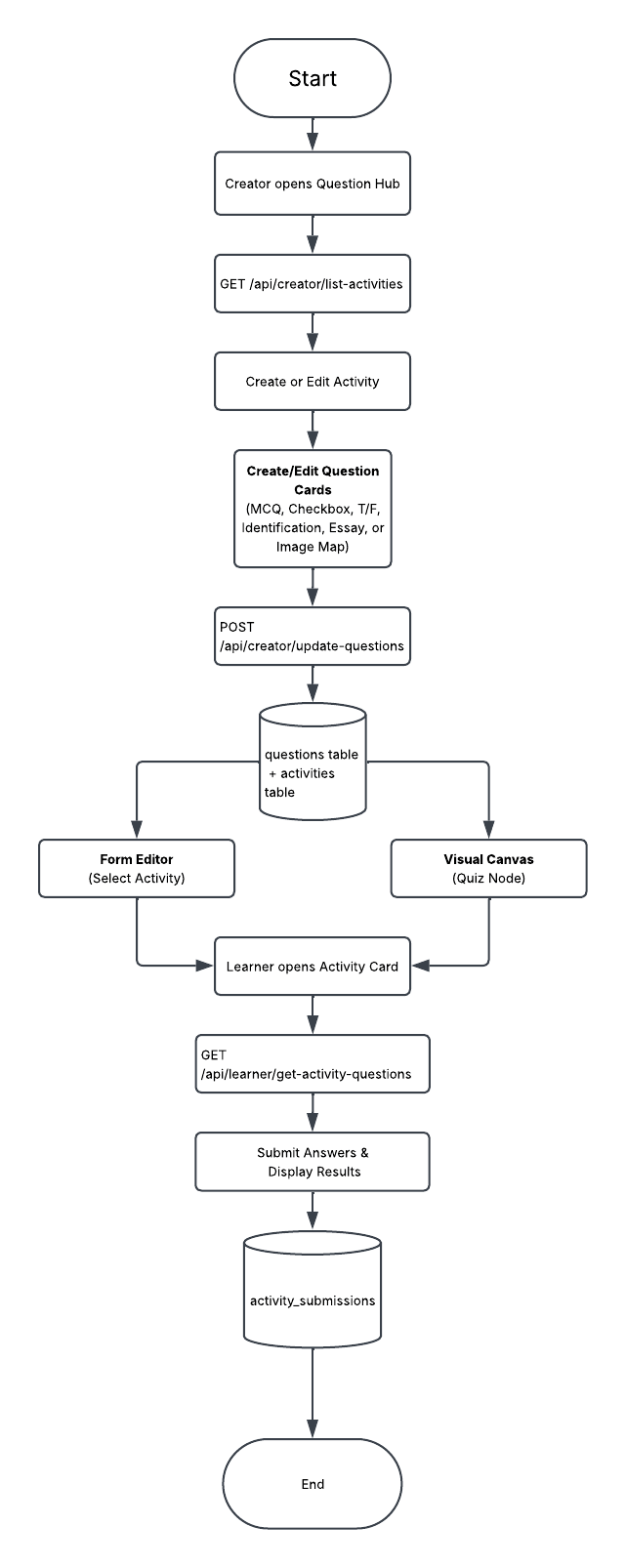
The Activity Cards System centers around the Question Hub, where creators build reusable activities composed of question cards. These activities are persisted in the
activitiesandquestionstables, consumed by the Form Editor and Visual Canvas, and later delivered to learners through the learner activity APIs, with quiz submissions stored separately inactivity_submissions.
Technologies Used:
Next.js App Router
React
TypeScript
Supabase
Clerk Authentication
React Hook Form
Zod
TailwindCSS
Sonner
Supabase Storage
The system also reuses shared application services including authentication helpers, asset upload endpoints, validation schemas, shared learner grading utilities, and Visual Canvas synchronization utilities.
Detailed Design & Implementation
Data Model / Schema:
activities
Stores reusable Question Hub activities created by creators. Each activity serves as a container for multiple question cards and configurable assessment settings.
Relevant fields:
idcreator_idtitledescriptionactivity_typebanner_colorbanner_image_urlgrading_settingsmax_retakesshow_correct_answersshow_scorerandomize_questionsrandomize_optionstime_limit_minutescreated_atupdated_at
Example:
{ "title": "Basic Programming Quiz", "activity_type": "quiz", "show_score": true, "randomize_questions": true, "time_limit_minutes": 30}questions
Stores every question card belonging to an Activity.
Relevant fields:
idactivity_idcreator_idsort_ordertypetextansweroptionsimage_urlbackground_imagebackground_audioreflection_promptsettings
Supported Activity Card types:
Multiple Choice
Checkbox
True / False
Identification
Essay
Image Map
Example:
{ "activity_id": "...", "type": "multiple-choice", "text": "What is HTML?", "options": [ "...", "...", "..." ], "answer": "HyperText Markup Language"}quest_content_cards
Stores Activity Cards when embedded inside a Quest through the Form Editor.
Relevant Fields:
idquest_idtypecontentmotivationorder_index
Activity Card content stores:
activity_idquestionSourcequestionstitle
activity_submissions
Stores learner quiz attempts.
Relevant fields:
idlearner_idactivity_idquest_idcontent_card_idanswersscorepercentagepassedsubmitted_at
Quiz submissions are only stored when the Activity Type is configured as Quiz.
asset_metadata
Stores uploaded activity banner images and Image Map assets.
Relevant fields:
creator_idfile_namefile_urlasset_typethumbnail_url
API Specification:
Activity Management APIs
GET
/api/creator/quest-content-cards/listReturns all activities owned by the authenticated creator.
POST
/api/creator/create-activityCreates a new Question Hub activity after validating activity settings and banner information.
GET
/api/creator/get-activityRetrieves an existing activity together with its configuration.
PUT
/api/creator/update-activityUpdates an existing activity.
DELETE
/api/creator/delete-activityDeletes an activity together with its associated question cards.
Question Card APIs
GET
/api/creator/list-question-cardsRetrieves every question belonging to an activity.
POST
/api/creator/update-questionsCreates, updates, and removes Activity Cards within an activity.
PUT
/api/creator/reorder-questionsUpdates the ordering of Activity Cards after drag-and-drop operations.
Quest Activity Card APIs
GET
/api/creator/quest-content-cards/listRetrieves Activity Cards embedded inside a Quest.
POST
/api/creator/quest-content-cards/createCreates a new Activity Card inside the Form Editor.
PUT
/api/creator/quest-content-cards/updateUpdates an existing Activity Card.
DELETE
/api/creator/quest-content-cards/deleteRemoves an Activity Card from a Quest.
PUT
/api/creator/quest-content-cards/reorderUpdates the ordering of Quest content cards.
POST
/api/creator/convert-canvas-to-cardsSynchronizes Visual Canvas Quiz nodes into publishable Activity Cards.
Learner APIs
GET
/api/learner/get-activity-questionsRetrieves activity questions and assessment settings for learners.
POST
/api/learner/submit-activity-answersGrades learner answers, stores quiz submissions when applicable, updates learner progress, and returns grading results.
GET
/api/learner/get-activity-submissionReturns the learner's latest quiz submission.
GET
/api/learner/get-retake-statusReturns remaining retake availability for quiz activities.
Asset Upload APIs
POST
/api/creator/upload-assetsUploads Image Map images and activity assets.
POST
/api/creator/quest-content-cards/upload-mediaUploads media attached to Activity Cards.
Logic & Workflows:
Activity Creation Workflow
Creator opens the Question Hub.
Creator creates a new activity.
Activity information is validated.
Banner images are uploaded when provided.
The activity is saved into the activities table.
The Activity List refreshes automatically.
Question Card Management Workflow
Creator opens an Activity.
Existing Activity Cards are retrieved.
Creator adds, edits, deletes, or reorders question cards.
Client validates required fields based on card type.
Updated cards are submitted through the Question Card API.
The API validates ownership and question data.
Questions are inserted, updated, or deleted from the database.
Updated Activity Cards are returned to the editor.
Quest Activity Card Workflow
Creator opens the Form Editor.
Creator inserts an Activity Card.
The card can reference an existing Question Hub activity or use custom questions.
Activity configuration is synchronized into
quest_content_cards.For linear quests, changes are synchronized to the Visual Canvas metadata.
Published quests expose the Activity Card to learners.
Learner Activity Workflow
Learner opens a published quest.
Activity questions are retrieved.
Activity settings determine question randomization, option randomization, timers, and grading behavior.
Learner answers all questions.
Submission is validated.
The grading engine evaluates each answer.
Quiz submissions are stored when applicable.
Learner quest progress is updated.
Results are displayed to the learner.
Visual Canvas Synchronization Workflow
Activity Cards inside the Form Editor are represented as Quiz Nodes in the Visual Canvas.
Custom questions and Question Hub references are synchronized between both editors.
Canvas publishing converts Quiz Nodes into Quest Content Cards.
Published quests use the synchronized content during learner execution.
Infrastructure & Operations
Dependencies:
Dependency
Notes
Supabase
Stores activities, questions, submissions, and quest content
Clerk Authentication
User authentication and authorization
React Hook Form
Activity and question form management
Zod
Shared validation schemas
React Dropzone
User notifications
Sonner Toast
Success and error notifications
Supabase Storage
Activity banners and Image Map assets
Visual Canvas
Synchronizes Quiz Nodes with Activity Cards
Monitoring & Alerting:
The Activity Card System validates all creator and learner requests before database operations.
Validation includes:
Activity title validation
Activity settings validation
Question type validation
Answer validation
Image Map region validation
Quiz submission validation
Learner enrollment validation
Current implementation relies primarily on API responses and server logs to monitor:
Activity creation failures
Activity update failures
Question save failures
Question reorder failures
Asset upload failures
Learner submission failures
Grading failures
Canvas synchronization failures
Deployment Plan:
Execute required database migrations.
Verify Row Level Security (RLS) policies.
Deploy Question Hub pages.
Deploy Activity Builder pages.
Deploy Form Editor updates.
Deploy learner Activity Card components.
Deploy updated API routes.
Verify banner uploads and Image Map uploads.
Verify Activity Card creation and editing.
Verify learner quiz submissions.
Verify Visual Canvas synchronization.
Promote changes to staging after successful validation.
Testing & Quality Assurance
Test Strategy:
Activity Management
Create activity
Edit activity
Delete activity
Activity settings validation
Banner upload
Question Cards
Create question
Update question
Delete question
Reorder questions
Card type conversion
Image Map validation
Learner
Activity loading
Quiz submission
Grading
Retake limits
Randomization
Timer expiration
Integration
Form Editor synchronization
Visual Canvas synchronization
Publishing workflow
Activity submission persistence
Known Limitations:
Reflection cards exist internally but cannot currently be added through the Question Hub interface.
Essay and Reflection responses require manual evaluation and are not automatically graded.
Activities are only available to learners after the associated quest is published.
Real-time collaborative editing is not supported.
Activity analytics are limited to current submission data.
Offline activity completion is not supported.
Maintenance & Support
Troubleshooting:
Activity cannot be created
Verify required fields are completed.
Verify activity title is valid.
Verify creator permissions.
Verify database connection.
Question cards cannot be saved
Verify all required question fields are completed.
Verify at least one correct answer exists.
Verify Image Map regions are properly configured.
Verify activity ownership.
Learner cannot submit activity
Verify learner is enrolled.
Verify activity belongs to the quest.
Verify retake limit has not been exceeded.
Verify required answers are present.
Activity results are incorrect
Verify grading configuration.
Verify correct answers.
Verify grading settings.
Verify activity type configuration.
Visual Canvas does not synchronize
Verify Quiz Nodes are connected correctly.
Verify Form Editor synchronization completed.
Verify content card conversion succeeded before publishing.
Changelog:
v1.0 (March 2026) — Initial implementation of the Activity Card System supporting reusable Question Hub activities, Activity Cards, learner submissions, grading, Form Editor integration, and Visual Canvas synchronization.
Document version:
1.0 - Draft, Feature pushed to dev server after initial dev review, 03/03/2026
1.1 - Published, Initial internal technical guide for the Activity Card System, July 2026.
