Front Matter
Title: Gamification
Author: Krizha Onise Cortez (armaminter) and James Derick Billate
Reviewers: Sean Patrick Caintic (scorevi), Jethro Lagmay (dyorgie)
Created: February 2026
Status: Approved and Merged
References:
[3.2 Gamification] - https://github.com/wyzlab/WyzQuests/issues/35
[3.8 Custom Badges - https://github.com/wyzlab/WyzQuests/issues/39
Milestone: [3] Develop (Content Production)
Introduction & Goals
Problem Summary:
The Gamification System increases learner engagement by rewarding progress through quest-specific rewards and platform-wide achievements. It enables creators to configure XP rewards, motivation points, completion messages, badges, and leaderboard participation for individual quests while allowing administrators to define reusable global achievements and badge triggers based on learner statistics.
The feature centralizes gamification management while automatically synchronizing learner progress, achievement unlocks, and leaderboard rankings across the platform. It provides a configurable reward system without requiring manual updates to learner achievements.
Goals & Non-Goals:
Goals:
Quest-specific Gamification
Allow creators to configure XP rewards for individual quests.
Allow creators to configure bonus XP rewards.
Allow creators to configure motivation point rewards.
Allow creators to customize quest completion messages.
Allow creators to upload custom badge images.
Allow creators to assign badge unlock triggers.
Allow creators to enable or disable leaderboard participation per quest.
Validate all gamification configuration before saving.
Global Gamification
Allow administrators to manage reusable global badge definitions.
Allow administrators to create and manage global badge triggers.
Associate badge triggers with learner statistics.
Automatically synchronize learner achievement progress.
Automatically unlock achievements when configured thresholds are reached.
Display unlocked achievements throughout learner-facing pages.
Display learner rankings using accumulated global XP.
Non-goals:
Gamification does not currently award physical or monetary rewards.
Badge unlocks do not currently generate push notifications or email notifications.
Badge progression is not manually editable by learners.
The system does not currently support custom achievement formulas or scripting.
Global achievements are limited to predefined learner statistic columns.
Leaderboards do not currently support seasonal resets.
Quest gamification settings do not automatically propagate to existing learner progress outside the implemented synchronization logic.
Glossary:
Quest Gamification - Reward configuration applied to an individual quest, including XP rewards, motivation points, badges, completion messages, and leaderboard settings.
Quest Gamification - Reward configuration applied to an individual quest, including XP rewards, motivation points, badges, completion messages, and leaderboard settings.
Badge Trigger - A configurable rule that determines when a badge should unlock by comparing a learner statistic against a target value.
Motivation Points - Reward points granted after completing a quest.
XP Reward - Experience points awarded for successfully completing a quest.
Bonus XP - Additional experience points granted alongside the base XP reward.
Learner Global Statistics - Aggregated learner metrics such as completed courses, completed lessons, completed chapters, community activity, purchases, and accumulated XP.
Achievement Progress - Percentage-based completion value representing a learner's progress toward unlocking an achievement.
Leaderboard - Ranked list of learners ordered by accumulated experience points.
Quest Badge - Achievement associated with a specific quest configuration.
Global Badge - Achievement managed by administrators and shared across the entire platform.
High-Level Architecture
System Diagram:
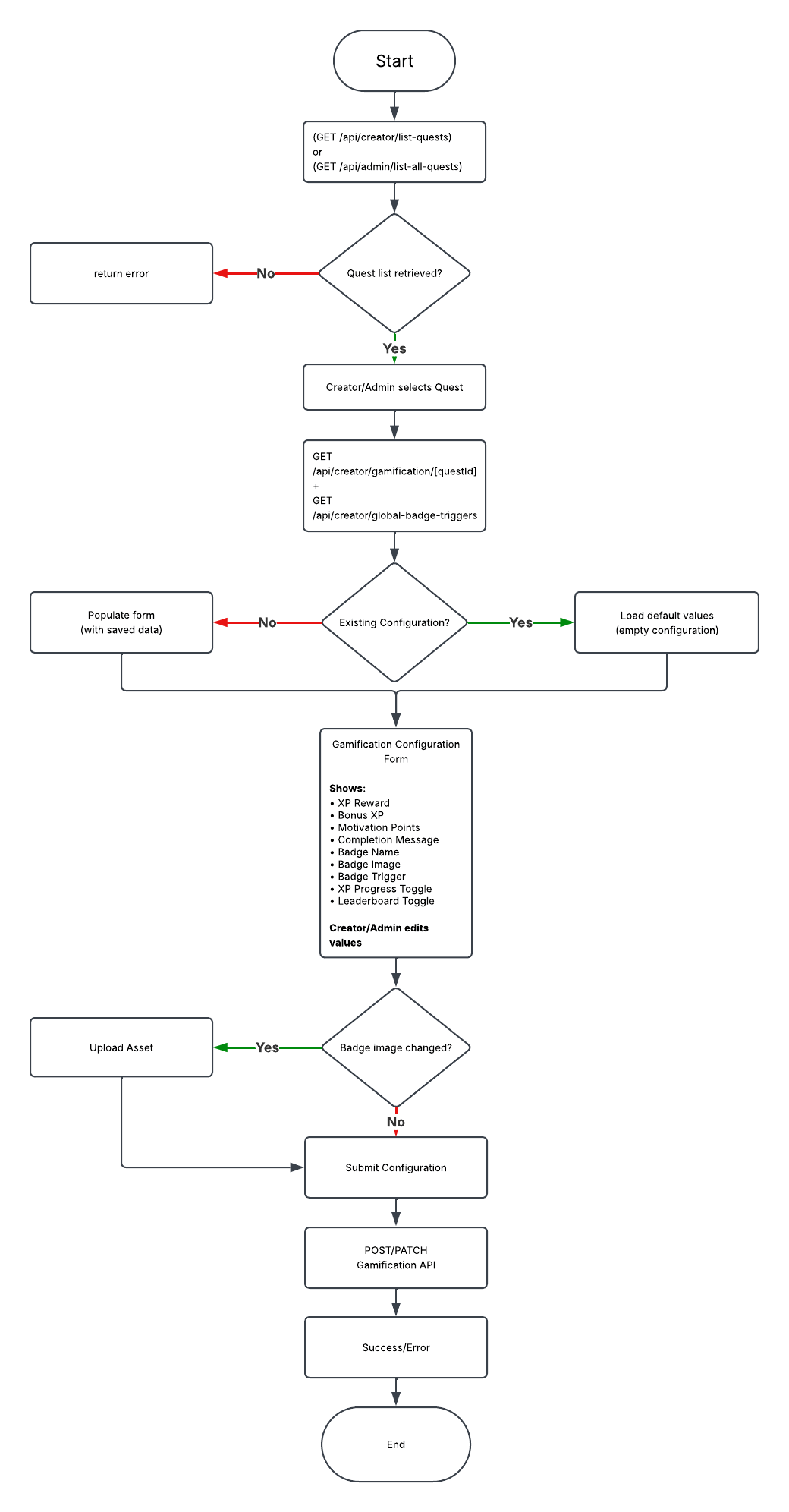
Technologies Used: The Gamification System is implemented using the following technologies:
Next.js App Router
React
TypeScript
Supabase
Clerk Authentication
Zod
React Hook Form
React Dropzone (badge upload)
TailwindCSS
Sonner Toast Notifications
The system also reuses shared application services, including authentication helpers, Supabase database access, asset upload endpoints, and validation schemas.
Detailed Design & Implementation
Data Model / Schema:
quest_gamification
Quest-specific gamification settings are stored in the
quest_gamificationstable. Each quest has a single configuration that defines learner rewards, badge information, completion messaging, and leaderboard participation.
Relevant Fields:
idquest_idxp_rewardbonus_xppoints_rewardcompletion_messagebadge_namebadge_image_urlbadge_triggerleaderboard_enabledshow_xp_progress
Example:
{ "quest_id": "...", "xp_reward": 100, "bonus_xp": 25, "points_reward": 10, "completion_message": "Great job!", "badge_name": "Explorer", "badge_image_url": "...", "badge_trigger": ["QUEST_COMPLETE"], "leaderboard_enabled": true, "show_xp_progress": true}global_badge_trigger
Global badge triggers define reusable unlock conditions for administrator-created achievements. Each trigger maps a learner statistic to a required target value.
Relevant Fields:
trigger_idtrigger_namelearner_stattarget
global_achievements
Stores platform-wide achievements managed by administrators.
Relevant Fields:
idbadge_namedescriptiontrigger_idbadge_image_urlcompletion_messageshow_xp_progressleaderboard_enabledcreated_atupdated_at
learner_global_stats
Stores accumulated learner statistics used to evaluate global achievement progress.
Relevant fields:
user_idxp_rewardscompleted_coursescompleted_lessonscompleted_chapterscommunity_postscommunity_interactionsproduct_purchasescreated_atupdated_at
learner_achievements
Stores each learner's achievement progress and unlock status.
Relevant fields:
user_idachievement_idprogressunlocked_atis_questcreated_atupdated_at
API Specification:
Quest Gamification APIs
GET
/api/creator/list-questsReturns all quests available for gamification configuration.
GET
/api/admin/list-all-questsReturns all quests available for administrator management.
GET
/api/creator/gamification/[questId]Retrieves an existing quest gamification configuration.
POST
/api/creator/gamification/[questId]Creates a new quest gamification configuration after validating reward values, badge information, and leaderboard settings.
PATCH
/api/creator/gamification/[questId]Updates an existing quest gamification configuration.
POST
/api/creator/upload-assetsUploads badge images and returns a public asset URL used within the configuration.
Global Gamification APIs
GET
/api/admin/global-achievementsReturns all administrator-defined achievements.
POST
/api/admin/global-achievementsCreates a new global achievement.
PATCH
/api/admin/global-achievementsUpdates an existing achievement.
DELETE
/api/admin/global-achievementsRemoves a global achievement.
GET
/api/admin/global-achievements/triggerReturns all available badge triggers.
POST
/api/admin/global-achievements/triggerCreates a badge trigger.
PATCH
/api/admin/global-achievements/triggerUpdates an existing badge trigger.
DELETE
/api/admin/global-achievements/triggerDeletes a badge trigger.
Learner Gamification APIs
GET
/api/learner/global-achievementsReturns learner achievement progress and unlocked achievements.
GET
/api/learner/global-statsReturns learner statistics used for achievement progression.
PATCH
/api/learner/global-achievementsSynchronizes learner achievement progress.
GET
/api/learner/leaderboardReturns leaderboard rankings ordered by accumulated XP.
Logic & Workflows:
Quest Gamification Workflow
Creator or administrator opens the Gamification page.
The system retrieves available quests.
The user selects a quest.
Existing quest gamification settings and available badge triggers are retrieved.
The configuration form is populated with existing values or default values.
The creator updates XP rewards, motivation points, badges, completion message, progress display, and leaderboard settings.
If the badge image changes, the image is uploaded through the asset upload API.
The configuration is validated using the shared Zod schema.
The system creates a new configuration or updates the existing configuration.
Success or validation feedback is displayed to the user.
Global Badge Management Workflow
Administrator opens the Global Gamification page.
Existing badge triggers and global achievements are retrieved.
Administrator creates or edits a global achievement.
Administrator selects a badge trigger linked to a learner statistic.
Badge images are uploaded when necessary.
The configuration is validated.
The achievement is saved to the database.
Learner Achievement Synchronization Workflow
Learner signs into the platform.
useGamificationLogic()executes during layout initialization.Learner statistics are retrieved.
Existing learner achievements are loaded.
Achievement progress is recalculated using configured badge triggers.
Achievements meeting their required targets are unlocked.
Updated progress is synchronized to the learner achievement records.
Achievement pages and dashboard components display the updated progress.
Leaderboard Workflow
Learner opens the Leaderboard page.
Global learner statistics are retrieved.
Leaderboard rankings are generated using accumulated XP.
Current learner rank and rank changes are calculated.
Leaderboard results are displayed.
Infrastructure & Operations
Dependencies:
Dependency
Notes
Supabase
Stores gamification configuration and learner progress
Clerk Authentication
User authentication and authorization
React Hook Form
Form state management
Zod
Form validation
React Dropzone
Badge image upload
Sonner Toast
Success and error notifications
Supabase Storage
Badge image storage
Monitoring & Alerting:
The Gamification System validates creator and administrator inputs using shared Zod schemas before saving any configuration.
Validation includes:
XP Reward range validation
Bonus XP validation
Motivation Points validation
Badge information validation
Completion message validation
Badge trigger validation
Learner synchronization additionally validates:
Achievement existence
Learner statistic availability
Progress range (0–100)
Achievement unlock conditions
Current implementation relies on API responses and server logs to monitor:
Failed configuration saves
Asset upload failures
Validation failures
Achievement synchronization failures
Leaderboard retrieval failures
Deployment Plan:
Execute Supabase migrations for gamification tables.
Verify Row Level Security (RLS) policies.
Deploy updated creator, administrator, and learner pages.
Deploy updated API routes.
Verify badge image uploads.
Verify quest gamification configuration.
Verify global achievement synchronization.
Verify leaderboard functionality.
Promote changes to staging after successful validation.
Testing & Quality Assurance
Test Strategy:
Quest Gamification
Create configuration
Update configuration
Badge image upload
Validation failures
XP reward validation
Motivation point validation
Global Gamification
Create badge
Update badge
Delete badge
Create trigger
Update trigger
Delete trigger
Learner
Achievement synchronization
Achievement unlocking
Leaderboard generation
Progress calculation
Known Limitations:
Badge unlocks do not currently generate push or email notifications.
Seasonal leaderboard resets are not implemented.
Achievement formulas are limited to predefined learner statistic columns.
Learners cannot manually edit achievement progress.
Quest gamification updates do not automatically recalculate previously synchronized learner achievements.
Physical or monetary rewards are outside the scope of the current implementation.
Maintenance & Support
Troubleshooting:
Gamification configuration cannot be saved
Verify all required fields are completed.
Verify the selected quest exists.
Verify validation passes.
Verify creator or administrator permissions.
Badge image upload fails
Verify the upload endpoint is reachable.
Verify the uploaded file type is supported.
Verify Supabase Storage configuration.
Achievement does not unlock
Verify learner statistics have been updated.
Verify the configured badge trigger target.
Verify
useGamificationLogic()executes successfully.Verify learner achievement records exist.
Leaderboard does not update
Verify learner global statistics exist.
Verify the leaderboard API returns data.
Verify learner XP has been synchronized.
Changelog:
v1.0 (February 2026) — Initial implementation of the Gamification System supporting quest-specific rewards, global achievements, learner synchronization, and leaderboard functionality.
Document version:
1.0 - Draft, Feature pushed to dev server after initial dev review, 03/03/2026
1.1 - Published, Initial internal technical guide for the Gamification System, July 2026.
1.2 - Published, additional title “Custom Badges”, July 2026.
