1. Front Matter
Title: AI Scenario Seed
Author: Joshua Uriel Tribiana (Joshua-Yel)
Reviewers: Sean Patrick Caintic (scorevi)
Creation Date: 2026-06-29
Status: Approved & Merged
References:
Issue: [2.4] AI Scenario Seed #33
Milestone: [1] Diagnose (Project Setup)
2. Introduction & Goals
Problem Summary: The AI Scenario Seed feature addresses the need for course creators to rapidly generate high-quality, relevant, and safe branching scenarios for workplace training. It reduces the "blank page" problem by providing structured, editable content based on a simple topic, complexity, and contextual input. The core technical challenge is to leverage a powerful generative AI model while enforcing strict content safety, preventing misuse, and managing operational costs.
Goals
Generate Scenarios: Provide an API endpoint that takes a topic and generates multiple, structured training scenarios.
Ensure Safety: Implement a multi-layered safety system to filter both user input (prompts) and AI-generated output.
Control Costs: Enforce token quotas to prevent budget overruns.
Track Usage: Log all AI interactions for monitoring, analytics, and billing purposes.
Maintain Availability: Ensure the safety-check mechanism is resilient to AI provider outages.
Non-Goals
Real-time Collaborative Editing: This feature is for seeding initial content, not for real-time multi-user editing of scenarios.
Infinite Scalability: The feature is subject to token quotas and is not designed for unlimited, high-volume generation without budget adjustments.
Support for any Language: The prompt is engineered for English and may not perform as expected with other languages.
User-provided Models: The system uses a centrally configured Gemini model; users cannot bring their own AI models or keys.
Glossary
Scenario Seed: The act of generating initial scenario content using AI.
Content Safety Service: The internal service responsible for analyzing and blocking inappropriate user input.
Hard Block: immediate rejection of a prompt based on regex patterns for severe violations (e.g., illegal activities).
Sensitive Term: keyword (e.g., "hacking") that is permissible only within an approved educational context (e.g., "phishing awareness").
AI Classifier: secondary Gemini model used by the Content Safety Service to perform nuanced analysis of prompts that pass initial checks.
Circuit Breaker: design pattern used to prevent cascading failures. If the AI Classifier fails repeatedly, the system temporarily uses a local-only safety check.
Token Quota: limit on the number of AI tokens a user, agency, or the entire platform can consume.
Term | Definition |
|---|---|
Scenario Seed | The act of generating initial scenario content using AI. |
Content Safety Service | The internal service responsible for analyzing and blocking inappropriate user input. |
Hard Block | An immediate rejection of a prompt based on regex patterns for severe violations (e.g., illegal activities). |
Sensitive Term | A keyword (e.g., "hacking") that is permissible only within an approved educational context (e.g., "phishing awareness"). |
AI Classifier | A secondary Gemini model used by the Content Safety Service to perform nuanced analysis of prompts that pass initial checks. |
Circuit Breaker | A design pattern used to prevent cascading failures. If the AI Classifier fails repeatedly, the system temporarily uses a local-only safety check. |
Token Quota | A limit on the number of AI tokens a user, agency, or the entire platform can consume. |
3. High-Level Architecture
System Diagram
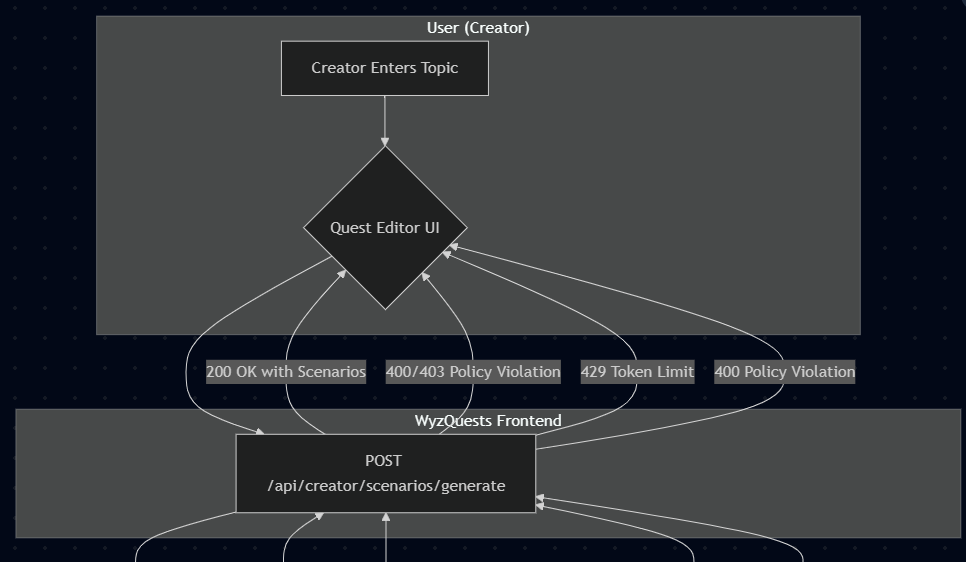
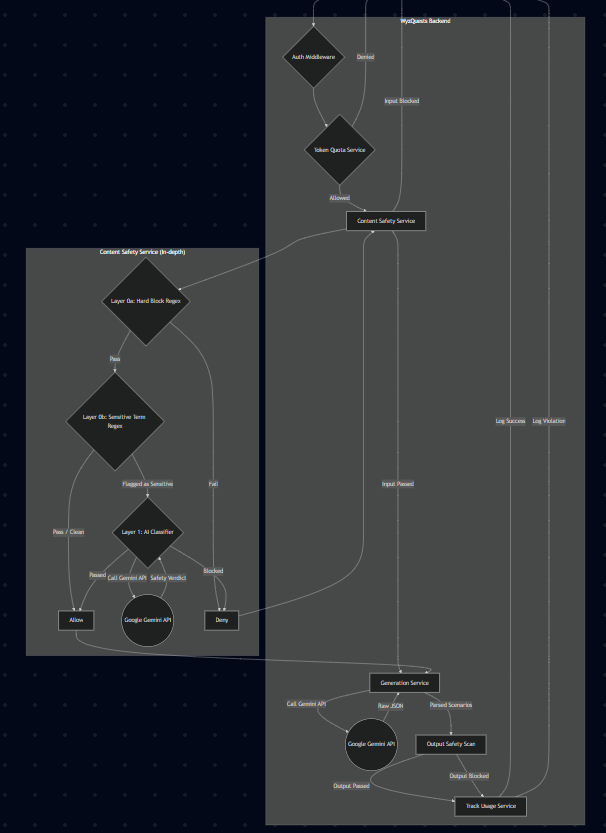
Technologies Used:
Google Gemini Pro - AI topic validation and curriculum generation
Zod - Input/output schema validation
Supabase - Data persistence and caching
Clerk - Authentication (creator role)
React Flow - Canvas node conversion
4. Detailed Design & Implementation
Data Model / Schema
The feature uses Zod schemas for runtime validation. No new database tables are introduced specifically for this feature, but it populates the existing quest content structure.
Request Schema (generateRequestSchema)
const generateRequestSchema = z.object({ topic: z.string().min(3).max(200).trim(), count: z.number().int().min(1).max(8), complexity: z.enum(["beginner", "intermediate", "advanced"]), context: z.string().max(500).optional(),});Output Schema (generatedScenarioSchema)
const generatedScenarioSchema = z.object({ id: z.string(), title: z.string(), scenario: z.string(), decisions: z.array(z.object({ id: z.string(), text: z.string(), outcome: z.string(), recommendedXP: z.number(), })), qualityScore: z.number(), characters: z.array(z.object({ name: z.string(), role: z.string() })), setting: z.string(),});API Specification
Endpoint:
POST /api/creator/scenarios/generateAuthentication: Required (Clerk
userId)Request Body: Must match
generateRequestSchema
Successful Response (200 OK)
{ "scenarios": "[...]", "tokensUsed": 1500, "cached": false, "modelUsed": "gemini-2.5-flash", "generatedAt": "2026-06-29T10:00:00.000Z"}Error Responses
Code | Meaning |
|---|---|
| Bad Request — Invalid input |
| Unauthorized — User not authenticated |
| Forbidden — Input violates content policy |
| Too Many Requests — Token quota exceeded |
| Internal Server Error — AI generation or parsing failed |
| Service Unavailable — AI provider API key or model misconfigured |
Logic & Workflows
1. Input & Pre-flight Checks
The
POSThandler in.../generate/route.tsreceives the request.Clerk
auth()ensures a valid user session.enforceTokenQuotachecks if the user/agency is within their usage limits. This is a hard gate.The request body is parsed and validated against
generateRequestSchema.
2. Multi-Layer Content Safety (Input)
The validated input is passed to
analyzeScenarioSeedSafetyin.../scenario-seed-content-safety.service.ts.Text Normalization: Input is normalized to detect and counter evasion techniques (e.g., invisible characters).
Layer 0a (Hard Blocks): The normalized input is checked against
ABSOLUTE_HARD_BLOCK_PATTERNS. A match results in an immediate rejection.Layer 0b (Sensitive Terms): The input is checked for sensitive keywords. A match without a corresponding educational allowlist pattern flags the request for stricter AI analysis.
Layer 1 (AI Classification): If the input is clean or flagged as sensitive (but not a hard block), it is sent to a specialized Gemini "classifier" model. This model uses a strict system prompt to make a final
passed: true/falsejudgment.Circuit Breaker: If the AI classifier call fails repeatedly, a circuit breaker trips, and the service falls back to a simpler, local-only regex analysis to maintain availability.
3. Content Generation
If the input passes all safety checks,
buildPromptconstructs a detailed prompt for the generation model.callGeminisends the prompt to the configured Gemini model. It includes retry logic to attempt fallback models if the primary one is unavailable.The raw text response is received.
4. Post-flight Checks & Finalization
parseResponsecleans and parses the raw AI output, validating its structure againstgeneratedScenarioSchema.scanOutputForViolationsperforms a final regex-based safety check on the generated content itself to catch any harmful instructions that may have been produced.trackAIUsageSafeis called to log the outcome, token counts, model used, and other metadata for analytics.A successful response is formatted and sent to the client.
5. Infrastructure & Operations
Dependencies
Internal
Clerk (Authentication)
WyzQuests Database (for
getActiveGeminiModelconfig andenforceTokenQuotachecks)
External
Google Gemini API
Monitoring & Alerting
All AI calls (generation and safety checks) are logged via trackAIUsageSafe. Errors are logged to the console via console.error with specific prefixes (e.g., [scenarios/generate]) and should be ingested by a centralized logging provider (e.g., Datadog, Sentry).
Alerts to Configure
High rate of
5xxerrors on the/api/creator/scenarios/generateendpoint.High rate of
403Content Policy Violations — could indicate a coordinated abuse attempt.[Scenario Seed Circuit Breaker] TRIPPED— indicates a problem with the AI provider or configuration.High rate of parsing failures (
Failed to parse AI response) — may mean the model is not adhering to the prompt format.
Deployment Plan
No new database tables are required. The feature relies on existing configuration for API keys and token limits.
Feature Flag Rollout
Deploy code with the feature flag off for the general user population.
Enable the flag for an internal test group to verify functionality in production.
Monitor logs for errors and unexpected costs.
Gradually roll out the feature to a wider audience.
6. Testing & Quality Assurance
Test Strategy
Unit Tests
lib/ai/scenario-seed-content-safety.service.ts: TestcheckHardBlocksandcheckSensitiveTermswith various safe and unsafe inputs. Mock the AI call to test the circuit breaker and fallback logic.app/api/creator/scenarios/generate/route.ts: TestbuildPromptto ensure it formats correctly. TestparseResponsewith valid, invalid, and incomplete JSON strings.
Integration Tests
Write tests for the
POSTendpoint that mock theGoogleGenAIclient.Verify that token quota enforcement correctly returns a
429response.Verify that the content safety service correctly returns a
403response for blocked prompts.Verify that a successful call results in a
200with the expected data structure.
End-to-End (E2E) / QA
AI-1 (Validator): Ensure that using the feature produces nodes on the canvas.
AI-2 (Safety): Test with flagged prompts to ensure the content-safety filter works. Attempt to bypass the filter using evasion techniques.
Test the full flow from the UI, confirming that scenarios are generated and appear correctly in the quest editor.
Known Limitations
JSON Format Brittleness: The feature relies on the AI consistently returning valid JSON. While the parser is robust, a fundamental change in the model's behavior could break the feature.
Safety is Not Absolute: The multi-layered safety system is robust but not infallible. Novel or highly sophisticated prompts could potentially bypass the filters.
Static Regex: The
OUTPUT_SAFETY_PATTERNSare static and may need to be updated as new threat vectors are identified.
7. Maintenance & Support
Troubleshooting
User reports "Generation Failed"
Check the server logs for errors related to
[scenarios/generate].If the error is
AI returned unexpected format, the model may be deviating. Try the same prompt in a test environment. The prompt may need adjustment.If the error is
API keyorNo models available, check the admin configuration for the Gemini API key and model name.
User reports "Topic is not permitted" (
403error)This is the content safety filter working as designed.
Ask the user for the topic they used.
If the topic seems legitimate, review
lib/ai/scenario-seed-content-safety.service.tsto see if an allowlist pattern needs to be expanded or if the AI classifier is being too strict.
Sudden spike in token costs
`Check the AI Usage logs to identify if a specific user or agency is responsible.
Review the
enforceTokenQuotaservice to ensure limits are being applied correctly.
Changelog
v1.0 — 2026-06-29 — Initial Release
