Author name: Joylynne Grace C. Esportuno
Reviewers: Uriel Tribiana
Creation Date: March 12, 2026
References: https://github.com/wyzlab/WyzQuests/issues/32
Status: Approved and Merged
INTRODUCTION & GOALS
Problem Summary
Creating branching scenarios usually means wrestling with complex logic and messy spreadsheets. The Scenario Logic changes that by allowing creators to build decision-driven paths directly on a Visual Canvas using intuitive, visual workflows.
Goals & Non-Goals
Goals
Allow users to create branching paths using a decision node, or in this feature we call it as a Question Node.
Branching paths should create distinct links when viewed on the Quest Player.
Non-Goal
This feature does not aim to be a spreadsheet viewer or spreadsheet-to-canvas converter. Creators should start fresh using the Visual Canvas.
Glossary
Scenario — It acts as a modular chapter or specific process within a Quest. In the visual canvas, the Scenario Node serves as a parent container. You can drag and drop any other type of node into it to build your flow, though a Scenario Node cannot contain itself.
Question Node — A Visual Canvas element that acts as a decision point, branching user journeys into different paths based on how they answer.
HIGH-LEVEL ARCHITECTURE
System Diagram
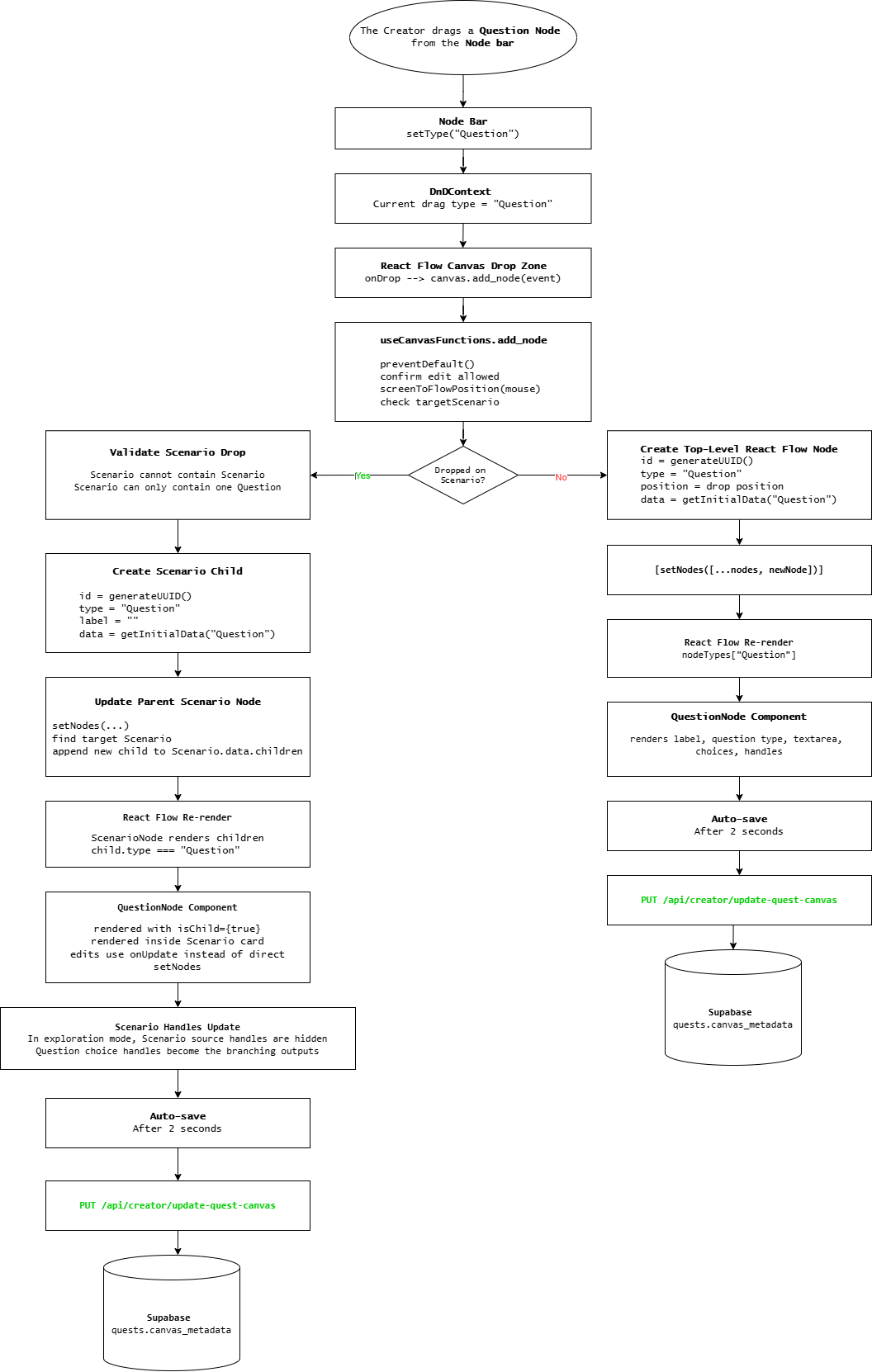
Technologies Used
Next.js, React Flow, and dnd-kit.
DETAILED DESIGN & IMPLEMENTATION
Data Model
"data": { "type": "Question", "label": "Variable Question", "choices": [ { "id": "b49dfd32-0901-4076-ac7d-3cc63022ab17", "text": "It is simply a symbol (usually a letter) that represents an unknown number or value", "status": "wrong", "feedback": "" }, { "id": "517df35b-0f1e-46bc-aae1-39f8658180f7", "text": "A named storage location in a computer's memory that holds a data value", "status": "correct", "feedback": "" } ], "quest_mode": "exploration", "isCollapsed": false, "questionText": "What is a variable in programming? " },Schema
export const choiceObjectSchema = z.object({ id: z.string(), text: z.string(), feedback: z.string().optional(), status: z.enum(["correct", "partial", "wrong"]).optional(), points: z.number().min(0).default(1), quest_mode: z.enum(["exploration", "linear"]).optional(),}); export const questionTypeSchema = z.enum([ "multiple-choice", "true-false", "checkbox",]); export const questionNodeDataSchema = z .object({ label: z.string().optional(), type: z.string(), questionType: questionTypeSchema.optional(), questionText: z.string(), choices: z.array(choiceObjectSchema).optional(), isCollapsed: z.boolean().optional(), isStart: z.boolean().optional(), isEnd: z.boolean().optional(), quest_mode: z.enum(["exploration", "linear"]).optional(), isArchived: z.boolean().optional(), }) .catchall(z.unknown());API Specification
GET /api/creator/update-quest-canvas?quest_id=Load canvas state for creator. GET /api/reviewer/get-canvas?quest_id={questId}Loads canvas metadata for readonly reviewer mode. PUT api/creator/update-quest-canvasTriggered whenever a user adds, removes, or repositions elements on the canvas. POST /api/ai/compute-canvas-layoutUsed during exploration-mode AI imports and smart merges to compute better node positions.LOGIC & WORKFLOW
Main Workflow
The creator goes to the Visual Canvas.
The creator drags the Question Node from the Node Bar and onto the Canvas.
The Creator selects a Question Type: Multiple Choice, True or False and Checkbox.
The creator adds choices on the Question Node.
The creator creates branching paths, dragging an edge from the choice handles and connecting it to another node.
The creator clicks the save button to save current changes on the Canvas.
Logic
A Question Node can exist in two modes:
As a normal canvas top-level node.
As a child inside a Scenario Node.
The distinction is controlled by isChild . When isChild is false, the question updates itself directly in React Flow’s global nodes array. Meanwhile, when isChild is true, the question is embedded inside a Scenario’s data.children , so it updates through the parent Scenario’s onUpdate callback.
Rendering a Question Inside a Scenario
In the ScenarioNode component, each child is rendered like this:
children.map((child) => ( <SortableChildWrapper key={child.id} child={child} onUpdate={(newData) => updateChild(child.id, newData)} />))Inside SortableChildWrapper , the code picks the correct component based on child.type
const ChildComponent = childNodeComponents[child.type];So, if the child type is ”Question” , it renders the Question Node.
Updating Question Data Inside a Scenario
In the component, QuestionNode.tsx , collpase state is updated through:
updateNodeData(id, !!isChild, onUpdate, { isCollapsed: !isCollapsed,});The important part is !!isChild.
That calls updateNodeData from useNodeActions.ts
Its logic is:
if (isChild && onUpdate) { onUpdate(newData);} else { setNodes(...)}So for a Scenario child, it does not directly search React Flow nodes. Instead, it calls the Scenario’s onUpdate.
That onUpdate points back to updateChild in useScenarioNodeFunctions.ts
const updatedChildren = node.data.children.map((child) => child.id === childId ? { ...child, data: { ...child.data, ...newData } } : child);Step by step:
User edits the child Question.
QuestionNodecallsupdateNodeData(...).updateNodeDataseesisChild === true.It calls
onUpdate(newData).Scenario’s
updateChildfinds the matching child by ID.It merges
newDatainto that child’sdata.The parent Scenario node is updated in React Flow.
So the state path is:
QuestionNode input→ updateNodeData→ onUpdate→ updateChild→ ScenarioNode.data.children[index].data→ React Flow setNodesDropping A Question Into A Scenario
A normal canvas QuestionNode can be dragged into a Scenario.
In QuestionNode.tsx
if (isChild) return; e.dataTransfer.setData("canvas-node-id", id);e.dataTransfer.setData("node-type", data.type);So only top-level questions can be dragged into a Scenario. If the question is already a child, dragging is blocked.
Then the Scenario drop zone handles the native drop in useScenarioNodeFunctions.ts
On drop:
It reads the dragged canvas node ID.
It checks whether the drop happened in the center zone.
It gets the original React Flow node.
It converts it into a
ChildNode.It removes the original node from the canvas.
It appends the new child to
scenario.data.children.
The conversion happens here:
const newChild: ChildNode = { id: nodeToConvert.id, type: nodeToConvert.type as any, label: (nodeToConvert.data.label as string) || "", data: nodeToConvert.data as any,};Then this removes the top-level node:
.filter((n) => n.id !== canvasNodeId)And this adds it into the Scenario:
children: [...currentChildren, newChild]So a dropped Question is no longer a standalone React Flow node. It becomes embedded data inside the Scenario.
Scenario Rules For Questions
The Scenario has a rule: only one Question can exist inside a Scenario.
That check appears in ScenarioNode.tsx
const hasQuestionChild = children.some((child) => child.type === "Question");And in useScenarioNodeFunctions.ts
if (draggedCanvasNode.type === "Question") { const hasQuestion = children.some((child) => child.type === "Question"); if (hasQuestion) { e.dataTransfer.dropEffect = "none"; return; }}So if the Scenario already contains a Question, another Question cannot be dropped into it.
The UI message also reflects this:
if (hasQuestion) return "Only one question per scenario";Why Scenario Handles Change When It Has A Question
In exploration mode, if a Scenario contains a Question, the Scenario hides its own outgoing source handles.
In ScenarioNode.tsx
const hideScenarioSourceHandles = data.quest_mode === "exploration" && hasQuestionChild;Then handle filtering does this:
if (hideScenarioSourceHandles) { return handle.type === "target";}Meaning: once the Scenario has a Question child, branching should probably happen through the Question’s choices, not through the Scenario container itself.
That is the key scenario-question logic.
Choice Handles Become Branching Points
Each choice in a Question gets its own React Flow source handle.
In QuestionNode.tsx
<Handle type="source" position={Position.Right} id={choice.id}/>So each answer choice can connect to a different next node.
That means the branching model is:
Scenario contains Question Choice A handle → next node Choice B handle → another node Choice C handle → another nodeThis is why the Scenario hides its own source handles when it contains a Question. The Question’s choices take over the routing.
Adding Or Editing Choices
When the user saves a choice, QuestionNode.tsx runs handleSaveChoice.
The workflow:
Validate that choice text is not empty.
Determine question type.
For
true-false, force status to"correct".If editing, replace the matching choice.
If adding, generate a new ID.
Save choices through
updateNodeData.
The save line is:
updateNodeData(id, !!isChild, onUpdate, { choices: updatedChoices });Again, if this Question is inside a Scenario, that update travels upward through onUpdate and changes the embedded child data.
Deleting A Choice
In QuestionNode.tsx, deleting a choice calls:
deleteChoice(id, !!isChild, choiceList, choice.id, onUpdate)deleteChoice removes the choice from the node data and also removes edges connected to that choice handle:
setEdges((eds) => eds.filter((e) => e.sourceHandle !== choiceId));So if Choice A was connected to another node, deleting Choice A also removes that connection. That prevents stale edges from pointing to handles that no longer exist.
Extracting A Question Back Out Of A Scenario
Scenario children can also be dragged out.
That happens in useScenarioNodeFunctions.ts
The hook tracks pointer position. If drag ends outside the Scenario bounds:
Find the child being dragged.
Remove it from
scenario.data.children.Convert it back into a React Flow node.
Place it at the pointer position on the canvas.
The new canvas node is built here:
const newNode = { id: childToExtract.id, type: childToExtract.type, position: newPosition, data: { ...childToExtract.data, label: childToExtract.label, },};So the same Question can move between these two states:
Top-level React Flow node↔Scenario child inside Scenario.data.childrenINFRASTRUCTURE & OPERATIONS
Dependencies
Dependency | Notes |
|---|---|
React Flow node/edge state | Canvas renders entirely from |
dnd-kit | A modern drag and drop toolkit for reordering child nodes within a Scenario node |
Monitoring & Alerting
The Question Node/Scenario Logic is mostly client-side React state inside React Flow, so failures would usually show up as UI bugs rather than backend errors.
Logs currently go to:
Browser console for frontend runtime issues
Sever/VPS logs for API routes that use console.error
For this specific workflow, the useful metrics monitor would be:
Drop conversion failures: Canvas Question Nodes dragged into a Scenario Node but not added to
childrenInvalid Scenario state count: Scenario has more than one Question child, which should be impossible by current rules.
Orphaned choice-edge count: edges whose sourceHandle points to a deleted/nonexistent choice ID.
Child update failures:
isChild === truebutonUpdateis missing, causing embedded Question edits not to persist.Canvas save failure after Scenario/Question edits.
React Flow rendering errors after adding/removing choices, because choice handles are dynamically created.
Deployment Plan
Pre-deploy Validation
Run
npm run buildRun relevant tests if available.
Manually test:
Drag Question into Scenario
Confirm only one Question Node can be added in a Scenario Node
Add/edit/delete choice inside Scenario Node
Connect choice handles to other nodes
Delete a choice and verify its edge disappears
Drag Question back out of Scenario Node
Save and reload the quest
Database migration
No migration needed if the data shape stays inside existing canvas JSON.
Staged rollout
Deploy first to staging
Test old quests with no Scenario children
Test quests with existing Scenario children
Test newly created Scenario + Question branching
Verify saved canvas JSON still reloads correctly
Production rollout
Deploy during low editor traffic
Watch server logs
Have rollback ready
Post-deploy checks
For a top-level Question Node:
Drag and drop a Question Node onto the Canvas
Add question and choices
Connect each choice to different nodes
For a Child Question Node:
Drag and drop a Scenario Node onto the Canvas
Drop in one Question Node into the Scenario Node
Add choices
Connect each choice to different nodes
Save, refresh, and verify edges/choices survive reload
Delete a choice and confirm the associated edge is gone
TESTING & QUALITY ASSURANCE
Test Strategy
As of now, this feature was mainly covered through manual QA rather than dedicated automated tests. Recommended coverage:
Unit Tests:
Preventing more than one
Questionchild inside aScenarioUpdating a child Question Node through
onUpdateAdding/editing/deleting choices
Deleting a choice removes edges using that choice’s
sourceHandleToggling
isCollapsedupdates child data correctly
Integration Tests
Drag a top-level Question Node into a Scenario Node
Confirmed it is removed from top-level
nodesConfirm it appears inside
Scenario.data.childrenConfirm the child renders with
isChild=trueConfirm edits to the embedded Question persist into the parent Scenario data
Confirm extracting a child Question Node back to the Canvas restores it as a top-level node
End-to-End Tests
For a top-level Question Node:
Drag and drop a Question Node onto the Canvas
Add question and choices
Connect each choice to different nodes
For a Child Question Node:
Drag and drop a Scenario Node onto the Canvas
Drop in one Question Node into the Scenario Node
Add choices
Connect each choice to different nodes
Save, refresh, and verify edges/choices survive reload
Delete a choice and confirm the associated edge is gone
Test Negative Cases:
Attempt to drop a second Question Node into the same Scenario Node
Delete a choice with an active edge
Known Limitations
If malformed canvas JSON already exists, the UI may not gracefully repair it
There does not appear to be a feature flag for Scenario Question branching
Scenario child data is embedded JSON, so querying or validating it at the database level is limited
MAINTENANCE & SUPPORT
Troubleshooting
Problem: Question Node cannot be dropped into Scenario Node
Check:
Does the Scenario Node already contain a Question Node?
Is the pointer in the center drop zone?
Confirm
dataTransfercontainscanvas-node-id
Problem: Question Node appears inside Scenario Node but edits do not save
Check:
Is
isChild={true}passed fromSortableChildWrapper?Is
onUpdate={(newData) => updateChild(child.id, newData)}passed?Inspect
updateNodeData; child updates requireonUpdateConfirm
Scenario.data.children[index].datachanges after editing
Problem: Scenario still has outgoing handles even with Question child
Check:
quest_modeshould be"exploration".Scenario must have a child with
type === "Question".hideScenarioSourceHandlesshould evaluate true.
Changelog
1.0 (Feb 23, 2026) : Question Node Initial Implementation
1.1 (Mar 12, 2026) : Render Scenario Logic on Quest Player
1.2 (June 9, 2026) : Render Question Node on Quest Player as an End Node
Document version: 1.0, Approved, Feature deployed to staging, 02/24/2026
