Author name: Joylynne Grace C. Esportuno
Reviewers: James Billate and Uriel Tribiana
Creation Date: March 3, 2026
References: https://github.com/wyzlab/WyzQuests/issues/81
Status: Approved and Merged
INTRODUCTION & GOALS
Problem Summary
As branching scenarios grow in complexity, it becomes easy to lose track of decision paths and logic flow. The Visual Canvas addresses this by giving creators a clear, top-level view of their entire scenario — allowing them to build workflows intuitively by dragging and dropping nodes and connecting them via handles to define relationships.
Goals & Non-Goals
Goals:
Provides Creators a bird’s-eye view of the entire branching scenario at once, so no path is hidden or lost.
Allow creators construct workflows by dragging and dropping nodes rather than filling out forms.
Connect nodes via handles to make logic flow immediately obvious.
Non-Goals:
Real-time multiplayer editing (collaboration with other creators) is out of scope.
Mobile devices are explicitly unsupported — the canvas is deesktop-only.
Glossary
Node - A single unit of content or logic.
Handle — The connection points on a node used to link it to other nodes.
Edge — The line drawn between two handles, representing a path or relationship.
Canvas — The workspace where all nodes and edges are displayed and managed.
Node bar — A toolbar consisting of all available nodes and actions.
Exploration Mode — This mode allows creators to create branching scenarios, wherein succeeding scenarios are determined based on the learner’s choices.
Linear Mode — This mode is for creating a linear quest progression.
HIGH-LEVEL ARCHITECTURE
System Diagram
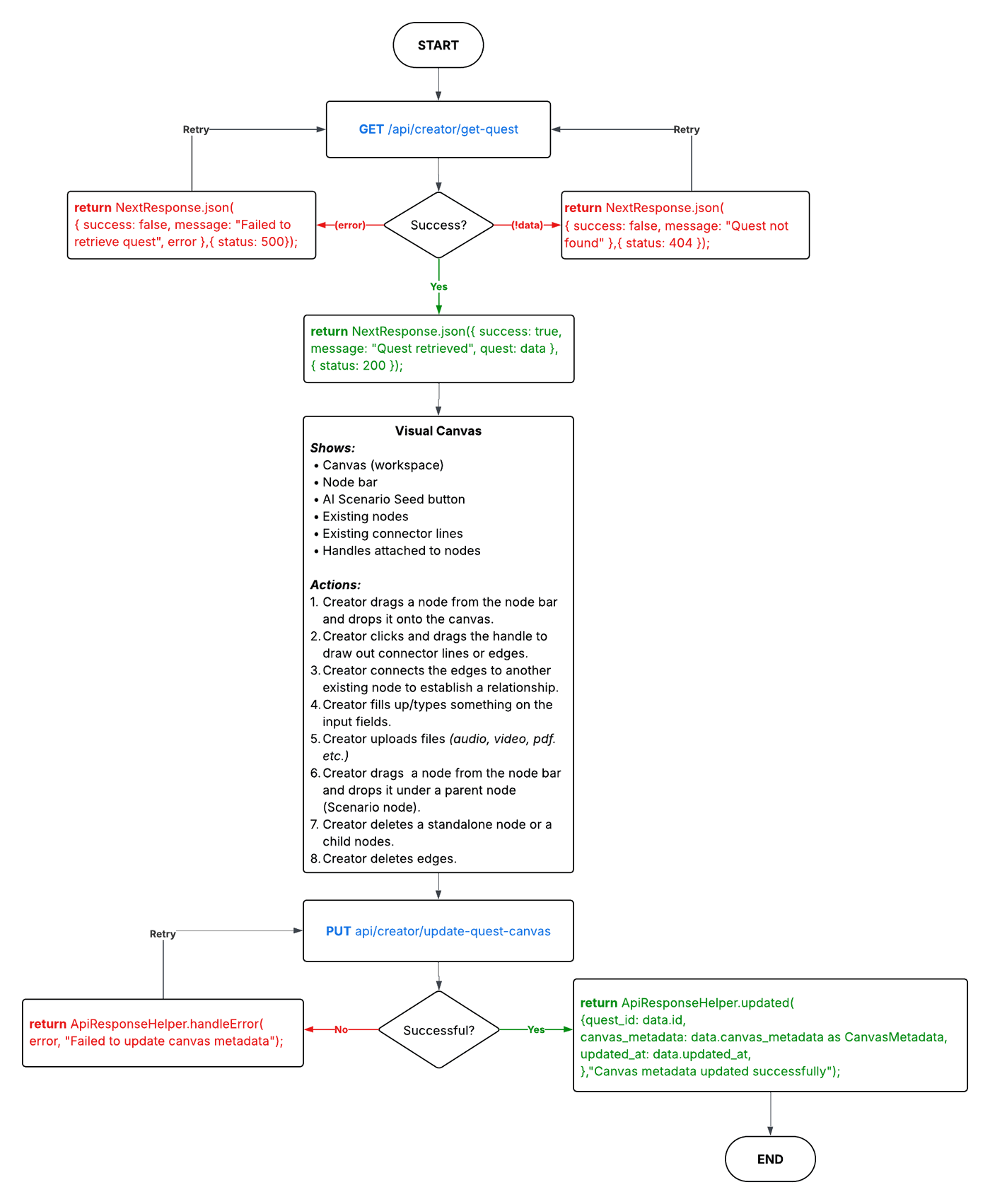
Technologies used
Next.js, TypeScript, Shadcn, TailwindCSS, Supabase, RESTful APIs, React Flow and dnd-kit.
DETAILED DESIGN & IMPLEMENTATION
Data Model/Schema
The Visual Canvas state is persisted to the quests table within the database. Specifically, the entire flow structure is serialized and stored in the canvas_metadata column in JSON format, allowing for the preservation of node positions, edges, and custom data attributes.
For example:
{ "quest_mode": "exploration", "edges": [ { "id": "xy-edge__[source-id]-source-right-[target-id]-target-left", "source": "[source-id]", "target": "[target-id]", "sourceHandle": "[source-id]-source-right", "targetHandle": "[target-id]-target-left" } ], "nodes": [ { "id": "[node-id]", "type": "Scenario", "x": 80, "y": 288.75, "data": { "type": "Scenario", "label": "Computer Science Fundamentals", "isStart": true, "isEnd": false, "children": [ { "id": "[child-id]", "type": "Text", "label": "Instructions", "data": { "type": "Text", "label": "Instructions", "textContent": "Computer Science is..." } } ] } } ]}API Specification
GET /api/creator/update-quest-canvas?quest_id=Load canvas state for creator. GET /api/reviewer/get-canvas?quest_id={questId}Loads canvas metadata for readonly reviewer mode. PUT api/creator/update-quest-canvasTriggered whenever a user adds, removes, or repositions elements on the canvas. POST /api/ai/compute-canvas-layoutUsed during exploration-mode AI imports and smart merges to compute better node positions.Logic & Workflow
Main Workflow
The creator goes to the Visual Canvas.
The creator drags a node from the Node bar and drops it onto the Canvas.
The creator fills all necessary data within the Node (input fields, labels, file uploads, etc.).
The creator creates an edge by dragging from the handle of a node and connecting it to another node’s handle.
The creator adds a Scenario Node onto the Canvas.
The creator drops a node within the Scenario Node, making it a child node (The child node must not be a Scenario Node).
The creator deletes unwanted edges or nodes.
The creator publishes the Quest.
The Quest will be published if it passes all validation checks (complete edges and node details).
Logic
Visual Canvas Hooks
useNodeActions(): This hook provides access to core node operations. (e.g., deleting, updating nodes, etc.)
useCanvasFunctions(): This hook provides access to the Visual Canvas’ utility functions.
Constants and Helpers
getInitialData(type, quest_mode)— Returns the correct default data shape for a newly created node based on its type. Every node type has required fields (e.g.TextneedstextContent,Quizneedsquestions[]). This ensures nodes are never created with missing data.NODE_GAP_VALUE: This constant refers to the horizontal spacing between nodes on the canvas in linear mode.resolveImportCollisions(nds)— A post-render utility that runs after an AI canvas import. The layout service estimates node heights before React Flow measures them. Once React Flow populatesn.measured?.height, this function pushes any overlapping game-over nodes downward until they clear all other cards. It runs up to 30 passes, sorted by Y position, and only moves game-over nodes (all other nodes are anchored).reconstruct_edges(currentNodes)— Builds a sequential chain of edges connecting each node to the next by index. Usessource-right→target-lefthandle pairs. Called whenever the linear node order changes (drops, deletions, reorders). Returns edges withtype: "default"andanimated: true.
State
nodes/setNodes: ReactFlow node array — the live canvas state.edges/setEdges: ReactFlow edge array.nodesRef/edgesRef: Refs that mirror node/edge state — used in callbacks where stale closure values would be a problem (e.g. smart merge).archivedNodesRef/archivedNodes: Archived nodes are removed from the canvas but kept in state and saved to DB. Stored both as a ref (for synchronous access) and as React state (for UI).currentLength: A ref tracking the previous node count, used bylinear_refreshto detect additions and deletions.draggedNodeId: Tracks which node is currently being dragged. Used to suppresslinear_refreshcollision avoidance and to gatefilteredEdges.mergeDialog: Controls the import merge dialog — stores whether it's open, node counts, and the pending import data waiting for user decision.importedCount: The number of AI-imported nodes, shown in the success banner.hasLoaded: Becomestrueonce the canvas has finished loading from DB (or confirmed empty). Gates auto-save and mode effects.isSaving: Drives the "Saving..." indicator in the UI.hasInitializedRef: Prevents the canvas load effect from running more than once per mount.pendingCollisionResolutionRef: A ref set totrueafter an exploration import. Tells the collision resolution effect to fire once React Flow has measured all nodes.previousQuestMode: Tracks the previous quest mode so the mode conversion effect knows when a real switch has happened.
Effects
Canvas Load Effect (
useEffecton[questId, setNodes, setEdges, hasLoaded]) Runs once on mount. CheckssessionStoragefor an AI-generated curriculum first — if found, parses and imports it. For exploration mode it calls the layout API first to compute collision-free positions before rendering. For linear mode it snaps nodes to the grid directly. If no import is pending, it loads the existing canvas from the database viaGET /api/creator/update-quest-canvas. In read-only mode it uses the reviewer API instead. Separates archived and active nodes on load, deduplicates by ID, and sets both into state.Collision Resolution Effect (
useEffecton[nodes]) Only active whenpendingCollisionResolutionRefis set (after an exploration import). Waits until every non-game-over node has a non-zeromeasured.heightfrom React Flow, then runsresolveImportCollisionsexactly once and clears the ref to prevent re-runs.Auto-save Effect (
useEffecton[nodes, edges, questId, hasLoaded]) Debounces canvas saves with a 2-second timer. On every node or edge change, cancels any pending save and schedules a new one. Sends the full canvas state (nodes + edges + archived nodes) toPUT /api/creator/update-quest-canvas. Skipped entirely in read-only mode.linear_refreshEffect (useEffecton[nodes, hasLoaded]) Runs on every node change in linear mode. Has two jobs: (1) snap any off-grid node back to its correcti * NODE_GAP_VALUEx-position and updateisStart/isEndflags, and (2) reconstruct edges when node count or positions change. UsescurrentLength.currentto detect additions/deletions. Only callssetNodesandsetEdgeswhen something actually needs to change, avoiding infinite loops.Mode Conversion Effect (
useEffecton[previousQuestMode.current, questMode, hasLoaded]) Fires when the quest mode switches between linear and exploration. Repositions all nodes to the linear grid when switching to linear, or updatesquest_modein node data when switching to exploration. Also reconstructs edges for linear mode.
Canvas Functions
add_node(e) — The onDrop handler for the canvas. Determines what was dropped and where, then takes the appropriate action:
If a NodeBar item is dropped onto a Scenario node → adds it as a child of that scenario
If a NodeBar item is dropped on empty canvas → creates a new standalone node. In linear mode, places it at the end of the chain and auto-connects it
If a Canvas node is dropped onto a Scenario → converts it to a child node and removes it from canvas
If a Scenario child is dragged out → converts it back to a standalone canvas node, sorting by drop x-position in linear mode
drag_over_node(e) — The onDragOver handler. Sets dropEffect: "move" to enable dropping.
drag_start_node(event, draggedNode) — Sets draggedNodeId when a node drag begins. This suppresses linear_refresh and switches <ReactFlow> to use filteredEdges for the ghost preview.
drag_x_node(event, draggedNode) — The onNodeDrag handler in linear mode. Provides real-time visual reordering as the user drags — it calls drag_reorder to sort nodes by the dragged node's current x-position, then updates all non-dragged nodes to their snapped grid positions while leaving the dragged node at its actual pointer position.
drag_reorder_commit(event, draggedNode) — The onNodeDragStop handler. Clears draggedNodeId, then checks if the node was dropped onto a Scenario (converts it to a child) or onto empty canvas (commits the reorder and reconstructs edges).
drag_reorder(currentNodes, draggedNode) — Pure utility. Given the dragged node's current x-position, computes the new index via Math.round(x / NODE_GAP_VALUE) and returns a reordered copy of the node array.
filteredEdges — A derived value (not a function) computed on every render. Calls reconstruct_edges on nodes excluding the currently dragged node. Used as the edges prop in <ReactFlow> only during an active linear drag, providing the ghost edge preview without the dragged node in the chain.
connect_node(params) — The onConnect handler for exploration mode. Adds a new edge between two handles.
flag_node(changes) — The onNodesChange handler. Has three branches:
Removal → applies the changes, clears
isEndif the end node was deleted, then recalculatesisStart/isEndviastart_end_indicatorsExploration mode → intercepts position changes and applies collision avoidance before passing to
applyNodeChanges. Pushes nodes apart iteratively (up to 10 passes) using minimum-displacement axis selectionLinear and all other cases → passes changes through to
onNodesChangeunchanged
start_end_indicators(nodes) — Pure utility. Marks the first top-level node as isStart unless a node already has isStart: true set (user-set start). Ensures the start node cannot simultaneously be the end node. Skips child nodes (those with parentId).
delete_all_nodes() — Clears the entire canvas.
AI & Import Functions
ai_import(selected) — Takes AI-generated scenario objects and adds them as Scenario nodes (each with a pre-populated Question child) to the canvas in a horizontal batch layout. Connects them sequentially with dashed step edges.
ai_scenarios_to_nodes(scenarios, existingNodeCount, batchIndex, batchId) — Converts raw AI scenario data into ReactFlow node and edge objects. Each scenario becomes a Scenario node containing a Question child with choices mapped from the AI decisions.
import_to_flownode(canvasData) — Converts a CanvasMetadata object (from AI curriculum or session storage) into ReactFlow nodes and edges. In linear mode, snaps to grid and enforces a sequential chain. In exploration mode, preserves branching topology and assigns sourceHandle/targetHandle per edge based on the relative positions of source and target nodes (right→left for horizontal, bottom→top or top→bottom for vertical).
create_content_cards_from_canvas(qId, importedNodes) — After an AI import, calls POST /api/creator/convert-canvas-to-cards to create publishable content card records in the database from the imported nodes, so the quest can be published.
Merge Functions
replace() — Merge dialog action. Replaces the entire existing canvas with the pending import nodes and edges.
cancel() — Merge dialog action. Dismisses the dialog and keeps the existing canvas unchanged.
smart(resolutions) — Merge dialog action. Executes a content-aware merge using user-confirmed resolution decisions. For linear mode, re-snaps the merged result to the grid. For exploration mode, calls the layout API to recompute collision-free positions across the combined node set. Only creates new content cards for genuinely new (appended) nodes.
Node Lifecycle Functions (archive / delete / unarchive)
These are inline functions on the canvas return object.
delete_node(id, isChild?) — Removes a node from the canvas. For child nodes, also cleans up any edges sourced from their choice handles. For top-level nodes, reassigns isStart to the next available node if the start node was deleted.
archive_node(id, isChild?) — Moves a node out of the active canvas into archivedNodesRef and archivedNodes state, marking it with isArchived: true. The node is still saved to DB (via auto-save which merges archivedNodesRef.current into the payload) but hidden from the canvas. Also removes its edges.
unarchive_node(id, isChild?) — Restores an archived node back to the active canvas, clears isArchived, and removes it from the archived collections.
INFRASTRUCTURE & OPERATIONS
Dependencies
Dependency | Notes |
|---|---|
React Flow node/edge state | Canvas renders entirely from |
| Validates DB canvas payload on load. If validation fails, canvas loads empty |
dnd-kit | A modern drag and drop toolkit for reordering child nodes within a Scenario node |
Monitoring & Alerting
The Visual Canvas has a validation helper located on /lib/validation/quest-validation . This helper defines a function validateQuestContent , which aims to validate the content of a canvas. The function takes a CanvasMetadata object as input and returns an array of validation erros found within the quest’s nodes.
Validation Errors Structure:
The ValidationError interface is used to store details about each validation error, such as the node ID, node label, edge label, node type, edge ID, and error message.
export interface ValidationError { nodeId: string; nodeLabel: string; edgeLabel?: string; nodeType: string; edgeId?: string; error: string;}Recursive Node Validation:
The validateNode function handles validation for individual nodes. It checks various types of nodes like text, image, video, code, file, link, audio, reflection, question, quiz, and scenario. For each node, it first checks if the required data exists. If any field is missing, an error is added to the errors array. The function also recursively validates children nodes of scenarios.
Quest Metadata Parsing:
The validateQuestContent function starts by checking if the canvasMetadata object exists. It then iterates through each node in the quest, calling validateNode to ensure all necessary data is present. It tracks the count of each node type to handle errors more precisely.
Deployment Plan
Merge Visual Canvas changes into the development branch after a successful code review.
Deploy to the dev server.
Verify creator mode can load, edit, auto-save, and reload canvas data.
Verify
readonlyreviewer mode loads from the reviewer endpoint and does not auto-save.Test AI Import, smart merge, replace, and cancel flows.
Test archived node restore/delete behavior.
Promote to staging after dev review.
TESTING & QUALITY ASSURANCE
Test Strategy
Unit tests for canvas metadata validation.
Unit tests for
reconstruct_edges,start_end_indicators, and import conversion logic.Integration tests for load and save API behavior.
Integration tests for readonly mode skipping auto-save.
E2E tests for adding, dragging, deleting, archiving, and restoring nodes.
E2E tests for AI import and smart merge behavior.
Known Limitations
The canvas is desktop-only.
The canvas does not include real-time collaboration.
MAINTENANCE & SUPPORT
Troubleshooting
Canvas stays loading:
Confirm
questIdexists.Confirm the correct API returns valid
canvas_metadata.Check
canvasMetadataSchemavalidation.
Canvas saves unexpectedly (Reviewer):
Confirm
questView === “readonly”is passed in reviewer.Check the aut-save effect in
useCanvasFunctions.
Linear edges are incorrect:
Check
reconstruct_edgesinuseCanvasFunctions.Confirm nodes are ordered correctly before publishing.
Changelog
v1.0 (Feb 2026) Initial Implementation
Document version
1.0 - Published, Feature pushed to dev server, 03/12/2026
1.1 - Published, Add sub-category of Design to [2.2] Visual Canvas document, 06/30/2026
