Author name: Joylynne Grace C. Esportuno
Reviewers: James Derick Billate and Joshua Uriel Tribiana
Creation Date: May 4, 2026
References: https://github.com/wyzlab/WyzQuests/issues/61
Status: Approved and Merged
INTRODUCTION & GOALS
Problem Summary
Quest Folder Structure gives creators a way to organize content at two levels: library-level folders for quests, and in-editor content folders for grouping quest nodes/cards. The library folder flow is functional. The in-editor “dual editor support” folder sheet currently supports folder CRUD, but content assignment and grouped visual rendering are not finished.
Goals
Organize creator library content using nested folders.
Support folder CRUD, folder navigation, search, breadcrumbs, and drag/drop movement in the content library.
Store quest-content folders inside
quests.canvas_metadata.folders.Allow future grouping of quest cards/nodes across supported editor modes.
Non-Goals
This document does not cover file-system folders.
Current in-editor content folders do not yet move nodes/cards into folders through drag/drop.
Current in-editor folders do not yet render grouped backgrounds around cards/nodes.
Glossary
Library Folder — Database-backed folder for organizing quests, projects, or adventures.
Content Folder — Canvas metadata folder used inside one quest editor.
Dual Editor Support — Folder grouping that should work for both form-editor cards and visual-canvas nodes.
Linear Mode — Quest mode that uses form editor and visual canvas support paths.
Exploration Mode — Quest mode focused on visual canvas branching.
HIGH-LEVEL ARCHITECTURE
System Diagram
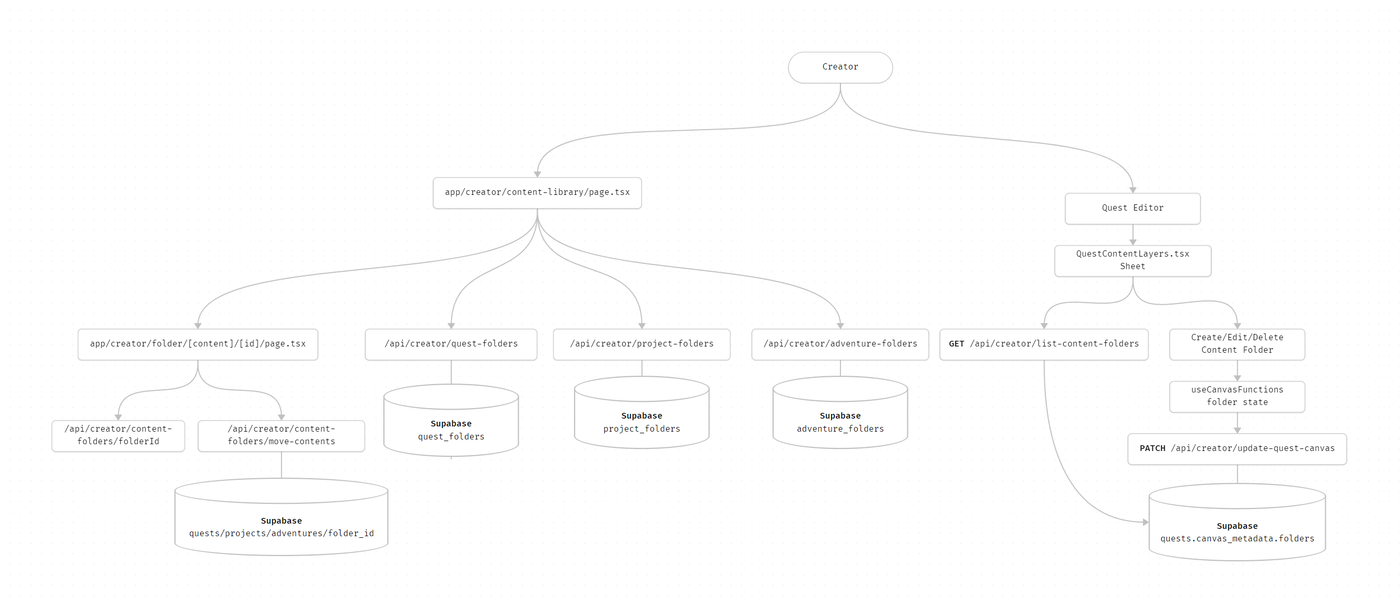
Technologies Used
Next.js App Router, React and TypeScript, Supabase, Zod,
@dnd-kit/core, React Flow canvas nodes, andreact-colorful
DETAILED DESIGN & IMPLEMENTATION
Data Model / Schema
Library folders
quest_folders: Stores creator quest folders and nesting.project_folders: Stores creator project folders and nesting.adventure_folders: Stores creator adventure folders and nesting.quests.quest_folder_id: Assigns quests to quest folders.Project/adventure folder ID fields : Assign project/adventure records to their folders.
In-editor content folders
Stored in quests.canvas_metadata:
{ nodes: CanvasNode[], edges: CanvasEdge[], quest_mode: "linear" | "exploration", folders: ContentFolder[] }ContentFolder fields:
id: Client-generated folder ID.name: Folder display name.textColor: Folder label/icon color.bgColor: Folder background color.parentFolderId: Reserved for nested content folders.orderIndex: Display ordering.isCollapsed: Folder collapsed state.
CanvasNode.folderId already exists in schema and is the intended assignment field for grouped nodes/cards.
API Specification
Endpoint | Method | Purpose |
|---|---|---|
|
| List/create root quest folders or assign quests |
|
| Folder detail, update, move, archive/delete |
|
| Move quests into a folder |
|
| Search folders and quests with folder paths |
| Multiple | Same pattern for projects |
| Multiple | Same pattern for adventures |
|
| Load |
|
| Persist canvas nodes, edges, and content folders |
Authentication is creator-scoped through existing auth helpers, and folder queries are scoped by the authenticated creator ID.
Logic & Workflows
Library folder flow
1. Creator opens app/creator/content-library/page.tsx.
2. Page fetches content and folder lists for the selected content type.
3. Creator creates, edits, deletes, searches, or opens a folder.
4. Nested folder pages load through app/creator/folder/[content]/[id]/page.tsx.
5. Drag/drop movement calls the relevant move-* endpoint or updates a folder parent.
Content-layer sheet flow
1. Creator opens the Layers sheet in the quest editor.
2. QuestContentLayers fetches folders from canvas_metadata.
3. Creator creates, edits, or deletes a content folder.
4. useCanvasFunctions updates folder state.
5. Canvas auto-save persists folders through /api/creator/update-quest-canvas.
6. MainContentLayers currently renders folders and ungrouped quest content separately.
Current State
Library folder CRUD is implemented.
Library folder navigation, breadcrumbs, search, and drag/drop movement are implemented.
Content-layer folder CRUD is implemented in the sheet.
Content-layer folders support name, text color, and background color.
Content-layer content assignment is not finished.
Grouped card/node rendering is not finished.
INFRASTRUCTURE & OPERATIONS
Dependencies
Supabase folder tables and quest rows.
quests.canvas_metadatafor in-editor content folders.Existing content-library folder components.
Existing visual-canvas save/load flow.
Monitoring & Alerting
Recommended checks:
Folder API 4xx/5xx rates.
/api/creator/update-quest-canvassave failures.Client logs for content-layer folder fetch failures.
Search API latency for large creator libraries.
Deployment Plan
1. Deploy API and UI changes together.
2. Verify root content-library folders load.
3. Verify nested folder routes load with breadcrumbs.
4. Verify drag/drop content movement in the library.
5. Verify Layers sheet can create, edit, delete, and persist content folders.
Testing & Quality Assurance
Test Strategy
Schema tests for
quest-folder.schema.tsandcontentFolderSchema.API tests for create/update/delete/move/search folder routes.
Integration tests for moving content between folders.
UI tests for content-library breadcrumbs and folder navigation.
Future E2E tests for dragging cards/nodes into content-layer folders.
Known Limitations
Content-layer sheet does not yet drag nodes/cards into folders.
Content-layer sheet does not yet display grouped contents inside each folder.
Visual canvas does not yet show folder-colored grouped backgrounds around nodes.
Form editor does not yet show folder-colored grouped backgrounds around cards.
Content folder deletion currently removes the folder record from metadata, but node/card assignment cleanup should be verified when assignment ships.
Next Work
1. Implement draggable contents in QuestContentLayers / MainContentLayers.
Use a drag/drop library or existing canvas interactions.
On drop, set
node.folderIdor the equivalent cardfolderId.Persist assignments through
/api/creator/update-quest-canvas.
2. Implement grouped card/node UI.
Render folder name and folder color around grouped contents.
Use
ContentFolder.bgColoras the group background.Use
ContentFolder.textColorfor folder label/icon contrast.Keep unassigned nodes/cards outside groups.
3. Apply grouping across editor modes.
Linear mode: support both form editor cards and visual canvas nodes.
Exploration mode: support visual canvas nodes.
Ensure conversion/sync paths preserve
folderId.
Maintenance & Support
Troubleshooting
Folder list is empty — Confirm API path for selected content type and authenticated creator scope.
Folder detail page fails — Check
app/creator/folder/[content]/[id]content param and folder ownership.Drag/drop library move fails — Check matching
move-quests,move-projects, ormove-adventuresendpoint.Layers sheet folders disappear — Check
quests.canvas_metadata.foldersand canvas save response.Grouping does not show — Expected until draggable assignment and grouped rendering are implemented.
Changelog
1.0 — Approved, Initial concise technical guide for Quest Folder Structure and dual editor support, 05/04/2026
Document Version
1.0 - Published, Initial concise technical guide for Quest Folder Structure, 06/30/2026
