1. Front Matter
Title: Project Creation Wizard
Author: Sean Patrick Caintic (scorevi)
Reviewers: Krizha Onise Cortez (armaminter)
Created: March 2026
Status: Approved
References:
Issue: [1.1] Project Creation Wizard #70
Sub-Issue: [1.1.1] Quest Mode Selection #283
Milestone: [1] Diagnose (Project Setup)
2. Introduction & Goals
Problem Summary: Creators need a streamlined interface to start new quest projects. The wizard provides two paths: AI-assisted creation (leveraging the AI Idea Validator) or manual creation with a blank canvas. This ensures both novice creators can get AI guidance and experienced creators can jump straight to building.
Goals:
Provide path selection modal (AI Assistant vs Blank Canvas)
Support quest mode selection (Linear vs Exploration)
Enable form pre-population from AI Validator import
Redirect to quest editor after project creation
Non-Goals:
Template library selection (separate feature)
Cloning existing projects
Collaborative project creation
Glossary:
Quest Mode: Linear (sequential) or Exploration (branching) learning path
AI Validator: Gemini-powered topic validation and curriculum generation
Canvas Metadata: React Flow nodes/edges JSON structure
3. High-Level Architecture
System Diagram:
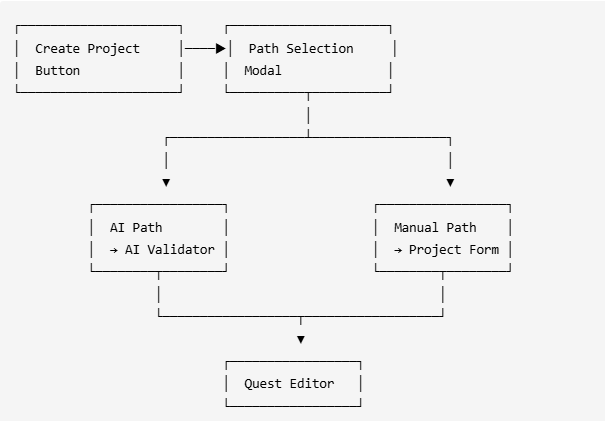
Technologies Used:
Next.js App Router - Page routing and Server Actions
Shadcn Dialog - Path selection modal
Shadcn RadioGroup - Quest mode selector
Supabase - Project persistence
Clerk - Authentication (creator role)
4. Detailed Design & Implementation
Data Model / Schema:
quests Table (Relevant Columns):
Column | Type | Description |
|---|---|---|
| UUID PK | Auto-generated |
| TEXT | Project title |
| TEXT | Project description |
| TEXT |
|
| TEXT |
|
| TEXT | Clerk user ID |
| JSONB | React Flow nodes/edges (default: empty) |
| TIMESTAMPTZ | Creation timestamp |
| TIMESTAMPTZ | Auto-updated |
API Specification:
POST /api/creator/create-project- Create new quest projectRequest:
{ title: string (required), description: string, quest_mode: "linear" | "exploration" (required), tags: string[] }Response: Standard
ApiResponse<{ id, title, status }>
Logic & Workflows:
Creation Flow:
User clicks "Create Project" button
Path Selection Modal opens
User chooses AI Assistant or Manual path
AI Path → Redirects to
/creator/ai-validatorManual Path → Opens
/creator/create-projectform
User selects quest mode (Linear or Exploration)
User fills title, description, and tags
Submit creates project → redirects to quest editor
AI Import Pre-Population:
When coming from AI Validator, the form auto-fills:
Title from topic
Description from viability rationale
Duration calculated from curriculum
Tags extracted from key topics
Canvas prepared for import
Key Files:
components/creator/CreateProjectModal.tsx- Path selection modalcomponents/creator/QuestModeSelector.tsx- Linear/Exploration toggleapp/creator/create-project/page.tsx- Project creation formapp/api/creator/create-project/route.ts- API endpoint
5. Infrastructure & Operations
Dependencies:
Supabase - Project data persistence
Clerk - Authentication and creator role verification
Monitoring & Alerting: No specific monitoring. Project creation is low-traffic and idempotent.
Deployment Plan:
Deploy API endpoint and UI components
No database migrations required (uses existing
queststable)No feature flags needed
6. Testing & Quality Assurance
Test Strategy:
Manual: Path selection, quest modes, form validation
Integration: API creates project with correct status
Known Limitations:
No template selection from library
Cannot clone existing projects
Single creator per project (no collaboration)
7. Maintenance & Support
Troubleshooting:
Form not pre-populating → Check sessionStorage for AI Validator data
Quest mode not saving → Verify
quest_modefield in request bodyRedirect fails → Check quest ID returned from API
Changelog:
1.0 (Feb 2026): Initial implementation
1.1 (Feb 2026): Added Quest Mode Selection (#283)
Document Version
1.0 - Initial version, 2026-04-27 06:52 UTC
1.0.1 - Minor revisions, 2026-04-27 06:54 UTC
1.0.2 - Minor revisions, 2026-04-28 06:19 UTC
1.0.3 - Minor revisions, 2026-06-29 07:44 UTC
1.0.4 - Minor revisions, 2026-06-29 07:47 UTC
1.0.5 - Minor revisions, 2026-06-29 09:08 UTC