Feature Owner : Joylynne Esportuno
Module : Design
Priority : P2
Sprint #11 : Partially Implemented
Date : July 2, 2026
EXECUTIVE SUMMARY
What is this feature ?
Quest Folder Structure organizes creator content in library folders and introduces in-editor content folders for grouping quest nodes/cards.
Why does it matter ?
Creators need scalable organization as content libraries and quests grow.
What's the MVP scope ?
Library folder CRUD/navigation/movement is available. Content-layer folder CRUD exists; dragging nodes/cards into folders and grouped visuals remain next work.
1. USER PAIN POINT & SOLUTION
Without Quest Folder Structure
Large libraries and long quests become difficult to scan and manage.
Pain Point
Emotional : Creators feel disorganized.
Functional : Finding content takes longer.
Business Impact : Content operations slow down.
Current State (Partially Implemented)
Creators group library items and quest content into folders.
Marketing Hook
"Keep every quest, project, and node exactly where creators expect it."
2. 4D FRAMEWORK MAPPING
Diagnose
Surfaces content organization gaps.
Design
Allows nested organization and visual grouping.
Develop
Stores library folders in tables and content folders in canvas metadata.
Deliver
Improves creator library and editor navigation.
3. USER FLOWS
Entry Point
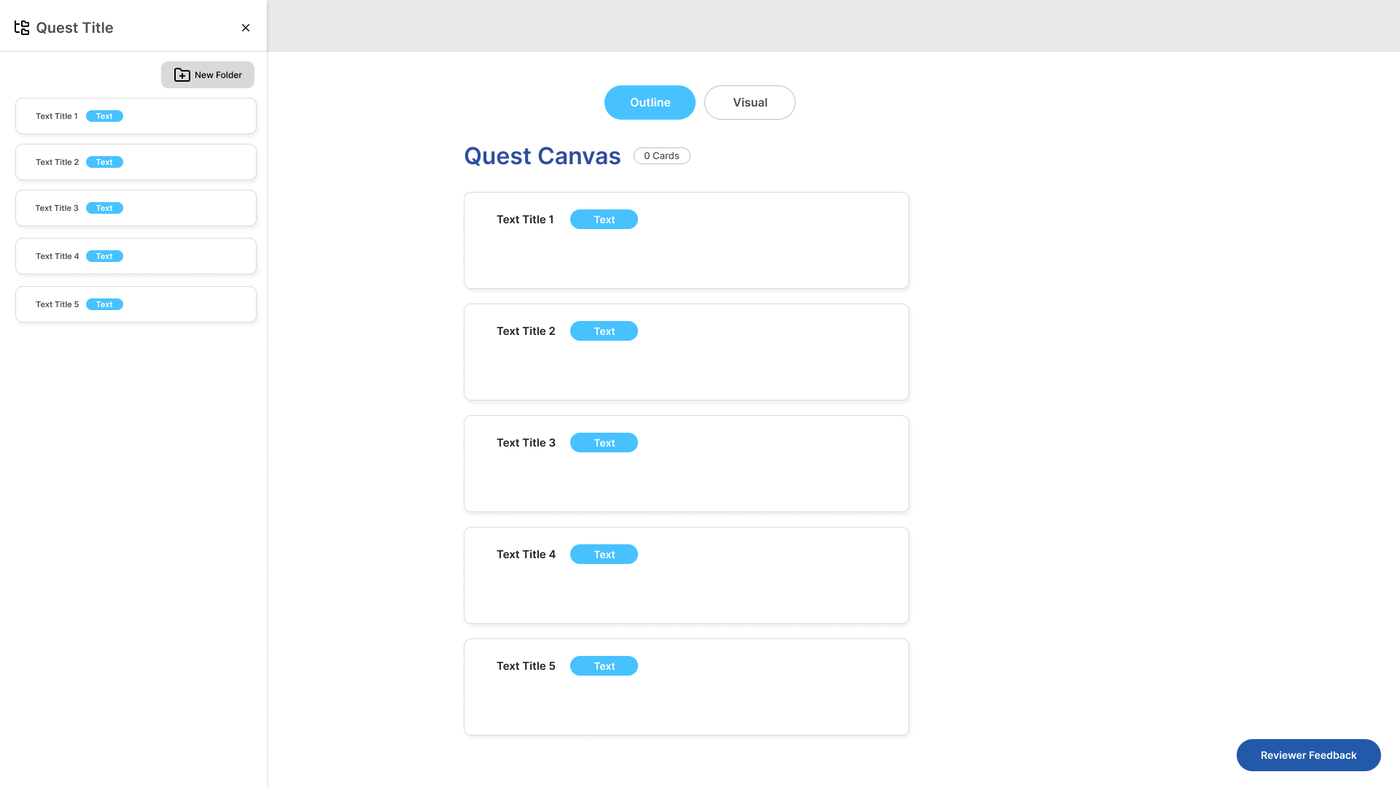
app/creator/content-library/page.tsx, app/creator/folder/[content]/[id]/page.tsx, and the quest editor Layers sheet.
Success Criteria
Creator can create folders, move library content, and persist content-layer folders.
Main Flow for Quest Folder Structure: Content Library
1. Creator opens content library
2. Creates or opens folder
3. Moves content/folders via drag/drop
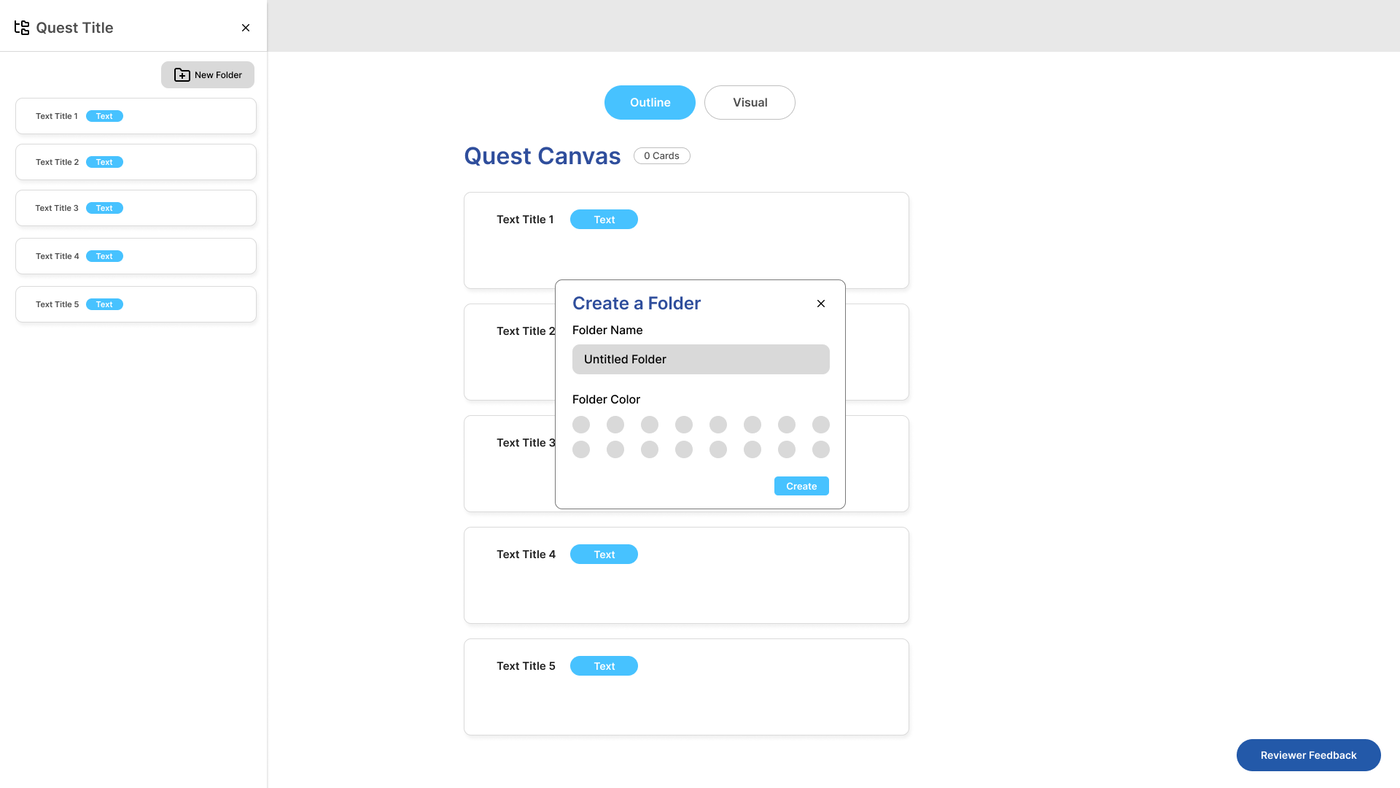
Main Flow for Quest Folder Structure: Content-layers on Quest Editor
1. Creator opens an existing quest
2. Clicks Quest Editor “Layers” button on content section
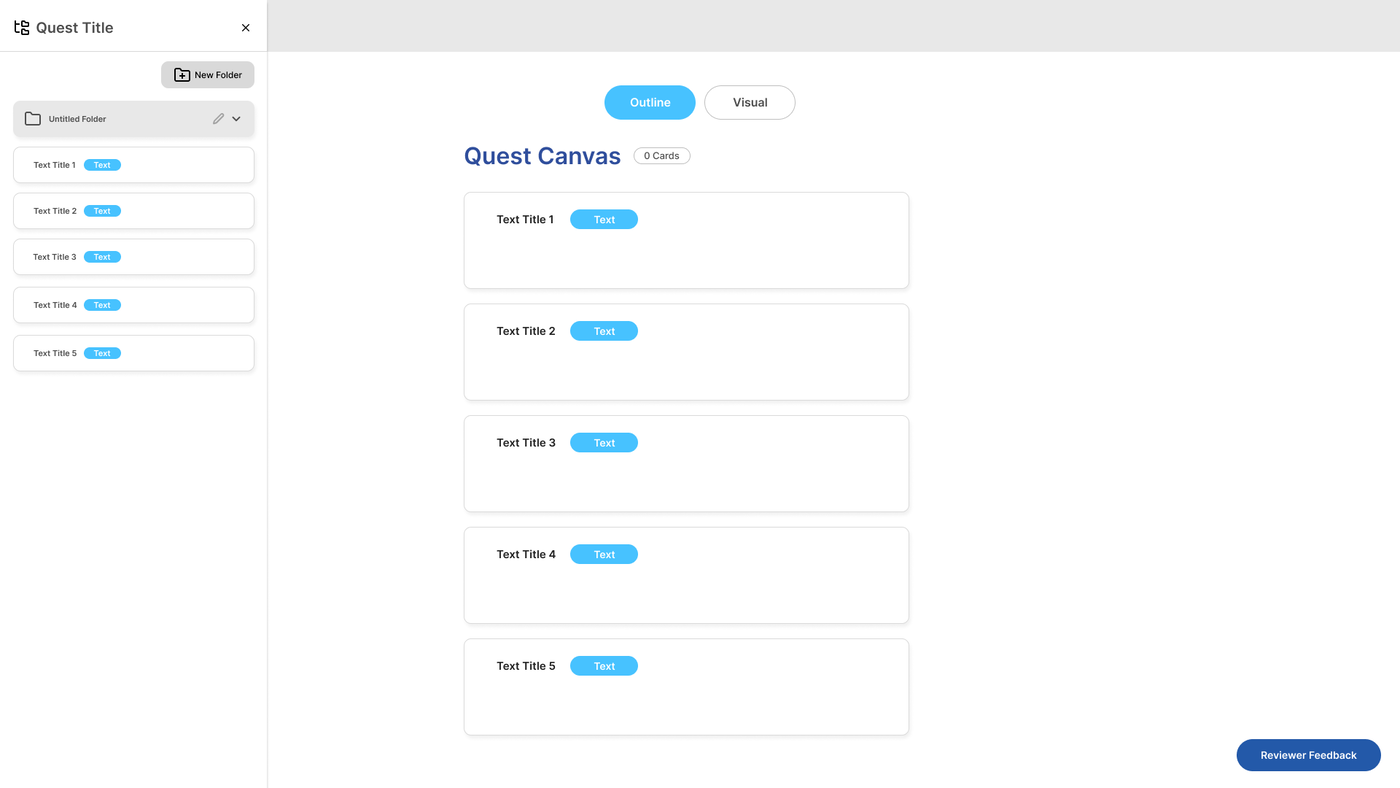
3. Creates/edit/deletes content folder
Edge Cases
No folders : Show create folder template
API error : Toast and retain previous state
Permission denied : Block access outside creator scope
Decision Points
IF library folder, persist in DB folder tables
ELSE IF content-layer folder, persist in
canvas_metadata.folders
5. WIREFRAMES
Content Library:
Excluded — This feature is fully implemented.
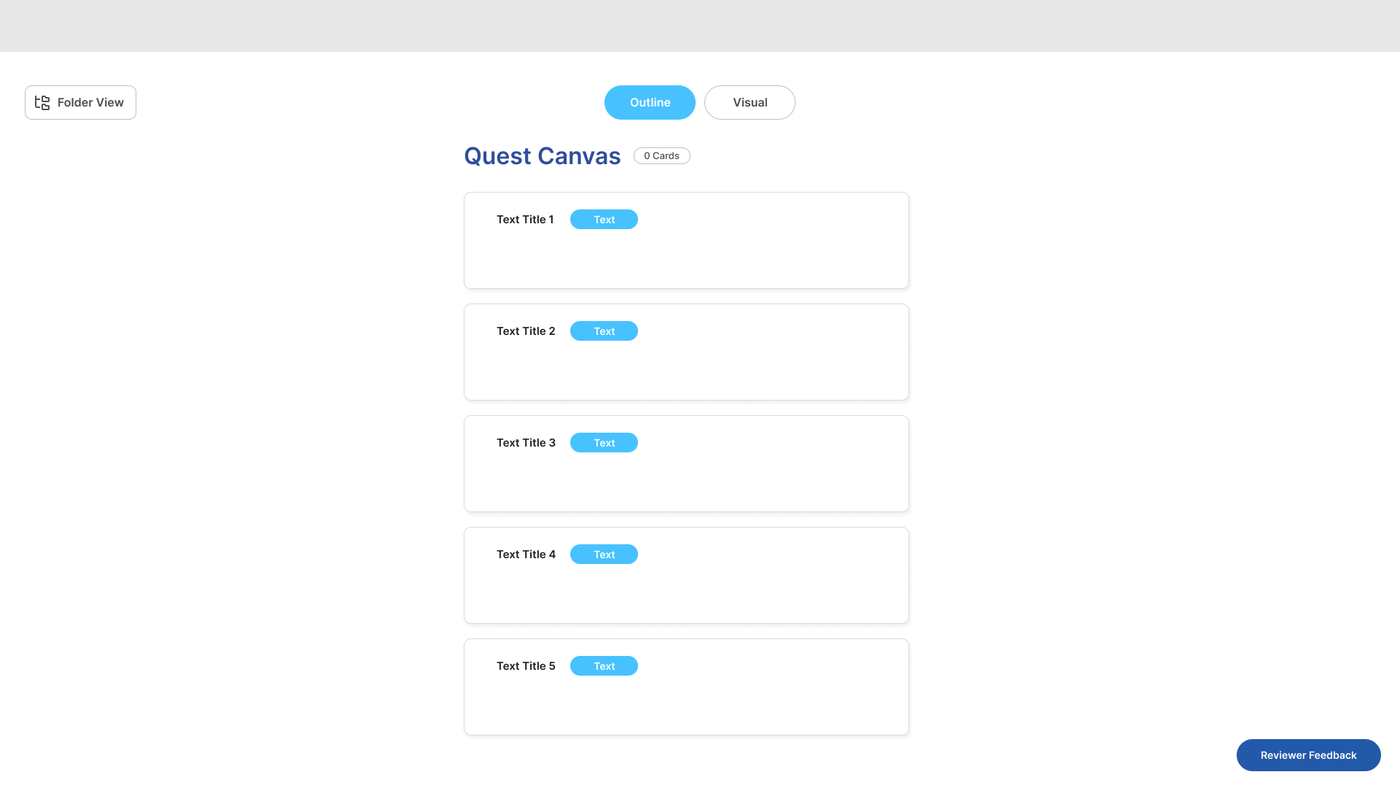
Content-layers (Quest Editor):
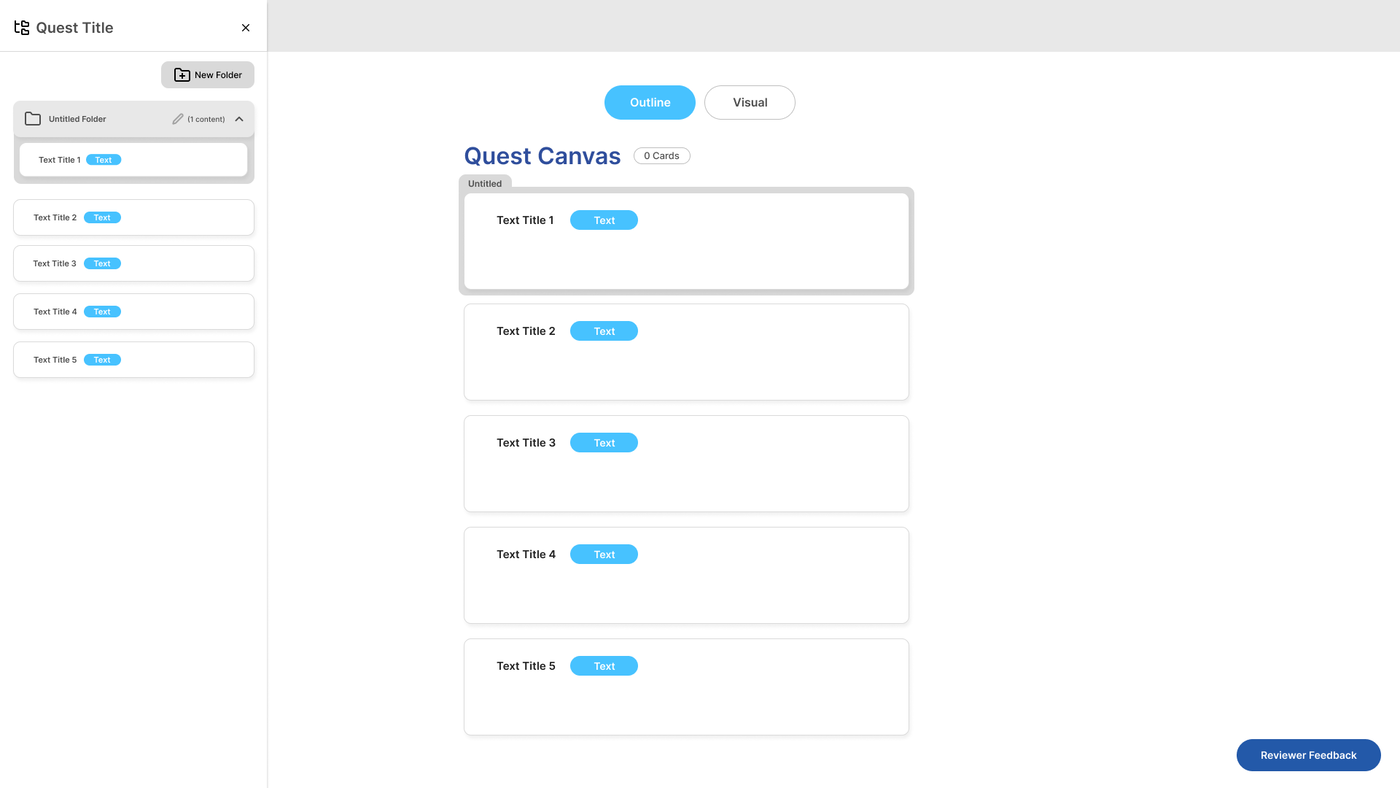
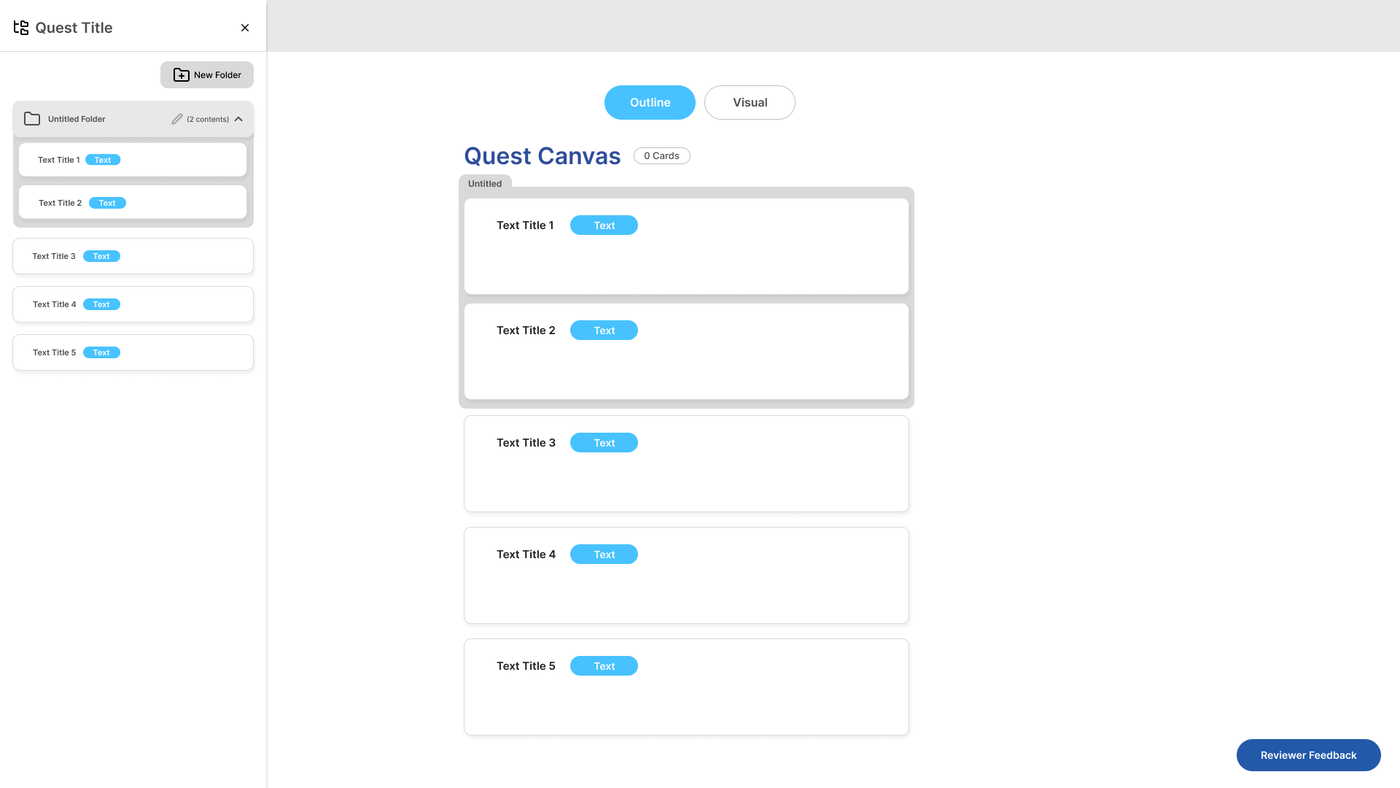
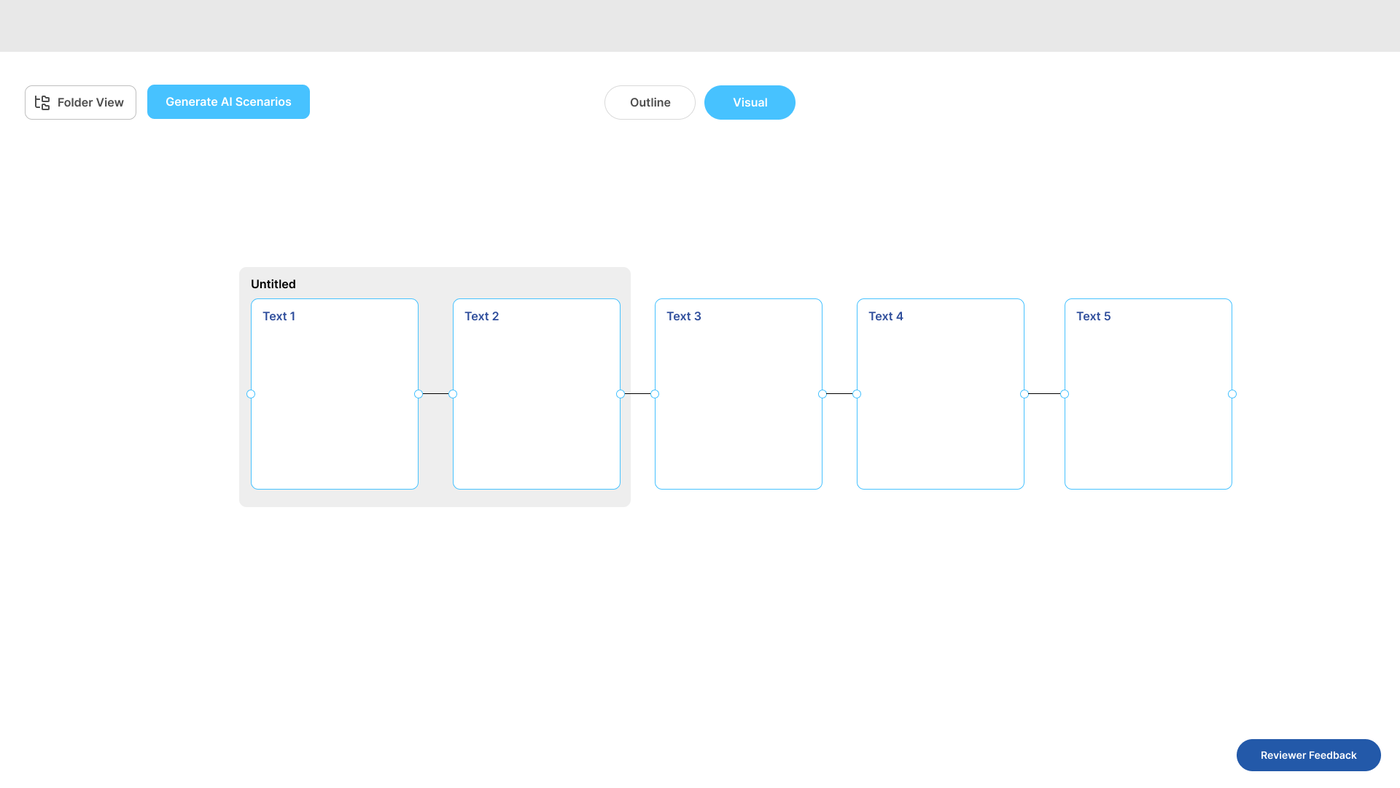
Initial wireframes for folder structure dual editor support. The frames below may not reflect current changes deployed to the dev/staging server.
6. WIREFLOWS
Content Library:
Exluded — This feature is fully implemented.
Content-layers (Quest Editor):
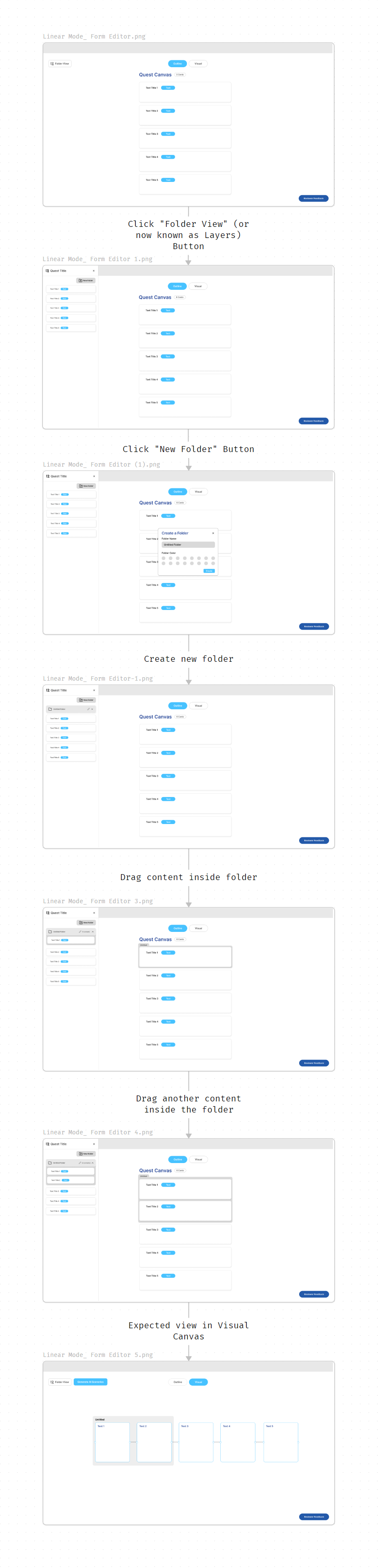
Initial wireflow for folder structure dual editor support. The flow below may not reflect current changes deployed to the dev/staging server.
7. PROTOTYPE
Figma Prototype Link for Content-layers Folder :
https://www.figma.com/proto/WKOJWD114z0GFeBDHxFgzA/Folder-Structure--Visual-Canvas---Form-Editor-?node-id=74-352&starting-point-node-id=2%3A2&show-proto-sidebar=1&scaling=scale-down&content-scaling=fixed&t=xORCUcg3Aj0uIYfN-1
How to test : Create a quest folder and a content-layer folder.
8. BACKEND SCHEMA
Database Tables
quest_foldersproject_foldersadventure_foldersquests.canvas_metadata.foldersCanvasNode.folderId
9. API ENDPOINTS
Endpoint Group 1: /api/creator/quest-folders/*
Purpose: Create, list, update, delete/archive, move, reorder, and search quest folders
Auth: Creator access required
Frontend Use: Content library quest folder views and drag/drop movement
Endpoint Group 2: /api/creator/project-folders/*
Purpose: Same folder operations for projects
Auth: Creator access required
Frontend Use: Content library project organization
Endpoint Group 3: /api/creator/adventure-folders/*
Purpose: Same folder operations for adventures
Auth: Creator access required
Frontend Use: Content library adventure organization
Endpoint 4: GET /api/creator/list-content-folders?quest_id=
Purpose: Loads in-editor content folders from quests.canvas_metadata
Auth: Quest creator/editor access required.
Frontend Use: Quest editor Layers sheet
Endpoint 5: PUT /api/creator/update-quest-canvas
Purpose: Persists content folders and future node/card folderId assignments in canvas metadata
Auth: Quest creator/editor access required.
Frontend Use: Content-layer folder CRUD and future grouping
10. DATA REQUIREMENTS
Frontend Needs
Folder ID, name, parent folder ID, description, color, order index, archive/expanded state
Folder breadcrumbs for nested navigation
Folder content counts for quests/projects/adventures
Active drag item data for content/folder movement
Search query and search result folder paths
Content-layer folder ID, name, text color, background color, collapsed state, and parent folder ID
Future node/card
folderIdassignment
Backend Needs
Authenticated creator ID
Folder table name/type based on content area
Content IDs being moved
Target folder ID and parent folder ID
Canvas metadata folders and node/card assignments for in-editor grouping
API Calls Frontend Will Make
List root folders and folder detail pages
Create/update/delete/move folders
Move content into target folders
Search folders/content
Load and save content-layer folders through canvas metadata
11. PERFORMANCE CONSIDERATIONS
Database Optimization
Indexes on quest_folders
creator_id,project_id,parent_folder_id,quest_folder_id
CREATE INDEX idx_quest_folders_creator_id ON public.quest_folders(creator_id);CREATE INDEX idx_quest_folders_project_id ON public.quest_folders(project_id);CREATE INDEX idx_quest_folders_parent_id ON public.quest_folders(parent_folder_id);CREATE INDEX IF NOT EXISTS idx_quests_quest_folder_id ON public.quests(quest_folder_id);API Response Time
Folder navigation should feel like normal page navigation, ideally under 1-2 seconds. Drag/drop move feedback should resolve quickly with loading/toast state.
12. SECURITY & AUTHORIZATION
Who Can Access This Feature?
Creator: Can manage own content folders and own quest content-layer folders
Admin: May access if platform-level admin tools explicitly allow it
Reviewer/Learner: No folder management access
13. ERROR HANDLING
401 Unauthorized: Prompt sign-in and do not load folder data.
403 Forbidden: Show access denied when the folder or content item belongs to another creator or an unauthorized workspace.
404 Folder Not Found: Show a missing folder state and provide navigation back to the content library root. Refetch folder lists to remove stale entries.
404 Content Not Found: When moving content, show that the quest/project/adventure no longer exists or is outside the current scope.
500 Save/Move Failure: Show retry message, clear loading state, and refetch folder/content data so the UI does not display stale drag/drop results.
14. TESTING CHECKLIST
Happy Path
Create/edit/delete library folder
Move content into folder
Breadcrumb navigation works
Search shows folder paths
Create/edit/delete content-layer folder
Edge Cases
Moving folder into itself or descendant is blocked
Unauthorized folder access is blocked
Future: drag node/card into folder updates
folderIdFuture: grouped rendering shows folder name/color in both required editor modes
15. OPEN QUESTIONS
For Frontend:
Should folder colors be constrained to design-token palettes?
What is the final grouped-node/card visual design?
Should drag/drop grouping happen in the Layers sheet, canvas, form editor, or all three?
For Backend:
Should content-layer folder assignments remain in
canvas_metadataor move to normalized tables later?Should folder moves support batch updates for cards/nodes?
16. OUT OF SCOPE
Content-layer drag assignment (To be developed)
Grouped canvas/card rendering (To be developed)
17. SUCCESS METRICS
Folder creation rate
Content move success rate
Time to find content
18. DEPENDENCIES
This feature depends on:
Content library folder APIs
Canvas metadata save/load
Quest editor Layers sheet
Drag/drop UI support
These features depend on this:
Dual editor support for grouped cards/nodes
Visual Canvas content organization
Form editor content organization
19. TIMELINE & OWNERSHIP
Backend: Joylynne Esportuno & James Derick Billate
Frontend: Joylynne Esportuno & James Derick Billate
QA: Uriel Tribiana
Estimated Completion:
This feature is partially completed on Sprint 11. The system currently have the Quest Folder Structure for the Content Library and Folders CRUD on the Content-layers dual editor support, which can be found on the Quest Editor. It doesn’t support content drag-and-drop within the Content-layers and UI for the node/card folder grouping yet.
