Feature Owner: Joshua Uriel Tribiana ( Joshua-Yel )
Module: Design
Priority: P0
Week 4 Sprint: Fully Implemented
Date: 2026-06-30
EXECUTIVE SUMMARY
What is this feature?
The AI Scenario Seed feature allows course creators to quickly generate branching scenarios for workplace training. By providing a topic, complexity, and optional context, creators can get a structured, editable scenario, reducing the “blank page” problem.
Why does it matter?
This feature addresses the user pain point of creating engaging and relevant training content from scratch, which is a slow and often frustrating process. For the business, it accelerates content creation, improves the quality of courses on the platform, and increases creator engagement.
What’s the MVP scope?
The MVP for Week 4 must include the core scenario generation functionality, including the API endpoint, token quota enforcement, and basic usage tracking. The UI in the Quest Editor to invoke this feature is also in scope.
1. USER PAIN POINT & SOLUTION
Current State (Without Feature)
Creators stare at a blank canvas in the Quest Editor, manually storyboarding branching scenarios. This process is time-consuming, creatively draining, and often results in simplistic scenarios that lack engagement.
Pain Point
Emotional: Overwhelm, anxiety from the “blank page,” and a lack of confidence in their ability to write compelling training scenarios.
Functional: The manual process is slow, error-prone, and struggles to scale for complex compliance topics.
Business Impact: High creator churn, low content quality, and increased time-to-market for new courses.
Future State (With Feature)
Creators can generate a rich, multi-path scenario in seconds. They can then focus their time on refining and customizing the AI-generated content instead of starting from zero.
Marketing Hook
“Go from a topic to a branching scenario in seconds, not hours.”
2. 4D FRAMEWORK MAPPING
Diagnose
The feature helps creators diagnose knowledge gaps by generating scenarios that test specific skills or compliance knowledge.
Design
It directly aids in the design phase by providing a complete, structured starting point for a complex learning interaction (a branching scenario).
Develop
Creators can more rapidly develop their quests by using the generated content as a foundation, adding their own media, and customizing the text.
Deliver
The output of this feature is directly integrated into the quest, ready to be delivered to learners after creator review and approval.
3. USER FLOWS
Entry Point
The user is in the Quest Editor and clicks a button to “Generate Scenario with AI”.
Success Criteria
A new set of connected nodes representing the branching scenario appears on the canvas, populated with the AI-generated titles, scenarios, and decisions.
Main Flow (Happy Path)
Creator clicks “Generate Scenario with AI” in the Quest Editor.
A modal appears asking for a Topic, Complexity, and optional Context.
Creator fills out the form and clicks “Generate”.
A loading indicator is displayed while the API call is in progress.
The API returns a set of scenarios.
The UI parses the scenarios and renders them as a connected graph of nodes on the quest canvas.
Edge Cases
No data: If the user tries to generate a scenario with an empty topic, the form will show a validation error.
API error: If the backend returns an error (500, 503), the UI will show a generic “Generation Failed. Please try again.” message.
Permission denied / Policy Violation (403): If the user’s input is blocked by the content safety filter, the UI will show a message like “This topic is not permitted. Please choose a different topic.”
Token Limit Exceeded (429): The UI will show a message like “You have reached your generation limit for today. Please try again later.”
Decision Points
IF the API call is successful → The new scenario nodes are added to the canvas.
ELSE → An appropriate error message is displayed to the user.
4. INFORMATION ARCHITECTURE
Primary Information (Always visible in the generation modal)
Topic (text input)
Complexity (select: beginner, intermediate, advanced)
Secondary Information
Context (optional text area)
N/A for the generation form itself.
Actions
Primary CTA:
“Generate AI Scenario” button in the modal.
Secondary Actions:
“Cancel” or “Close” button in the modal.
5. WIREFRAMES
Excluded — existing UI Implemented
Key Screens:
Main view: The button within the Quest Editor UI.
Modal/detail view: The modal for entering the topic, complexity, and context.
Empty state: N/A
Loading state: A spinner or loading indicator after clicking “Generate AI Scenario”.
Error state: Error messages displayed within the modal for different failure scenarios (e.g., API error, content policy violation).
Annotations:
The “Generate ” button will be disabled until the ‘Topic’ field is filled.
The modal will make a
POSTrequest to/api/creator/scenarios/generate.
6. WIREFLOWS
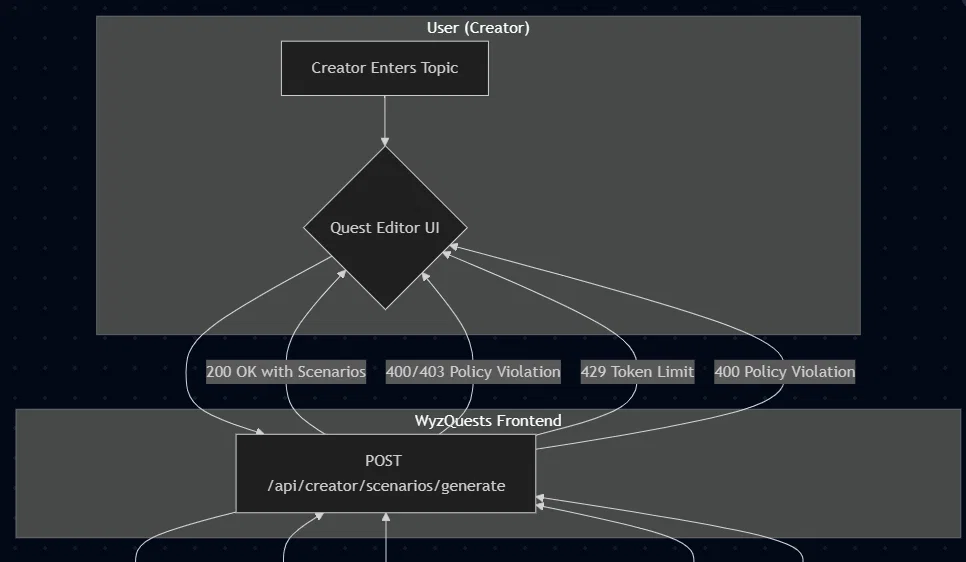
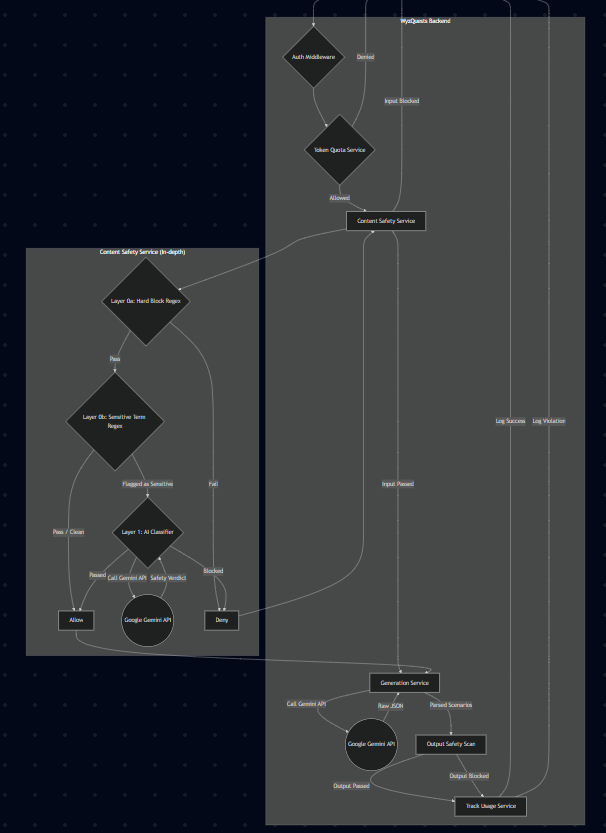
7. PROTOTYPE
Excluded — feature is fully implemented.
How to test:
Click the “Generate AI Scenario” button.
Fill in the form and click “Generate”.
Observe the loading state and then the new nodes appearing on the canvas.
8. BACKEND SCHEMA
Database Tables
No new database tables are introduced. This feature populates the existing quest content structure. Runtime validation is handled by Zod schemas.
// Request Schema (Zod)const generateRequestSchema = z.object({ topic: z.string().min(3).max(200).trim(), count: z.number().int().min(1).max(8), complexity: z.enum(["beginner", "intermediate", "advanced"]), context: z.string().max(500).optional(),}); // Output Schema (Zod)const generatedScenarioSchema = z.object({ id: z.string(), title: z.string(), scenario: z.string(), decisions: z.array(z.object({ id: z.string(), text: z.string(), outcome: z.string(), recommendedXP: z.number(), })), qualityScore: z.number(), characters: z.array(z.object({ name: z.string(), role: z.string() })), setting: z.string(),});Indexes: N/A
Constraints: N/A
9. API ENDPOINTS
Endpoint 1: POST /api/creator/scenarios/generate
Purpose: Generates a set of branching scenarios based on user input.
Auth: Required (Clerk userId)
Request Body:
{ "topic": "Handling difficult customers", "count": 3, "complexity": "intermediate", "context": "The setting is a retail electronics store."}Response 200:
{ "scenarios": [ { "id": "...", "title": "The Angry Customer", "scenario": "...", "decisions": [...] } ], "tokensUsed": 1500, "cached": false, "modelUsed": "gemini-2.5-flash", "generatedAt": "2026-06-30T12:00:00.000Z"}Response 400 (Bad Request):
{ "success": false, "error": "Invalid input"}Response 401 (Unauthorized):
{ "success": false, "error": "Unauthorized"}Response 403 (Forbidden/Policy Violation):
{ "success": false, "error": "Input violates content policy"}Response 429 (Too Many Requests):
{ "success": false, "error": "Token quota exceeded"}Response 500 (Internal Server Error):
{ "success": false, "error": "AI generation or parsing failed"}10. DATA REQUIREMENTS
Frontend Needs
The UI needs to display form fields for topic, complexity, and context. After generation, it needs to parse the scenarios array from the API response and render the title, scenario, and decisions into the corresponding nodes on the canvas.
API Calls Frontend Will Make
POST /api/creator/scenarios/generate: Made when the user clicks the “Generate” button in the modal.
Caching Strategy
API responses for this feature should not be cached on the client, as each generation request is unique and expected to produce new content.
11. PERFORMANCE CONSIDERATIONS
Database Optimization
The feature does not directly interact with the database in a way that requires new optimizations. It relies on existing infrastructure for token quota checks.
Caching Strategy
Backend caching is not applicable for the generation itself. However, the results of the content safety classification could be cached for a short period to reduce redundant checks on identical prompts.
API Response Time
Target: < 15 seconds for a typical generation request. The UI should handle this with a clear loading indicator.
Who can access this feature?
Creator: ✓
Reviewer: ✗
Learner: ✗
A valid Clerk
userIdmust be present.The user must have the ‘creator’ role.
The
enforceTokenQuotaservice will check the user’s/agency’s available token balance before proceeding.
Data Validation
Input is validated using the
generateRequestSchema(Zod).A multi-layered content safety system (
analyzeScenarioSeedSafety) analyzes the user’s input for harmful content before it is sent to the generative AI.The generated output from the AI is also scanned for safety violations before being sent to the client.
13. ERROR HANDLING
Common Errors
401 Unauthorized: The user’s session has expired. The UI should redirect to the login page.
403 Forbidden: The input was blocked by the content safety filter. Show a message: “This topic is not permitted. Please choose a different topic.”
429 Too Many Requests: The user is out of tokens. Show a message: “You’ve reached your generation limit.”
500 Server Error: A generic error occurred. Show a message: “Generation failed. Please try again.” and log the detailed error for debugging.
14. TESTING CHECKLIST
Happy Path
□ User can open the generation modal.
□ User can fill out the form and click “Generate”.
□ A loading state is shown.
□ A valid scenario graph is added to the canvas.
Edge Cases
□ Form validation prevents submission with an empty topic.
□ Generating a scenario with a topic that violates the content policy shows a 403 error message.
□ Exceeding the token quota shows a 429 error message.
□ The UI gracefully handles a 500 server error.
□ The circuit breaker for the AI safety check is tested to ensure it falls back correctly.
15. OPEN QUESTIONS
For Frontend:
How should the newly generated nodes be positioned on the canvas to avoid overlapping with existing content?
What is the exact copy for the different error messages?
For Backend:
What are the initial token quota limits for individual creators and agencies?
16. OUT OF SCOPE (v1.1+)
Real-time collaborative editing of the generated scenarios.
Support for languages other than English.
Allowing users to bring their own AI models or API keys.
Advanced analytics dashboard for AI usage (tracking is implemented, but the dashboard is not).
Why: To focus on delivering the core value proposition of rapid scenario generation and to manage complexity for the initial release.
17. SUCCESS METRICS
How will we know this feature is successful?
Adoption: 60% of active creators use the feature within the first month of release.
Efficiency Gain: Time spent in the “scenario design” phase (measured by analytics) decreases by 50% for users of this feature.
Content Quality: Quests created with the AI seed feature have a higher learner engagement score (e.g., completion rate, time spent) than those created entirely from scratch.
18. DEPENDENCIES
This feature depends on:
Clerk for authentication.
A configured and available Google Gemini API key.
Existing token quota and usage tracking infrastructure.
These features depend on this:
No immediate dependencies, but future AI-powered content generation features may build upon the safety and infrastructure patterns established here.
19. TIMELINE & OWNERSHIP
Owner: Joshua Uriel Tribiana (Joshua-Yel)
QA: Patrick Babala
Document Version
1.0 - Initial version - 2026-06-30
